
What Actually Improves Gaming Performance?
Gear vs Skill Explained
Does gaming gear improve performance, or is skill the only thing that really matters? It’s a common debate in competitive gaming communities. Marketing often suggests that higher DPI, faster polling rates, or premium switches will instantly improve your results. At the same time, experienced players frequently argue that practice and game knowledge matter far more than any piece of hardware.
The truth sits somewhere in between. Certain equipment can remove technical limitations and improve consistency, but no mouse, keyboard, controller, or headset can replace hours of focused practice. Understanding what improves gaming performance requires separating measurable mechanical advantages from exaggerated marketing claims.
This guide is for casual players looking to improve, competitive gamers evaluating upgrades, beginners confused by specs, and experienced players wondering whether new gear will actually make a difference. We’ll break down performance mechanics clearly and objectively, so you can decide where skill ends and hardware begins.
For a broader comparison of peripherals and gaming hardware, see our Gaming Gear rankings and buying guides covering keyboards, mice, controllers, headsets, and other competitive gaming accessories.
What Actually Improves Gaming Performance?
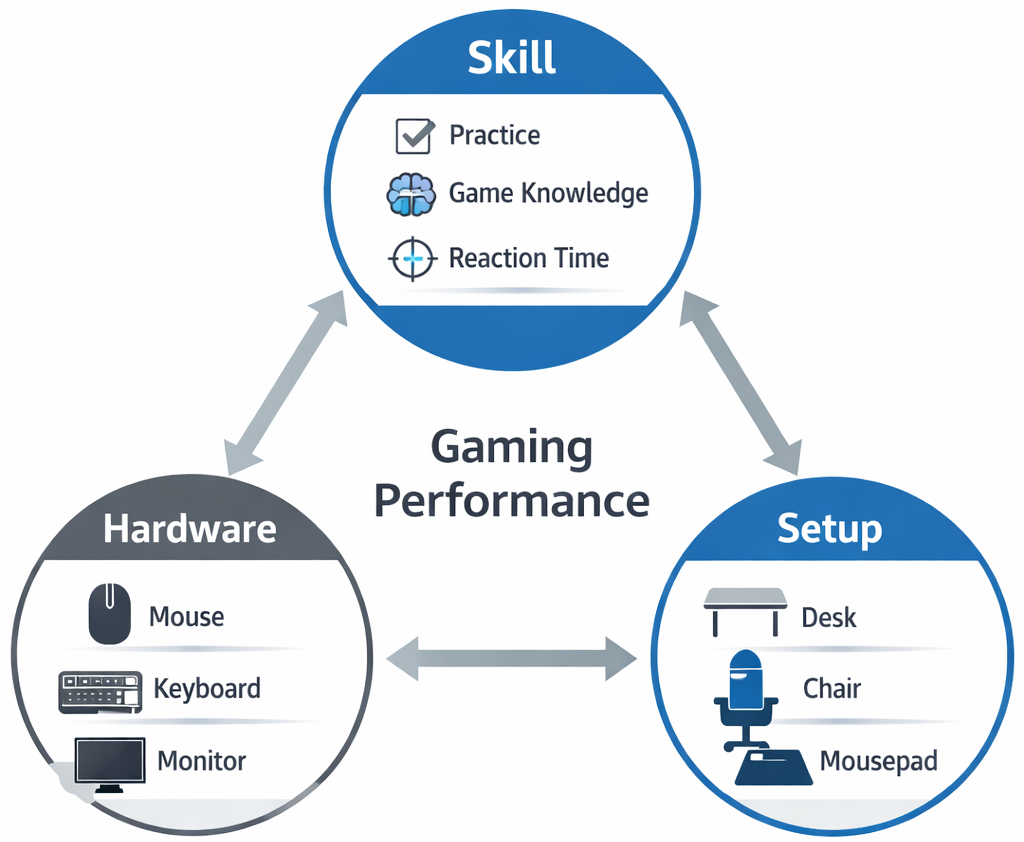
Before comparing gaming gear vs skill, it’s important to define performance in practical terms. Gaming performance is not just about winning. It includes several measurable and experiential factors:
Reaction time
Accuracy and precision
Consistency over time
Comfort during long sessions
System stability and smoothness
Reaction time refers to how quickly you respond to visual or audio cues. Accuracy reflects how precisely you execute inputs. Consistency is your ability to repeat good performance over extended sessions without fatigue or technical interruptions. Comfort affects how long you can maintain focus. System stability ensures your inputs are registered without stutter, lag, or frame drops. Memory capacity plays a major role in that stability—especially when running background apps or multiple processes alongside a game. If you want a deeper breakdown, this guide on how much RAM you need for a laptop explains how memory impacts real-world performance.
Skill, hardware, and setup all contribute differently. Skill determines decision-making, positioning, and awareness. Hardware influences how quickly and reliably your actions translate into on-screen movement. Setup affects long-term comfort and fatigue.
Understanding these roles helps answer the core question: what improves gaming performance in measurable ways?
Gaming Gear vs Skill — What Matters More?
The discussion of gaming gear vs skill often becomes polarized. In reality, both play important but distinct roles.
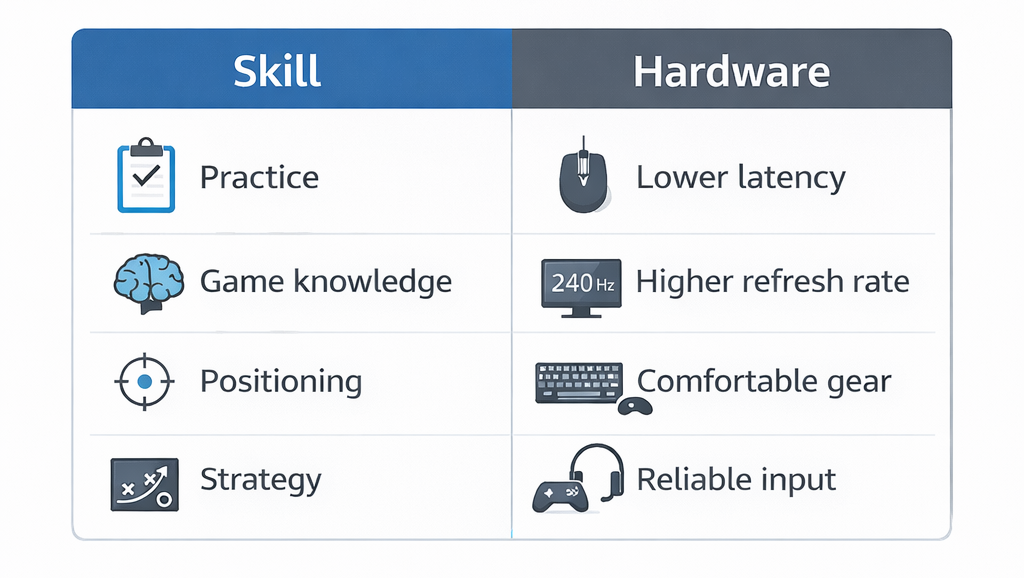
Skill-Based Improvements
Skill development remains the foundation of performance. This includes:
Game knowledge and map awareness
Practice and repetition
Muscle memory
Positioning and timing
Game knowledge improves decision-making. Practice refines mechanical execution. Muscle memory allows faster, more automatic responses. Positioning reduces the need for extreme reaction speed by placing you in advantageous situations.
No hardware upgrade replaces these fundamentals.
Hardware-Based Improvements
Hardware contributes by reducing limitations and improving reliability:
Lower input latency
Higher refresh rate stability
Greater consistency
Improved comfort
For example, a stable high-refresh display can make motion appear smoother. Reduced input delay allows actions to register more quickly. Comfortable equipment prevents strain during long sessions.
The key distinction is this: gear removes bottlenecks. It does not create skill. A skilled player using basic equipment will usually outperform an untrained player using premium hardware.
Gaming Mouse DPI Explained (Myths vs Reality)
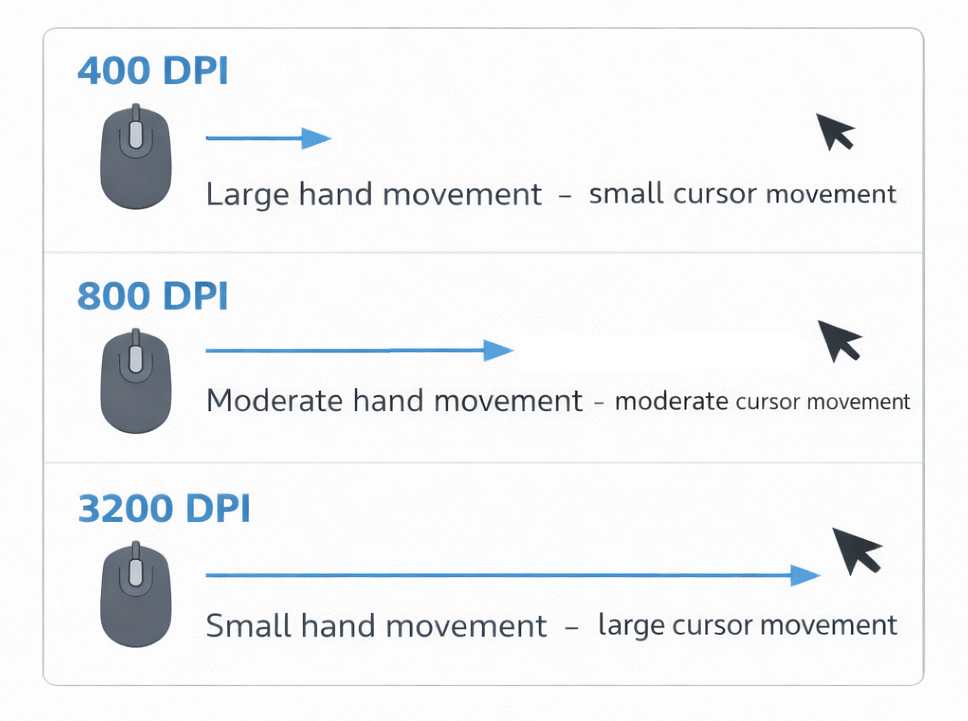
One of the most misunderstood specifications is DPI. Gaming mouse DPI explained simply refers to “dots per inch,” a measurement of how far the cursor moves on screen relative to physical mouse movement.
For a more detailed breakdown of how DPI affects real gameplay and how to choose practical settings, see our guide on gaming mouse DPI explained.
Higher DPI means the cursor moves farther with less hand movement. However, higher DPI does not automatically improve accuracy.
Important clarifications:
DPI is not the same as in-game sensitivity.
Very high DPI can make movement harder to control.
Most competitive players use moderate DPI settings combined with in-game tuning.
The myth that “higher DPI automatically improves performance” stems from marketing emphasis on large numbers. In reality, extremely high DPI settings often reduce precision by making small hand movements translate into exaggerated on-screen motion.
Consistency and control matter more than raw DPI figures. When evaluating gaming mice, consider sensor stability and tracking consistency rather than focusing solely on maximum DPI numbers.
Polling Rate Explained for Gaming
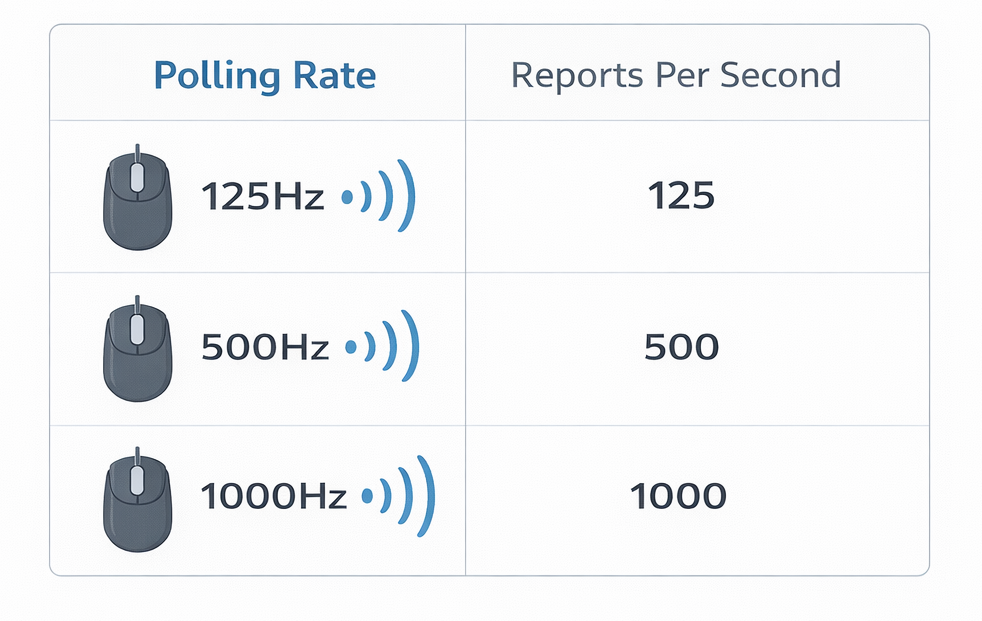
Another common specification is polling rate. Polling rate explained for gaming refers to how often a mouse reports its position to the computer, measured in Hertz (Hz).
Common polling rates include:
125Hz
500Hz
1000Hz
A 1000Hz polling rate means the mouse reports its position 1000 times per second. Higher polling rates can reduce input delay slightly, but the real-world difference between 500Hz and 1000Hz is small for most players.
Diminishing returns apply here. Beyond a certain point, improvements become difficult to perceive without specialized measurement tools. Stability and consistent tracking matter more than extreme specifications.
When assessing what improves gaming performance, reliable input is more valuable than headline numbers.
Input Latency Explained (And Why It Matters)
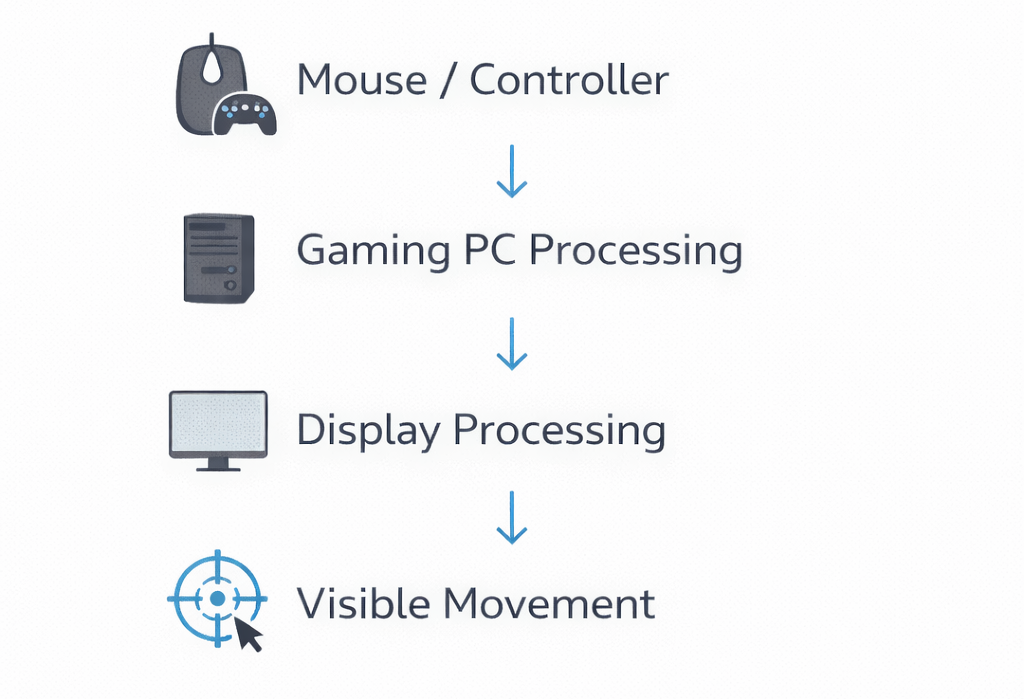
Input latency explained refers to the delay between your physical action and the visible result on screen. This delay includes multiple components:
Device latency (mouse or controller)
Display latency
System latency (processing time)
Controller vs mouse latency can vary depending on connection type and hardware quality. Wired devices typically offer lower latency than older wireless models, though modern wireless technology has significantly reduced the gap.
Display latency also plays a role. Even the most responsive device cannot compensate for a slow monitor. Smooth gaming monitors with low response times help reduce overall delay perception.
System latency is influenced by gaming PCs and their ability to process inputs quickly without frame drops. A stable system ensures your actions translate consistently into on-screen movement. If your system is struggling to keep up, choosing the right hardware plays a major role—see our guide on how to choose the right laptop for performance and gaming.
Reducing input latency improves responsiveness and consistency. While it does not replace skill, minimizing delay removes technical barriers that could hinder performance.
Mechanical Keyboard Switches for Gaming
Mechanical keyboard switches for gaming are often discussed in terms of speed and actuation. There are three primary switch types:
Linear
Tactile
Clicky
Linear switches move smoothly without a tactile bump. Tactile switches provide feedback during actuation. Clicky switches include an audible click.
Factors that influence feel include:
Actuation force
Actuation point
Reset distance
Some players prefer lighter linear switches for rapid key presses. Others prefer tactile feedback for deliberate inputs. However, switch type alone rarely creates a dramatic performance difference. Broader keyboard design also plays a role in overall feel and noise, especially when comparing mechanical vs membrane keyboards.
Preference plays a significant role. Comfort and familiarity often matter more than theoretical actuation speed. When evaluating gaming keyboards, prioritize consistency and comfort rather than assuming one switch type guarantees faster gameplay.
Ergonomics vs Performance — The Overlooked Factor

Ergonomics may have a greater long-term impact than many performance specifications.
Consider:
Wrist strain during extended play
Mouse grip style compatibility
Chair support and posture
Headset weight and clamping force
Fatigue over long sessions
Discomfort reduces consistency. Even small ergonomic issues can compound over hours, leading to reduced accuracy and slower reactions. Understanding how fit, weight, and padding affect long-session comfort is critical, which is why it helps to know what makes a good gaming headset before choosing one.
Properly sized gaming mice, supportive gaming chairs, and comfortable gaming headsets can improve endurance and focus. These improvements may not show up in spec sheets, but they contribute to stable performance over time.
Choosing the right mouse shape, weight, and features also plays a role in long-term comfort, which is why understanding how to choose a gaming mouse can help you build a more consistent setup.
In many cases, improving ergonomics offers more noticeable benefits than increasing DPI or polling rate.
Does Gaming Equipment Improve Skill?
So, does gaming equipment improve skill?
The answer is nuanced.
Gaming equipment can:
Remove hardware bottlenecks
Reduce input delay
Improve comfort
Increase consistency
However, it cannot replace:
Practice
Strategic thinking
Game knowledge
Decision-making
Better gear may allow your existing skill level to express itself more clearly. It can reduce frustration caused by unreliable hardware. But it does not create reflexes or tactical awareness.
When asking what improves gaming performance, remember that equipment supports skill — it does not substitute for it.
When Upgrading Gear Actually Makes Sense
Upgrading becomes reasonable under specific circumstances:
You experience measurable input lag.
Your hardware struggles to maintain stable frame rates.
Your current gear causes discomfort or strain.
You are entering more competitive environments.
If your setup introduces noticeable limitations, removing those bottlenecks can improve consistency. For example, a stable system running smoothly will feel more responsive than one plagued by stutter.
However, upgrading purely for higher numbers without addressing actual limitations rarely produces meaningful results.
Focus on solving real problems rather than chasing specifications.
Final Thoughts
Skill remains the primary driver of success in gaming. Practice, knowledge, and consistency form the foundation of strong performance. Hardware plays a supporting role by reducing latency, improving comfort, and eliminating technical barriers.
Marketing often exaggerates specifications like DPI and polling rate, but extreme numbers rarely translate into dramatic in-game improvements. Balance comfort, reliability, and stability over headline features.
In the end, the best improvements come from combining smart equipment choices with deliberate practice.