
How to Choose a Gaming Mouse in 2026

Choosing the right gaming mouse can feel confusing, especially with so many specs being advertised—DPI numbers, polling rates, ultra-lightweight designs, and constant debates about wired vs wireless performance. It’s easy to assume that higher numbers automatically mean better performance, but that isn’t how real gameplay works.
Understanding how to choose a gaming mouse comes down to something much simpler: matching the mouse to how you actually play.
This gaming mouse buying guide focuses on what truly matters in real-world use—comfort, consistency, and control—rather than marketing claims. If you’re trying to improve your setup, it also helps to understand what actually improves gaming performance, since your mouse is only one part of the equation.
For a broader comparison of peripherals and gaming hardware, see our Gaming Gear rankings and buying guides covering keyboards, mice, controllers, headsets, and other competitive gaming accessories.
Why the Right Gaming Mouse Matters
A gaming mouse directly affects how you interact with every game you play.
It influences:
- Aim consistency
- Reaction time
- Precision during movement
- Fatigue during long sessions
A poorly suited mouse can make aiming feel inconsistent or uncomfortable, even if your settings are correct. On the other hand, the right mouse won’t magically improve skill—but it removes physical limitations that can hold you back.
The goal isn’t to find the “best gaming mouse” overall—it’s to find the best gaming mouse for your needs.
Gaming Mouse Sensors Explained
Optical vs Laser Sensors
Modern gaming mice almost exclusively use optical sensors, and for good reason.
Optical sensors:
- Track more consistently on common surfaces
- Avoid acceleration issues
- Are more predictable for competitive gaming
Laser sensors, while once popular, can introduce tracking inconsistencies—especially at lower speeds—which is why they’ve largely fallen out of favor.
Sensor Accuracy and Tracking
Most modern sensors offer what’s considered “flawless tracking,” meaning they accurately translate your hand movement into on-screen movement without skipping or smoothing.
At this point, sensor quality is rarely a limiting factor. Nearly all reputable gaming mice perform well enough for competitive use, so this is not where most buying decisions should be made.
DPI, Sensitivity, and Real World Performance
DPI (dots per inch) determines how sensitive your mouse is—how far your cursor moves relative to physical movement.
For a more detailed explanation of how DPI works and how it affects real gameplay, see our guide on gaming mouse DPI explained.

However, higher DPI does not mean better performance.
Most competitive players use relatively moderate DPI settings, typically between 400 and 1600, combined with in-game sensitivity adjustments.
Key points:
- DPI affects sensitivity, not accuracy
- Extremely high DPI can reduce control
- In-game sensitivity matters just as much
Mouse Weight and Balance
Lightweight vs Heavier Mice
Mouse weight plays a major role in how a mouse feels during gameplay.
Lightweight mice:
- Easier to move quickly
- Ideal for fast-paced FPS games
- Reduce fatigue during long sessions
Heavier mice:
- Provide more control for slower movements
- Can feel more stable for strategy or MMO games

Weight Distribution
Balance is just as important as total weight.
A mouse that feels front-heavy or rear-heavy can affect control more than a few extra grams. A well-balanced mouse will feel more natural and predictable in motion.
Grip Style and Hand Size
Common Grip Types
There are three main grip styles:
- Palm grip – full hand rests on the mouse
- Claw grip – arched hand with fingers controlling movement
- Fingertip grip – only fingertips touch the mouse
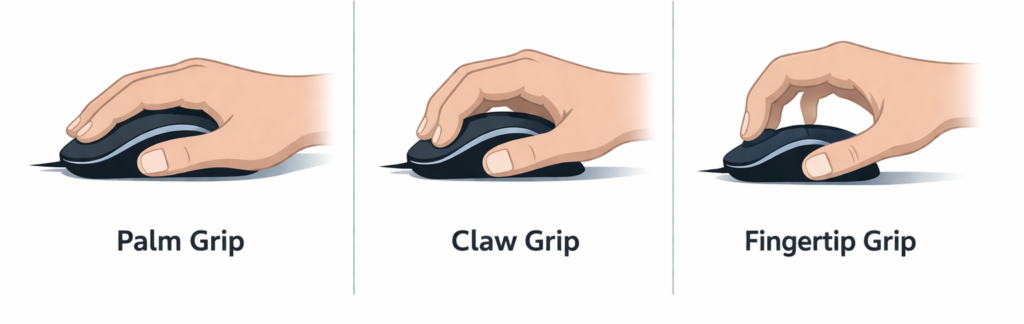
Matching Grip Style to Mouse Shape
Shape is one of the most important factors when choosing a gaming mouse.
A mouse that doesn’t match your grip style or hand size can cause discomfort and reduce precision over time.
Consider:
- Smaller hands may prefer compact mice
- Larger hands benefit from wider or longer shapes
- Comfort directly affects performance consistency
Wired vs Wireless Gaming Mice

Wireless gaming mice have improved significantly in recent years.
Modern wireless options offer:
- Extremely low latency
- Reliable connections
- Long battery life
For most players, the difference between wired and wireless is now negligible.
Wired mice still make sense if:
- You prefer zero battery management
- You want a simpler setup
- You’re on a tighter budget
If you want a full breakdown, check out our guide on wired vs wireless gaming gear.
Buttons, Scroll Wheels, and Customization
Mouse features should match your game type—not just add complexity.
Consider:
- Primary clicks (important for FPS responsiveness)
- Side buttons (useful for MMOs or productivity)
- Scroll wheel feel and durability
- Software customization and profiles
More buttons aren’t always better. In many cases, simplicity leads to better consistency. Mouse features should match your game type—not just add complexity.
Consider:
- Primary clicks (important for FPS responsiveness)
- Side buttons (useful for MMOs or productivity)
- Scroll wheel feel and durability
- Software customization and profiles
More buttons aren’t always better. In many cases, simplicity leads to better consistency.
Mouse Feet, Mousepads, and Desk Surface
Performance doesn’t stop at the mouse itself. The surface your mouse moves on can significantly affect both control and speed:

Mouse feet:
- Affect glide and friction
- Wear down over time
Mousepads:
- Cloth pads offer control
- Hard pads offer speed
Consistency across your desk surface plays a big role in maintaining reliable tracking and muscle memory.
Competitive vs Casual Gaming Mouse Needs
Different players prioritize different features.
Competitive players typically prefer:
- Lightweight designs
- Minimal buttons
- Maximum consistency
Casual players often prioritize:
- Comfort
- Versatility
- Wireless convenience
The best gaming mouse for your needs depends entirely on how you play—not what professional players use.
Common Gaming Mouse Myths
There are several misconceptions that can mislead buyers:
- Higher DPI always improves aim → False
- Wireless mice are laggy → Outdated
- Expensive mice guarantee performance → Not necessarily
- More buttons = better mouse → Depends on usage
Understanding these helps you make more informed decisions.
How Much Should You Spend on a Gaming Mouse?
Gaming mice are available across a wide price range.
General breakdown:
- Budget: solid performance, fewer features
- Mid-range: best balance of performance and value
- High-end: premium materials and refinements
For most users, mid-range options offer the best value due to diminishing returns at higher prices.
Choosing the Best Gaming Mouse for Your Genre
Different genres benefit from different features.
FPS (First-Person Shooters):
- Lightweight
- Low latency
- Minimal buttons
MOBA / RTS:
- Additional programmable buttons
- Balanced weight
MMO:
- Many side buttons
- Custom profiles
Casual / Mixed Use:
- Comfort
- Wireless convenience
- Versatility
This is where understanding what to look for in a gaming mouse becomes practical.

Best Gaming Mouse Recommendations
Once you understand how to pick a gaming mouse based on your play style, comparing actual models becomes much easier.
If you’re ready to explore specific options, check out our:
These guides break down the best gaming mouse options for different budgets and play styles without relying on marketing hype.
Final Thoughts
Learning how to choose the right mouse for gaming isn’t about chasing specs—it’s about finding the right fit.
A good gaming mouse:
- Removes friction from your gameplay
- Improves comfort over long sessions
- Supports consistent performance
But it won’t replace practice or skill.
Focus on comfort, control, and consistency—and you’ll end up with a mouse that actually improves your experience.