
Gaming Mouse DPI Explained: What It Means and How It Affects Gameplay

DPI is one of the most advertised specs on gaming mice, with some models claiming values well over 20,000 DPI. This often creates the impression that higher numbers automatically mean better performance. In reality, that isn’t how DPI works.
DPI (dots per inch) simply determines how far your cursor moves on screen relative to your hand movement. It affects movement speed—not accuracy—and must be understood alongside in-game sensitivity settings.
This guide breaks down what gaming mouse DPI actually does, how it interacts with sensitivity, and how to choose practical DPI settings based on your games, setup, and play style.
For a broader comparison of peripherals and gaming hardware, see our Gaming Gear rankings and buying guides covering keyboards, mice, controllers, headsets, and other competitive gaming accessories.
What Is DPI on a Gaming Mouse?

DPI stands for dots per inch, and it measures how sensitive your mouse is to movement.
In practical terms, DPI determines how far your cursor travels on screen when you move your mouse a physical distance. For example:
- Low DPI → larger hand movement required for cursor movement
- High DPI → small hand movement results in large cursor movement
Modern gaming mice allow DPI to be adjusted because different users and scenarios require different movement scales. Lower settings are often used for precision tasks, while higher settings can make navigating large screens faster.
DPI does not change how accurate your mouse sensor is—it only changes how movement is translated.
DPI vs Sensitivity — What’s the Difference?

Mouse DPI
DPI is a hardware-level setting controlled by your mouse sensor. It defines how sensitive the mouse is before any software adjustments are applied.
In-Game Sensitivity
In-game sensitivity is a software-level multiplier that adjusts how your movement behaves inside a specific game.
Why Both Matter Together
DPI and sensitivity work together to determine your overall cursor movement.
For example:
- High DPI + low in-game sensitivity
- Low DPI + high in-game sensitivity
These combinations can produce very similar results in terms of how far your aim moves on screen.
This combined effect is often referred to as effective sensitivity, even though most players never need to calculate it directly. The key takeaway is that DPI alone does not define how your mouse feels—both settings must be balanced together.
While these combinations can feel similar at first, extreme values in either direction can affect fine control. That’s why most players settle into moderate DPI ranges and fine-tune sensitivity inside the game rather than pushing either setting too far.
Does Higher DPI Improve Aim?
No—higher DPI does not improve aim.
A common misconception is that higher DPI provides more precision. In reality, increasing DPI simply makes your cursor move faster relative to your hand movement.
Higher DPI can actually make aiming harder because:
- Small hand movements translate into large on-screen changes
- Fine adjustments become more difficult to control
Lower or moderate DPI settings tend to provide better control, especially in games that require precise tracking or small corrections. Improving aim comes down to consistency and control rather than simply increasing DPI.
What DPI Do Professional Gamers Use?
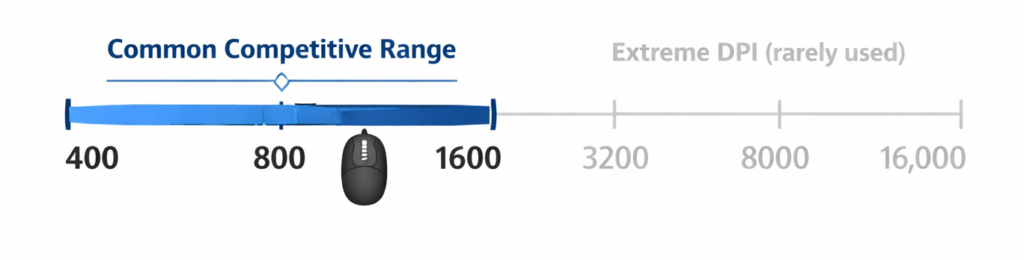
Most competitive players use DPI settings in the range of 400 to 1600.
This range is preferred because it offers:
- Predictable movement
- Better control for small adjustments
- Consistent muscle memory
Professional players are not choosing settings based on maximum specifications. Instead, they prioritize comfort and repeatability.
The exact number varies by individual, but the overall pattern is clear: extreme DPI values are rarely used in competitive play.
DPI and Different Gaming Genres
FPS Games
Many FPS players also pair lower DPI settings with lightweight gaming mice to improve speed and control. This allows for:
- More precise aiming.
- Better control during small adjustments
- Smoother tracking of targets
MOBA / RTS
These games often use moderate DPI settings because:
- Players need to move across the screen quickly
- Precision is still important, but less extreme
MMO / Casual Games
Higher DPI is more common here due to:
- Large interfaces
- Frequent cursor movement across the screen
- Less reliance on pinpoint accuracy
Understanding how DPI applies to your main game type makes choosing settings more practical.
How Sensor Technology Affects DPI
Sensor technology determines how cleanly DPI scales—not whether high DPI improves aim.
Modern gaming mouse sensors are capable of extremely high DPI values, but that doesn’t mean those values are useful in real-world gameplay.
There are two important concepts:
- Maximum DPI: The highest sensitivity a mouse can reach
- Usable DPI: The range where control and consistency are maintained
Very high DPI numbers exist largely because of marketing and sensor capability, not because they improve performance.
Higher DPI may be useful in specific cases, such as:
- High-resolution displays
- Multi-monitor setups
However, for most gaming scenarios, moderate DPI settings remain more practical.
Polling Rate vs DPI (Common Confusion)

DPI is often confused with polling rate, but they measure completely different things.
- DPI → how far your cursor moves
- Polling rate → how often your mouse reports its position to your computer
Increasing DPI does not reduce input lag. Polling rate affects responsiveness, while DPI affects movement scale.
Higher polling rates can improve responsiveness slightly, but there are diminishing returns beyond common settings.
While DPI controls movement distance, responsiveness is influenced by connection type and signal behavior, which is why understanding wired vs wireless gaming gear can help clarify how input latency works.
DPI on High Resolution and Multi Monitor Setups

Screen resolution can influence how DPI feels.
- 1080p displays → lower DPI often feels comfortable
- 1440p and 4K displays → higher DPI may feel more natural
- Multi-monitor setups → higher DPI can make navigation easier
This is because more pixels require more cursor movement to travel across the screen. However, this is about comfort—not competitive advantage. The goal is to find a setting that allows smooth navigation without sacrificing control.
Common Gaming Mouse DPI Myths
There are several persistent myths around DPI:
- Higher DPI automatically improves aim
- You should always use your mouse’s maximum DPI
- Wireless mice require higher DPI
- DPI alone determines mouse quality
These misconceptions often come from marketing rather than real-world performance.
How to Choose the Right DPI for You
There is no single “best DPI for gaming.” The right setting depends on your setup and preferences.
A practical approach:
- Start with a moderate DPI setting
- Adjust gradually based on comfort
- Keep your settings consistent
- Match your DPI to:
- Desk space
- Mousepad size
- Game type
- Whether you aim with your arm or wrist
Consistency matters more than chasing specific numbers.
Once you understand how DPI affects movement and control, it becomes easier to evaluate different options when looking at the best gaming mice for your setup.
Should You Use DPI Switching Buttons?
Many gaming mice include buttons that allow you to switch DPI on the fly.
These can be useful for:
- Switching between desktop and gaming use
- Temporary adjustments for specific tasks
However, constantly changing DPI during gameplay can reduce consistency and make it harder to build muscle memory.
For most players, sticking to one primary setting is more effective.
DPI in the Bigger Picture of Gaming Performance
DPI is only one part of overall performance.
Other factors often have a bigger impact:
- Mouse shape and comfort
- Weight and balance
- Grip style
- Practice and consistency
If you’re looking to improve your setup, it’s worth understanding how to choose a gaming mouse and what actually contributes to performance. Understanding weight, shape, and grip style will help you apply DPI settings more effectively.
DPI should be treated as a tool—not the main driver of results.

Final Thoughts
DPI is often misunderstood, but it’s a simple concept once broken down.
It controls how movement translates from your hand to your screen—not how accurate your aim is. Moderate, consistent settings tend to outperform extreme values, and the “right” DPI depends entirely on your comfort and play style.
Understanding DPI helps you make better decisions when setting up your mouse, but improvement ultimately comes from practice, consistency, and overall setup—not from chasing higher numbers.