Monitor Arm vs Monitor Stand: Which Is Better for Your Desk?
Monitor Arm vs Monitor Stand: Which Is Better for Your Desk? Read More »
Looking for the best tech accessories to upgrade your desk, devices, or everyday tech setup?
At TechGearTopTen, we compare and rank accessories based on real-world usefulness, build quality, and value — not gimmicks or marketing claims.
The right accessories can make your setup faster, cleaner, and easier to use — whether you’re working from home, gaming, traveling, or managing multiple devices. Small upgrades like a reliable USB-C hub, a quality wireless charger, or a sturdy monitor arm can improve comfort, reduce clutter, and prevent common headaches like unstable connections or slow charging.
This category focuses on accessories that solve practical problems and hold up over time, so you’re not replacing cheap add-ons every few months.
Our rankings and guides are built using real-world usage insights, long-term reliability feedback, and practical workflow considerations — not just manufacturer specifications.
Explore our expert Top 10 rankings covering essential accessories used in modern workspaces, mobile setups, and multi-device environments.
Popular rankings in this category include:
Many accessories appear similar on paper, but real-world performance can vary dramatically. Our rankings prioritize accessories that deliver stable connections, reliable charging, durable construction, and compatibility across common devices.
Tech accessories have evolved quickly as devices have become thinner, more portable, and more dependent on versatile connectivity standards like USB-C.
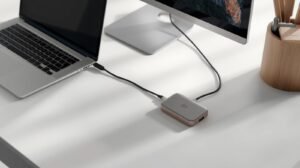
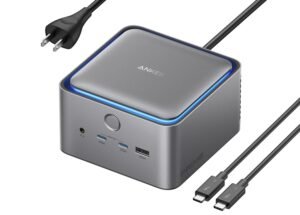
A good USB-C hub should support the ports you actually use — such as HDMI, USB-A, Ethernet, or SD card readers — while maintaining stable data transfer and video output.
Charging gear also varies widely. Some chargers deliver reliable power and efficient heat management, while others run hot or fail to deliver their advertised wattage.
Different accessories solve different problems depending on how you use your devices. Understanding your setup helps narrow down which upgrades will actually make a difference.
For desk setups, accessories often focus on organization, ergonomics, and workspace efficiency.
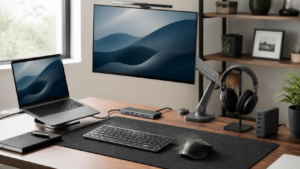
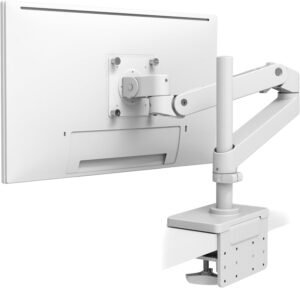
Monitor arms free up desk space while improving screen positioning for better posture. Cable management solutions reduce clutter and make setups easier to maintain. Adjustable lighting and charging solutions can also make workspaces more comfortable for long sessions.
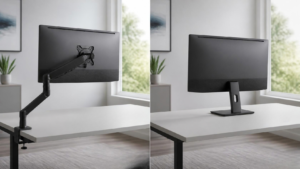
If you’re deciding whether an arm is actually necessary for your setup, our monitor arm vs stand guide compares the differences in adjustability, desk space, ergonomics, compatibility, and cost.
Laptop users often rely on accessories that expand connectivity and improve portability.
USB-C hubs allow thin laptops to connect to multiple displays, external drives, and wired networks. Portable stands and accessories can also improve typing posture and cooling performance.
Many modern users manage several devices at once — laptops, phones, tablets, headphones, and more.
Charging accessories help simplify this ecosystem. Multi-port chargers, wireless charging pads, and power-delivery hubs allow you to keep multiple devices powered without cluttering your desk with cables.
Reliable charging solutions are especially important for daily workflows where devices must stay powered throughout the day.
Travel setups prioritize compact accessories that deliver functionality without adding bulk.
Portable chargers, compact hubs, folding stands, and wireless charging pads help recreate a productive workspace when working from hotels, airports, or temporary offices.
Lightweight gear that combines multiple functions is especially valuable for mobile work setups.
USB-C has become the dominant connectivity standard across modern laptops, tablets, and smartphones.
Unlike older ports that served only one purpose, USB-C can carry power, data, and video signals through a single cable. However, not every USB-C port supports every feature.
Some USB-C connections support only charging and data transfer, while others also support video output through DisplayPort Alt Mode. Power Delivery (USB-C PD) adds another layer, allowing devices to charge at higher wattages.
Understanding these differences is important when choosing hubs, cables, and docking stations.
For a deeper explanation of USB-C capabilities and limitations, see our guide that explains how USB‑C works in real-world setups.
Accessories play a major role in long-term comfort and workspace usability.
Monitor positioning, keyboard height, and screen distance all affect posture and fatigue during long work sessions. Ergonomic accessories help create a more comfortable environment while also improving desk organization.
Monitor arms allow displays to be raised to eye level and free up desk space by replacing bulky monitor stands. Cable management accessories reduce clutter and make workstations easier to maintain.
If you’re building a cleaner and more ergonomic workspace, see how to optimize your desk setup for productivity.
Charging accessories are among the most commonly used tech add-ons.
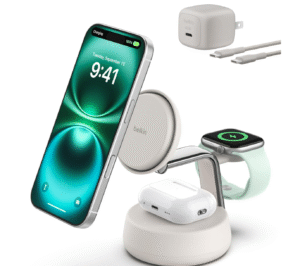
Wireless charging pads offer convenient cable-free charging for smartphones and accessories, while wired fast-charging solutions typically deliver higher power output and faster charging speeds.
However, not all chargers perform equally. Common problems include overheating, slow charging speeds, and poor device alignment on wireless pads.
Build quality and internal power management components often determine whether a charger performs reliably over time.
The best tech accessories solve real problems — improving convenience, organization, comfort, or performance. For a step-by-step approach to identifying useful upgrades, checking compatibility, and avoiding unnecessary purchases, read our guide on how to choose the right tech accessories for your setup.
When shopping for accessories, focus on these practical decision points:
Avoid common mistakes like buying cheap cables that fail quickly, hubs that cannot support your monitor output, or chargers that do not deliver consistent power.
Many accessory problems happen because of compatibility misunderstandings.
A common mistake is assuming all USB-C cables support the same capabilities. In reality, some cables support only charging while others support high-speed data or video output.
Other mistakes include buying underpowered hubs that cannot drive external monitors, choosing monitor arms that exceed weight limits, or filling desks with low-quality accessories that fail quickly.
Taking a few minutes to confirm compatibility before purchasing accessories can prevent frustration and reduce unnecessary replacements.
We compare accessories against similar products in the same category and price range so you can see what offers real value.
Rankings are updated as new options release and older models become less competitive.
Before purchasing new accessories, consider these key factors:
Choosing accessories that match your actual workflow helps create a setup that stays reliable over time.
This page is updated regularly as new accessories release, better options appear, and outdated products are removed — ensuring the rankings remain accurate and useful.