
Top 10 Lightweight Gaming Mice
Lightweight gaming mice vary more than they first appear, and choosing the right one often comes down to how key differences affect your playstyle. Factors like weight, shape, and responsiveness can influence everything from quick flicks to long-session comfort, making direct comparisons more useful than looking at specs alone. If you’re still deciding what matters most, start with How to Choose a Gaming Mouse to understand how shape, weight, and sensor performance affect real-world gameplay.
Some options focus on pure speed and minimal resistance, while others prioritize control, ergonomics, or versatility across different game types. Connectivity, battery approach, and feature sets also play a role, especially depending on whether you value simplicity or added functionality in your setup.
This guide is structured to help you compare these differences quickly. It starts with a clear side-by-side overview, followed by focused recommendations and detailed breakdowns, so you can identify which type of mouse best fits your needs without overthinking the decision.
Disclosure: As an Amazon Associate I earn from qualifying purchases.
Upgrading your gaming setup?
This guide is part of our Gaming Gear category, where we review keyboards, mice, controllers, headsets, and accessories for every type of gamer.
Comparison Table (Top Picks)
The table below highlights how the top lightweight gaming mice compare across key factors like use case, design focus, and overall performance characteristics.
| Product | Best For | Key Strength | Weight / Size | Connectivity | Notable Trade-Off |
|---|---|---|---|---|---|
| Razer Viper V3 Pro | Competitive FPS | Balanced speed + control | Ultra-light | Wireless | Minimal shape support |
| Logitech G Pro X Superlight 2 | All-around use | Versatile, consistent feel | Lightweight | Wireless | Lacks specialization |
| Razer DeathAdder V4 Pro | Ergonomic comfort | Supportive right-handed shape | Lightweight | Wireless | Not ambidextrous |
| ASUS ROG Harpe Ace | Aim training | Control-focused tuning | Lightweight | Wireless (tri-mode) | Less speed-focused |
| Endgame Gear XM2 8K | Low-latency wired play | High polling responsiveness | Lightweight | Wired | No wireless option |
| Corsair Sabre V2 Pro | Ultra-light speed | Extremely low weight | Ultra-light | Wireless | Less stability for some users |
| HyperX Pulsefire Haste 2 | Simple FPS performance | Easy-to-use ultralight design | Ultra-light | Wireless | Fewer advanced features |
Quick Picks
These picks highlight the strongest options based on how they perform across different playstyles and priorities.
Best Overall — Razer Viper V3 Pro (#1)
Delivers a refined balance of control and precision that suits high-level competitive play.
Best Ergonomic — Razer DeathAdder V4 Pro (#3)
Offers a more supportive shape that reduces strain during longer sessions without sacrificing control.
Best for Aim Training — ASUS ROG Harpe Ace Aim Lab Edition (#4)
Focuses on repeatability and consistency to support players improving their aim mechanics.
Best Wired Option — Endgame Gear XM2 8K (#5)
Prioritizes direct input and stable performance for players who prefer a no-compromise wired setup.
Best Budget — Logitech G305 Lightspeed (#10)
Keeps things simple with dependable wireless performance and long-lasting battery life.
10. Logitech G305 Lightspeed
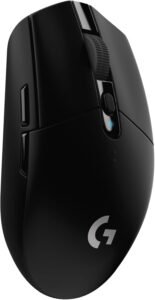
For players who want a straightforward wireless setup without overthinking specs, the G305 Lightspeed remains a practical starting point. It doesn’t fall into the true ultralight category, but it still delivers a lighter feel than many traditional designs. Its long battery life and dependable connection make it an easy choice for consistent, everyday use.
Why It Made the List
- Stable Lightspeed wireless performance
Delivers a consistent connection suitable for everyday gaming
Helps maintain control without noticeable lag - Strong battery efficiency
Supports extended use between battery changes
Reduces interruptions during regular play - Proven HERO sensor
Tracks accurately for general gaming needs
Keeps movement predictable across common sensitivity ranges - Simple, no-frills design
Easy to set up and use
Works well as a straightforward starter mouse
Trade-Offs
- Not a true ultralight mouse
Heavier than most modern ultralight designs - Basic shape and materials
Lacks the premium feel of higher-end models - Uses AA battery
Adds weight compared to rechargeable alternatives
Best For:
Players looking for a dependable, lightweight-class wireless mouse with long battery life and straightforward performance.
Final Verdict
The G305 Lightspeed is not an ultralight mouse, but it remains a strong lightweight-class option for beginners or budget-conscious users. It fits this ranking by offering reliable wireless performance and excellent battery life in a simple, proven design.
9. Glorious Model O 2 Wireless
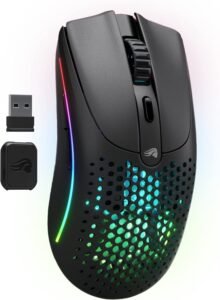
Built with speed in mind, the Model O 2 Wireless leans into a lightweight, glide-focused experience that favors quick adjustments and precise control. Its honeycomb-style design and familiar shape make it especially appealing to fingertip and claw grip users. It stands out as a refined option for players who prioritize fast, responsive movement.
Best For:
Fingertip and claw grip players who want a lightweight wireless mouse with fast glide and responsive movement.
Real-World Performance
In use, it feels quick and effortless, with very little resistance during fast swipes or micro-adjustments. The shape supports a more aggressive grip style, allowing for precise control without feeling bulky in hand. In practice, it favors speed and responsiveness over a locked-in, full-palm feel.
What Stands Out
- Lightweight honeycomb-style build → reduces drag and supports faster hand movement
- Smooth glide with low-friction feet → enables consistent tracking across quick flicks and small adjustments
- Ambidextrous shape → accommodates flexible grip styles, especially fingertip and claw
- Dual wireless modes → allows easy switching between gaming setups and everyday use
- Refined design from earlier models → improves overall consistency and handling
Who Is It For?
- Players who use fingertip or claw grip and prefer a lighter, more agile mouse
- Gamers focused on precision aiming, especially in fast-paced titles
- Users who want a wireless setup without sacrificing responsiveness
Pros & Cons
Pros
- Very lightweight feel supports fast, controlled movement
- Shape works well for precision-focused grip styles
Cons
- Less suited for palm grip users who prefer more hand support
- Honeycomb design may not appeal to those who prefer a solid shell
Bottom Line
The Model O 2 Wireless earns its place as a lightweight, precision-focused option tailored to fingertip and claw grip users. It stands out for its fast glide and flexible design, making it a strong fit for players who prioritize speed and control.
8. SteelSeries Aerox 5 Wireless
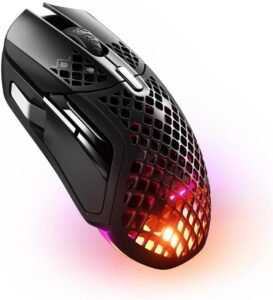
Not every lightweight mouse is built purely for FPS, and the Aerox 5 Wireless reflects that. It brings additional programmable inputs into a lighter design, making it more adaptable across different game types. This balance of flexibility and performance makes it a strong choice for players who don’t stick to a single genre.
Why It Made the List
- Extra programmable buttons
Supports more in-game actions and shortcuts
Useful for managing abilities, macros, or key binds across genres - Lightweight for its feature set
Keeps movement relatively quick despite added inputs
Helps maintain control during longer sessions - Dual wireless connectivity
Allows switching between gaming and general use setups
Adds convenience for multi-device environments - Versatile shape and layout
Adapts well to different playstyles
Works across FPS, MOBA, and general gaming use
Trade-Offs
- Heavier than most ultralight-focused mice
Slightly less agile for pure competitive FPS play - More complex button layout
May take time to adjust or feel unnecessary for simpler setups - Honeycomb-style shell
Not preferred by users who want a solid outer surface
Best For:
Players who rotate between FPS, MOBA, and general gaming and want a lightweight mouse with additional programmable controls.
Final Verdict
The Aerox 5 Wireless ranks here by offering more flexibility than typical lightweight mice without becoming overly heavy. It’s a practical option for gamers who value versatility and extra inputs over minimalism.
7. HyperX Pulsefire Haste 2 Wireless
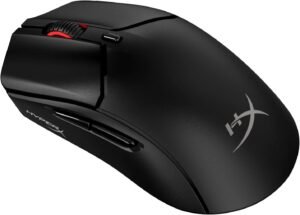
For those stepping into the ultralight category, the Pulsefire Haste 2 Wireless offers a clean and approachable experience. It focuses on delivering reliable performance without adding unnecessary complexity. The result is a mouse that feels quick, consistent, and easy to adjust to right away.
Best For:
FPS players who want a true ultralight wireless mouse that performs reliably without unnecessary complexity.
Real-World Performance
It delivers a feel that is quick and controlled, making it easy to track targets and adjust aim without resistance. The shape supports natural hand positioning for a wide range of grip styles, especially during fast flicks and tracking scenarios. In use, it delivers consistent responsiveness without requiring much adjustment.
What Stands Out
- Ultralight design → enables faster swipes and reduced fatigue during longer sessions
- Stable wireless performance → maintains consistent input without noticeable interruptions
- Simple, familiar shape → adapts easily to different grip styles with minimal learning curve
- Long battery life → supports extended use without frequent charging
- Dual wireless options → adds flexibility for gaming and general device use
Who Is It For?
- FPS players who rely on quick reactions and precise aim
- Users moving into ultralight mice for the first time
- Gamers who prefer a clean, no-frills setup with consistent performance
Pros & Cons
Pros
- Lightweight feel improves speed and control
- Easy to use with a shape that suits most players
Cons
- Fewer advanced features compared to higher-end models
- May feel too simple for users who want more customization
Bottom Line
The Pulsefire Haste 2 Wireless lands here as a strong value-focused ultralight option with dependable performance. It’s a practical choice for players who want speed and consistency without extra complexity.
6. Corsair Sabre V2 Pro
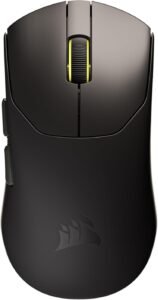
Designed with minimal resistance in mind, the Sabre V2 Pro pushes weight reduction to the extreme. Its ultra-light build targets players who want maximum speed and freedom of movement during fast-paced gameplay. It fits best as a performance-driven option for users who prioritize quick reactions over a more anchored feel.
Best For:
Competitive FPS players who want an extremely lightweight mouse for fast flicks and minimal hand resistance.
Real-World Performance
During gameplay, it almost feels effortless, with very little drag during both large swipes and small adjustments. The low weight makes rapid direction changes easier, especially in fast-paced scenarios. It prioritizes speed and responsiveness over a more anchored or controlled feel.
What Stands Out
- Extremely low weight → reduces fatigue and allows quicker hand movement
- High polling capability → supports more immediate input response in supported setups
- Performance-focused sensor → delivers consistent tracking during fast motion
- Minimal design approach → removes unnecessary bulk for a more direct feel
- Wireless operation → maintains freedom of movement without cable drag
Who Is It For?
- Competitive FPS players focused on speed and reaction time
- Users who prefer the lightest possible mouse for aggressive playstyles
- Gamers with optimized setups that can take advantage of high polling performance
Pros & Cons
Pros
- One of the lightest wireless mice available
- Excellent for fast, reactive gameplay
Cons
- Very light feel may reduce control for some users
- Minimal design may lack comfort for extended sessions
Bottom Line
The Sabre V2 Pro stands out for its extremely low weight and speed-focused design. It’s best suited for players who prioritize quick movement and responsiveness over a more stable or cushioned feel.
5. Endgame Gear XM2 8K
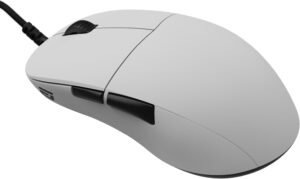
For players who prefer a wired connection, the XM2 8K offers a focused approach to speed and consistency. It emphasizes low latency and stable input without adding extra features that distract from performance. This makes it a strong choice for competitive users who want a direct, no-compromise setup.
Why Choose the Endgame Gear XM2 8K?
It stands out by delivering extremely fast input response through its high polling capability while maintaining a lightweight, controlled feel. For players who want maximum consistency without relying on wireless, it offers a focused, competition-ready experience.
Key Features and Benefits
Ultra-Lightweight Build
- Reduces drag for quicker hand movement
- Supports fast flicks and micro-adjustments
- Helps minimize fatigue during longer sessions
High Polling Rate Performance
- Enables faster input reporting in supported systems
- Improves responsiveness in fast-paced gameplay
- Helps maintain smoother tracking during rapid movement
Precision Sensor Performance
- Provides consistent tracking across different playstyles
- Maintains accuracy during quick swipes and adjustments
- Supports reliable control in competitive scenarios
Optimized Wired Connection
- Eliminates concerns about wireless interference
- Ensures stable, uninterrupted input
- Delivers consistent performance without charging needs
Specifications at a Glance
- Approximate weight: ~52g
- Connection: Wired
- Polling rate: Up to 8000Hz (system-dependent)
- Sensor: PixArt PAW3395
Who Is It For?
- Competitive FPS players who prefer wired setups
- Users focused on minimizing latency and maximizing responsiveness
- Gamers who want a lightweight mouse with consistent performance
Pros & Cons
Pros
- Extremely responsive input with high polling support
- Lightweight design supports fast, controlled movement
Cons
- Wired-only design limits mobility compared to wireless options
- High polling benefits may depend on system compatibility
Final Verdict
The XM2 8K earns its spot as a performance-focused wired option built for speed and consistency. It’s well suited for competitive players who prioritize low latency and reliable input above all else.
4. ASUS ROG Harpe Ace Aim Lab Edition
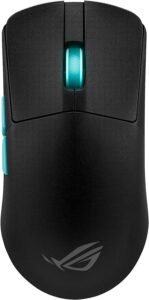
Rather than focusing purely on speed, the Harpe Ace Aim Lab Edition is built around control and repeatability. Developed with input from competitive players and Aim Lab, it targets users looking to refine their aiming consistency. Its design leans toward stability, making it a unique option in a category often dominated by speed-focused mice.
Best For:
Players actively using aim trainers or competitive FPS titles who want consistent control for improving precision.
Real-World Performance
Movement feels stable and controlled rather than overly fast or loose. The shape promotes a secure grip that helps maintain consistent hand positioning across sessions. In use, it supports repeatable tracking and flicks, making it easier to build muscle memory over time.
What Stands Out
- Aim Lab integration → helps guide sensitivity and setup adjustments for more consistent aim
- Well-balanced lightweight design → improves control without feeling overly floaty
- Right-handed esports shape → provides a stable grip for repeatable movements
- Tri-mode connectivity → allows flexible use across competitive and everyday setups
- Pro-tested tuning → focuses on consistency rather than just speed
Who Is It For?
- Players regularly using aim trainers to improve accuracy
- Competitive FPS gamers focused on building consistent mechanics
- Users who prefer a controlled, balanced feel over ultra-light speed
Pros & Cons
Pros
- Strong emphasis on control and consistency
- Shape supports stable, repeatable aiming
Cons
- Right-handed design limits grip flexibility for some users
- Less focused on ultra-light speed compared to other options
Bottom Line
The Harpe Ace Aim Lab Edition ranks here because it focuses on consistency and precision rather than raw speed. It’s a strong fit for players who are actively working to refine their aim and want a stable, repeatable feel.
3. Razer DeathAdder V4 Pro
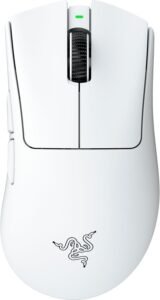
The DeathAdder V4 Pro takes a different approach by combining a familiar ergonomic shape with modern lightweight performance. It’s designed for players who want more support during longer sessions without giving up responsiveness. This balance makes it a strong fit for users who prioritize comfort alongside competitive capability.
Why Choose the Razer DeathAdder V4 Pro?
Its key advantage is delivering a more supportive, ergonomic feel while still maintaining the speed and responsiveness expected from a lightweight esports mouse. Compared to flatter designs, it offers better long-session comfort without sacrificing control.
Key Features and Benefits
Ergonomic Right-Handed Shape
- Supports natural hand positioning during extended play
- Reduces strain compared to flatter, low-profile designs
- Provides a more secure grip for controlled movements
Lightweight Design with Performance Focus
- Keeps movement responsive without feeling overly fragile
- Balances speed with a more grounded, stable feel
- Works well for both tracking and controlled flicks
High-End Sensor and Input Performance
- Maintains consistent tracking across fast movements
- Supports responsive input in competitive scenarios
- Helps ensure predictable cursor behavior
Wireless Convenience with Competitive Reliability
- Eliminates cable drag during gameplay
- Maintains stable connection during extended sessions
- Allows flexible use across different setups
Specifications at a Glance
- Approximate weight: ~56g
- Connection: Wireless (USB-C charging)
- Polling rate: Up to 8000Hz (system-dependent)
- Sensor: Optical (high-performance class)
Who Is It For?
- Players who prefer palm or relaxed claw grip styles
- Gamers who want comfort for long sessions without losing performance
- Users transitioning from heavier ergonomic mice to lighter designs
Pros & Cons
Pros
- Comfortable shape supports longer play sessions
- Strong balance between control and responsiveness
Cons
- Right-handed design limits usability for left-handed users
- Slightly less minimal than ultra-flat ultralight options
Final Verdict
The DeathAdder V4 Pro lands here due to combining ergonomic comfort with competitive-level performance. It’s a strong fit for players who want a supportive shape without stepping away from lightweight responsiveness.
2. Logitech G Pro X Superlight 2
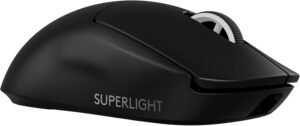
Known for its consistency, the Superlight 2 delivers a dependable experience that works across a wide range of playstyles. Its neutral shape avoids specialization, making it easy to adapt to without a learning curve. For players who want reliability above all else, it remains one of the safest all-around choices.
Why Choose the Logitech G Pro X Superlight 2?
Where it differentiates itself is offering a neutral shape and consistent performance that works for most users without specialization. Rather than focusing on a niche strength, it delivers reliable results across different genres and playstyles.
Key Features and Benefits
Neutral, Versatile Shape
- Adapts easily to fingertip, claw, and light palm grips
- Reduces adjustment time when switching from other mice
- Provides a familiar feel for a wide range of users
Lightweight Wireless Design
- Keeps movement responsive without feeling overly delicate
- Supports both fast flicks and controlled tracking
- Helps reduce fatigue during extended sessions
Consistent Sensor and Input Performance
- Maintains stable tracking across different movement speeds
- Supports predictable cursor control in competitive scenarios
- Delivers reliable responsiveness across game types
Specifications at a Glance
- Approximate weight: ~60g
- Connection: Wireless (USB-C charging)
- Programmable buttons: 5
- Polling rate: Up to 8000Hz (system-dependent)
Who Is It For?
- Players who want one mouse that works well across multiple genres
- Users who prefer a safe, widely compatible shape
- Gamers looking for consistent performance without a steep adjustment period
Pros & Cons
Pros
- Versatile shape suits a wide range of grip styles
- Reliable performance across different types of games
Cons
- Lacks specialized features for niche preferences
- May feel too generic for users seeking a unique shape
Final Verdict
The G Pro X Superlight 2 fits this ranking by delivering consistent, well-rounded performance without compromise. It’s a practical choice for players who want reliability and versatility in a lightweight wireless design.
1. Razer Viper V3 Pro
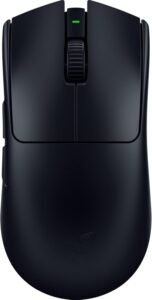
At the top of the list, the Viper V3 Pro brings together speed, balance, and precision in a way that feels refined rather than extreme. Its symmetrical design supports controlled, consistent movement across different grip styles. This combination makes it a strong option for players aiming to perform at a high level without compromise.
Why Choose the Razer Viper V3 Pro?
What sets it apart is combining speed, control, and consistency in a single design without leaning too heavily in one direction. Compared to other options, it delivers a balanced performance that works at the highest level without requiring compromise.
Key Features and Benefits
Lightweight, Balanced Design
- Enables quick direction changes with minimal effort
- Maintains a controlled, stable feel during tracking
- Supports both fast flicks and precise adjustments
High-End Sensor and Input Performance
- Delivers consistent tracking during rapid movement
- Supports responsive input in competitive scenarios
- Helps maintain predictable cursor behavior under pressure
Symmetrical Shape for Precision Play
- Works well with fingertip and claw grip styles
- Encourages consistent hand positioning
- Adapts to a wide range of aiming techniques
Specifications at a Glance
- Approximate weight: ~54g
- Connection: Wireless
- Polling rate: Up to 8000Hz (system-dependent)
- Sensor: Optical (high-performance class)
- Programmable buttons: 8
Who Is It For?
- Competitive FPS players focused on precision and consistency
- Users who prefer a symmetrical shape for flexible grip styles
- Gamers seeking a lightweight mouse tuned for high-level performance
Pros & Cons
Pros
- Strong balance between speed and control
- Consistent performance suited for competitive play
Cons
- May feel minimal for users who prefer more hand support
- High-performance features may require compatible hardware to fully benefit
Final Verdict
The Viper V3 Pro earns its position by delivering a refined balance of speed, control, and consistency. It’s well suited for serious players who want a lightweight mouse capable of supporting high-level competitive performance.
Best Lightweight Gaming Mice by Use Case
Best for Competitive FPS Gaming: Razer Viper V3 Pro
For players focused on competitive shooters, consistency and control matter more than extremes. This option stands out by maintaining a stable, predictable feel across both fast flicks and controlled tracking, making it easier to rely on during high-pressure moments. Compared to more specialized designs, it avoids leaning too far toward either speed or support, which helps it adapt to different aiming styles. In practice, it fits players who want confidence in every movement without needing to adjust their technique.
Best for All-Around Use: Logitech G Pro X Superlight 2
Some players don’t want to think about switching mice between games, and this is where a more neutral approach works best. Its shape and overall feel make it easy to adapt to, whether you’re playing shooters, casual titles, or general desktop use. Unlike more niche-focused options, it doesn’t favor one style heavily, which keeps it reliable across different scenarios. This makes it a strong fit for users who want one setup that works consistently without needing adjustments.
Best for Ergonomic Comfort: Razer DeathAdder V4 Pro
For longer sessions, comfort becomes just as important as performance. This option stands apart by offering a more supportive shape that naturally fits the hand, helping reduce strain over time. Compared to flatter designs, it provides a more secure and relaxed grip, which can improve control during extended play. It works best for players who value stability and comfort without stepping away from competitive-level responsiveness.
Best for Aim Training and Precision: ASUS ROG Harpe Ace Aim Lab Edition
Players focused on improving accuracy need a setup that supports repeatability rather than raw speed. This model emphasizes controlled movement and consistent hand positioning, which helps reinforce muscle memory during practice. Compared to faster, more aggressive designs, it feels more grounded, making it easier to build precision over time. It’s particularly suited for those regularly using aim trainers or refining their mechanics in competitive environments.
Best for Budget and Entry-Level Use: Logitech G305 Lightspeed
For users getting started or keeping things simple, reliability matters more than advanced features. This option stands out by delivering a consistent wireless experience without adding unnecessary complexity. Compared to higher-end models, it trades some refinement for a more straightforward setup that’s easy to use right away. It fits players who want dependable performance for everyday gaming without needing to fine-tune their gear.
How We Ranked the Best Lightweight Gaming Mice
These lightweight gaming mice were evaluated based on how they perform in real-world use, focusing on key differences that impact control, comfort, and consistency across different playstyles.
Performance and Responsiveness
We looked at how each mouse handles quick movements, tracking, and input consistency during gameplay. Smooth, predictable behavior matters more than raw specifications, especially in fast-paced scenarios where small adjustments can affect accuracy.
Shape and Comfort
Shape plays a major role in long-term usability. We considered how well each design supports different grip styles and whether it helps maintain a stable, comfortable hand position over extended sessions.
Weight and Movement Feel
Rather than focusing only on how light a mouse is, we evaluated how that weight translates into real use. Some designs favor effortless movement, while others provide a more controlled, grounded feel depending on user preference.
Connectivity and Reliability
Both wired and wireless options were assessed based on consistency and ease of use. A stable connection and predictable input are essential, regardless of setup or environment.
Features and Practical Use
We considered how additional features—such as programmable inputs or simplified layouts—affect everyday usability. The goal was to balance functionality without adding unnecessary complexity.
Suitability for Different Use Cases
Each mouse was placed based on how well it fits specific scenarios, from competitive play to general use. This helps highlight which options are better suited for particular priorities.
How to Use This List
The right choice depends on your preferences and how you play. Use the comparison table and use-case sections to narrow down what matters most, then choose the option that best aligns with your setup and goals.
Final Verdict
Choosing the best lightweight gaming mouse ultimately comes down to how you play and what you prioritize. While all of the options in this list are designed to reduce resistance and improve responsiveness, the “best” choice depends on whether you value speed, control, comfort, or simplicity in your setup. The key is identifying which factors matter most for your playstyle rather than focusing on a single spec or feature.
For players focused on competitive performance, balanced and precision-oriented designs like the Razer Viper V3 Pro (#1) offer a well-rounded experience that adapts across different scenarios. Those who prefer comfort during longer sessions may benefit more from ergonomic options like the Razer DeathAdder V4 Pro (#3), while users looking for a flexible, do-it-all setup can lean toward neutral, adaptable designs such as the Logitech G Pro X Superlight 2 (#2). Simpler, more straightforward options like the Logitech G305 Lightspeed (#10) remain practical for entry-level use or everyday gaming without added complexity.
If you’re unsure, start by narrowing down your preferred grip style and how you typically play. From there, use the comparisons and use-case sections to match a mouse that feels natural in your hand and consistent in your gameplay.