
Top 10 Budget Laptops Under $800
Shopping for the best budget laptops under $800 is all about finding the best balance between everyday speed, screen quality, battery life, and real-world usability—without paying for features you won’t use. In this price range, the best laptops aren’t “cheap” — they’re smart, well-balanced machines: responsive for browsing and office apps, comfortable for long typing sessions, and reliable enough for school or remote work. If you’re unsure how to balance specs and features in this price range, see our guide on how to choose the right laptop without overspending.
For this Top 10 Budget Laptops Under $800 roundup, we leaned into the strengths shown in our list—big-screen value picks, portable 14-inch workhorses, and a few performance-focused options that pack more performance and storage than you’d expect at the price.
Disclosure: As an Amazon Associate I earn from qualifying purchases.
Shopping for a laptop or computer?
This guide is part of our Laptops & Computers category, where we break down the best laptops and desktops for everyday users, work-from-home setups, students, and gamers.
Quick Picks: Best Budget Laptops Under $800
Best Overall (Most Balanced Buy): ASUS Vivobook 14″ (#1)
Best Touchscreen Value: Dell Inspiron 3535 Touchscreen (#3)
Best Entry-Level Large Display Value: Acer Aspire Go 15 (#10)
How We Ranked Budget Laptops Under $800
To rank these, we focused on what matters most in daily use—not just specs on paper. Our scoring heavily favored laptops that feel fast and comfortable in real workflows like: Chrome tabs + email + Google Docs/Office apps + video calls.
Key criteria:
Everyday performance: responsiveness for browsing, schoolwork, office apps, and multitasking
Display experience: Full HD vs HD, screen size, and comfort for long sessions
Memory + storage value: how well the configuration supports real use (and how quickly you’ll “outgrow” it)
Portability: weight, screen-size practicality (14″ vs 15.6″), and travel-friendliness
Battery life: how well it holds up through classes/workdays
Connectivity & ports: USB-C/USB-A/HDMI basics so you aren’t forced into dongles
Best fit for a buyer type: student, remote worker, home user, cloud-first Chromebook user
10. Acer Aspire Go 15 Laptop
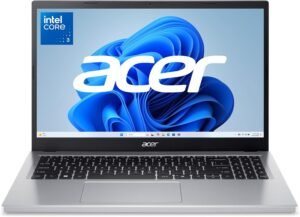
If you’re shopping for a budget-friendly laptop with a roomy display and dependable performance, the Acer Aspire Go 15 Laptop is an easy entry point. Built for web work, documents, streaming, and light multitasking, it delivers the essentials without jumping into premium pricing—making it a practical pick for students, home offices, and casual productivity.
Why Choose the Acer Aspire Go 15 Laptop?
The Aspire Go 15 focuses on screen size, simplicity, and value. Its 15.6″ display gives you more space for spreadsheets, side-by-side documents, and streaming, while modern entry-level components keep everyday tasks smooth. It’s not trying to be a powerhouse—just a reliable, affordable workhorse that’s easy to live with.
Key Features and Benefits
15.6″ Full-Size Display
More room for multitasking and split windows
Comfortable for long reading and spreadsheet sessions
Great for classes, remote work, and streaming
Snappy Everyday Performance
Handles browsing, email, documents, and video calls with ease
Smooth performance for daily productivity tasks
Efficient hardware helps keep things responsive
Lightweight for Its Size
Easy to move between rooms or classes
Slim profile for a 15.6″ laptop
Practical for students and hybrid workers
Useful Port Selection
Connect external displays, accessories, and storage
No dongle anxiety for everyday peripherals
Straightforward plug-and-play
Clean, Practical Design
Professional look fits school or office environments
Comfortable keyboard for typing sessions
Built for day-to-day use
Specifications at a Glance
Display: 15.6″ Full HD (1920 × 1080)
Processor: Intel Core 3 processor
Memory: 8 GB RAM
Storage: 256 GB SSD
Graphics: Integrated graphics
Ports: USB-A, USB-C, HDMI, headphone jack
Battery Life: Up to ~8–9 hours (typical use)
Operating System: Windows 11
Weight: ~3.8–4.1 lbs
Webcam: 720p HD
Wireless: Wi-Fi 6, Bluetooth
Keyboard: Full-size (non-backlit on most configs)
Audio: Stereo speakers
Extras: Large display, value-focused build
Specs listed reflect the specific configuration linked below. Other configurations may be available at different prices.
Who Is It For?
Students needing a large, affordable screen
Home users handling everyday tasks
Remote workers on a budget
Families sharing a general-purpose laptop
Anyone who wants good value under $800
Pros & Cons
Pros
Large 15.6″ display at a budget price
Solid everyday performance
Lightweight for a full-size laptop
Practical port selection
Good battery life for daily use
Cons
Not designed for heavy creative or gaming workloads
Entry-level display brightness
Keyboard usually not backlit
Integrated graphics only
Final Verdict
The Acer Aspire Go 15 Laptop earns the #10 spot on our budget list by delivering screen space, reliability, and strong value under $800. It’s a smart choice if you want a full-size laptop that covers daily productivity without unnecessary extras or cost.
For buyers prioritizing affordability, a larger display, and dependable everyday performance, the Aspire Go 15 is a solid place to start.
9. Lenovo IdeaPad 3i Chromebook 15.6″
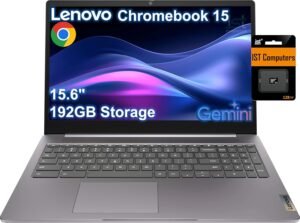
If you’re looking for a budget laptop under $800 that’s perfect for browsing, streaming, and cloud-first workflows, the Lenovo IdeaPad 3i Chromebook 15.6″ is a top pick. With a large 15.6″ screen, ChromeOS simplicity, and long battery life, this Chromebook provides dependable performance for everyday productivity and school tasks without breaking the bank.
Why Choose the Lenovo IdeaPad 3i Chromebook 15.6″?
The IdeaPad 3i Chromebook takes the classic Chromebook formula — fast boot times, simple interface, and automatic updates — and puts it on a generous 15.6″ display. ChromeOS is streamlined for web-based work, Google Workspace apps, video calls, and entertainment, making this laptop ideal for students, casual users, and anyone who mostly lives in the browser.
Instead of heavyweight software or complex settings, this Chromebook gives you a fast, lightweight, and secure experience that’s easy to maintain and even easier to use.
Key Features and Benefits
Large 15.6″ Display
Plenty of space for documents, tabs, and streaming
Comfortable UI scaling for multitasking
Great for school work, browsing, and watching videos
Simple and Responsive ChromeOS
Quick startup and snappy navigation
Built-in virus protection and automatic updates
Perfect for cloud apps and web productivity
All-Day Battery Life
Long runtime keeps you productive away from outlets
Great for classes, meetings, and travel days
Less time charging, more time working
Lightweight and Portable for Its Size
Easy to carry between classes or meetings
Ideal for students and on-the-go workers
Slim build fits into backpacks and bags
Fast, Reliable Connectivity
Built-in Wi-Fi and Bluetooth keep you connected
Quick access to Google apps and cloud storage
Smooth video calls and browsing
Specifications at a Glance
Display: 15.6″ Full HD (1920 × 1080)
Processor: Intel-based ChromeOS SoC
Memory: 4 GB RAM
Storage: 64 GB eMMC
Graphics: Integrated ChromeOS graphics
Ports: USB-C, USB-A, audio jack
Battery Life: Up to ~10–12 hours
Operating System: ChromeOS
Weight: ~3.8–4.2 lbs
Webcam: HD webcam
Wireless: Wi-Fi 5/6, Bluetooth
Keyboard: Full-size keyboard (non-backlit on many configs)
Audio: Stereo speakers
Extras: Simple, cloud-centric experience
Specs listed reflect the specific configuration linked below. Other configurations may be available at different prices.
Who Is It For?
Students needing big, affordable screen space
Users who rely on web apps and cloud workflows
Families or shared devices for basic tasks
Travelers seeking long battery life
Anyone who wants a simple, secure laptop experience
Pros & Cons
Pros
Large screen for productivity under $800
ChromeOS is fast, secure, and simple
Long battery life for all-day use
Lightweight and easy to carry
Great value for students and web-centric use
Cons
Limited local storage
Not suited for heavy creative or offline software
Keyboard typically not backlit
Performance limited to web and cloud apps
Final Verdict
The Lenovo IdeaPad 3i Chromebook 15.6″ earns the #9 spot by bringing a big, productive screen and smooth ChromeOS experience to the budget laptop category. It’s especially well-suited for students, remote learners, and anyone whose workflow lives mostly in the browser.
If you want a fast, secure, and easy laptop for everyday tasks and school work without spending much, this Chromebook is a dependable and affordable choice.
8. HP 14″ Intel N150 Laptop
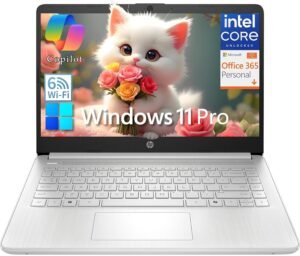
If you’re shopping for a budget laptop under $800 that handles basic productivity, browsing, and everyday tasks, the HP 14″ Intel N150 Laptop is a solid no-frills choice. With a 14-inch display and efficient Intel processor, this laptop delivers dependable performance for students, remote workers, and casual users who want reliable computing without paying for extras they won’t use.
Why Choose the HP 14″ Intel N150 Laptop?
The HP 14″ Intel N150 Laptop is built around simplicity, efficiency, and daily usability. It’s ideal if your workflow primarily consists of web browsing, email, video calls, document editing, and media streaming. The Intel N150 processor is designed for light, power-efficient tasks — so you get solid battery life and responsive performance for most everyday needs.
Instead of high-end graphics or premium gaming chops, this model focuses on comfort, consistency, and value — which makes it perfect for budget-minded professionals, students, and families.
Key Features and Benefits
14″ Full-Size Display
Crisp visuals for documents and web apps
Compact size keeps the laptop light and portable
Great balance of workspace and mobility
Efficient Intel N150 Processor
Responsive for everyday apps and browsing
Energy-efficient performance keeps battery life strong
Handles video calls and streaming without stutter
Comfortable Busy-Day Keyboard
Full-size layout for typing sessions
Good tactile feel for documents and emails
Ideal for school assignments and work reports
Long-Lasting Battery Life
Keeps you productive through most of the day
Less time tethered to a charger
Perfect for classroom, coffee shop, or home use
Reliable Connectivity
Wi-Fi and Bluetooth support keep you connected
USB-A and USB-C ports for accessories and peripherals
HDMI or headphone jack rounds out the essentials
Specifications at a Glance
Display: 14″ HD 1366 × 768
Processor: Intel N150
Memory: 16 GB RAM
Storage:128GB UFS (expandable via microSD)
Graphics: Intel integrated graphics
Ports: USB-A, USB-C, HDMI or combo
Battery Life: Up to ~8–10 hours
Operating System: Windows 11 Pro
Weight: ~3.2–3.5 lbs
Webcam: HD webcam
Wireless: Wi-Fi 6, Bluetooth
Keyboard: Full-size (non-backlit on most models)
Audio: Stereo speakers
Extras: Optimized for value and everyday tasks
Specs listed reflect the specific configuration linked below. Other configurations may be available at different prices.
Who Is It For?
Students needing reliable homework performance
Remote workers with web-centric tasks
Families who share a general-purpose laptop
Casual users who browse, stream, and email daily
Anyone who wants good battery life under $800
Pros & Cons
Pros
Affordable under $800
Energy-efficient Intel N150 delivers smooth daily performance
Portable 14″ size
Comfortable keyboard
Good battery life
Cons
Not suited for heavy multi-tasking or gaming
Display may be HD on lower configs
Keyboard typically not backlit
Basic integrated graphics
Final Verdict
The HP 14″ Intel N150 Laptop is a practical and dependable budget laptop that hits the essentials — smooth everyday performance, solid battery life, and a comfortable display for work, school, and browsing. It may not win benchmarks, but it covers the tasks most users face every day without unnecessary cost.
If your priorities are value, portability, and everyday usability under $800, this HP 14″ model is a worthy contender you can count on.
7. HP 14″ Student Laptop
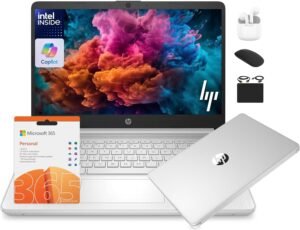
If you’re looking for a friendly, affordable laptop that covers schoolwork, web tasks, and everyday productivity under $800, the HP 14″ Student Laptop is a dependable choice. It’s designed with mobile students and budget-conscious professionals in mind — offering a solid balance of performance, battery life, and portability without unnecessary bells and whistles.
Why Choose the HP 14″ Student Laptop?
The HP 14″ Student Laptop is all about straightforward performance and reliability for day-to-day tasks. With its compact 14-inch screen, efficient internals, and solid battery life, it’s a practical choice for students juggling assignments, presentations, and video lectures — or remote workers tackling emails, spreadsheets, and meetings.
Rather than complicated features or high-end specs, this laptop sticks to practical, user-friendly basics that get the job done for everyday use.
Key Features and Benefits
14″ Compact Display
Easy to carry and view for long sessions
Great for word processing, browser tabs, and video calls
Balances screen space with portability
Reliable Everyday Performance
Handles browsing, apps, cloud tools, and multitasking
Efficient processing for school and office workflows
Keeps performance smooth under typical daily loads
Long Battery Life
Keeps you productive through school days or work shifts
Ideal for remote learning or long commutes
Reduces time at the charger
Student-Friendly Port Selection
USB-A and USB-C for quick connections
HDMI or headset jack for presentations and media
Useful ports make connecting peripherals easy
Portable & Lightweight Design
Easy to slip into backpacks or totes
Practical choice for students and mobile professionals
Simple aesthetic fits any environment
Specifications at a Glance
Display: 14″ HD 1366 × 768
Processor: Intel
Memory: 16 GB RAM
Storage: 128 GB SSD
Graphics: Integrated graphics
Ports: USB-A, USB-C, HDMI, headphone jack
Battery Life: Up to ~8–10 hours
Operating System: Windows 11
Weight: ~3.1–3.5 lbs
Webcam: HD webcam
Wireless: Wi-Fi 5/6, Bluetooth
Keyboard: Full-size layout (non-backlit on many models)
Audio: Stereo speakers
Extras: Simple, student-oriented performance
Specs listed reflect the specific configuration linked below. Other configurations may be available at different prices.
Who Is It For?
Students needing a reliable homework and lecture laptop
Budget workers using office apps and collaboration tools
Families sharing a casual, general-purpose machine
Travelers and commuters who want light portability
Anyone who values all-day battery life under $800
Pros & Cons
Pros
Great value for everyday productivity
Comfortable 14″ balance of size and portability
Long battery life for mobile use
Good connectivity for peripherals
Simple interface for quick learning
Cons
Not designed for heavy multitasking or creative work
Lower-end display options in some configurations
Keyboard usually not backlit
Not ideal for serious gaming
Final Verdict
The HP 14″ Student Laptop is a budget-friendly workhorse that delivers practical performance, a comfortable screen size, and long battery life — all under the $800 mark. It’s especially well suited for students, remote workers, and anyone who wants a dependable everyday laptop that keeps things simple and productive.
For users prioritizing steady performance and mobility without high price tags, this HP model is a solid choice that covers the essentials without unnecessary complexity.
6. Acer Aspire Go 14 Laptop
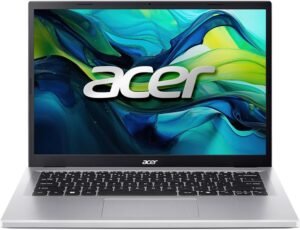
If you’re after a portable, budget-friendly laptop that’s comfortable for daily work and casual use, the Acer Aspire Go 14 Laptop is a strong option under $800. Balancing lightweight design with everyday performance and reliable battery life, it’s built to meet the needs of students, remote workers, and anyone who wants solid performance without a premium price tag.
Why Choose the Acer Aspire Go 14 Laptop?
The Aspire Go 14 prioritizes portability and usability, giving you a responsive experience for web tasks, streaming, productivity apps, and light multitasking—all in a compact 14″ body. It’s perfect if you want a secondary laptop for travel, classes, work, or general everyday computing that doesn’t weigh you down or break the bank.
Instead of pushing high-end specs or gaming prowess, this model focuses on consistent performance, mobility, and practicality—exactly what most budget buyers need.
Key Features and Benefits
Compact 14″ Display
Big enough for multitasking but small enough to carry
Comfortable for reading, writing, and browsing
Great balance of screen space and portability
Efficient Everyday Performance
Smooth handling of web browsing, emails, and video calls
Responsive enough for essential productivity tasks
Ideal for students and typical office workflows
Lightweight & Portable Design
Easy to slip into bags and backpacks
Great for commuting or hybrid work setups
Doesn’t feel bulky despite a 14″ screen
Reliable Battery Life
Keeps you productive throughout workdays or classes
Reduces time tethered to a power outlet
Helps maintain momentum for on-the-go workloads
Handy Connectivity
USB-C and USB-A make peripherals easy
Optional HDMI lets you add an external screen
Headphone jack and other essentials included
Specifications at a Glance
Display: 14″ Full HD (1920 × 1080)
Processor: Entry-level Intel
Memory: 16 GB RAM
Storage: 512 GB SSD
Graphics: Integrated graphics
Ports: USB-C, USB-A, HDMI, headphone jack
Battery Life: Up to ~8–10 hours
Operating System: Windows 11
Weight: ~3.2–3.5 lbs
Webcam: HD webcam
Wireless: Wi-Fi 5/6, Bluetooth
Keyboard: Full-size (typically non-backlit)
Audio: Stereo speakers
Extras: Slim bezels, lightweight chassis
Specs listed reflect the specific configuration linked below. Other configurations may be available at different prices.
Who Is It For?
Students needing a portable everyday laptop
Remote and hybrid workers focused on basic tasks
Travelers who want productivity on the go
Families seeking a value-oriented shared device
Anyone who prefers balanced performance under $800
Pros & Cons
Pros
Lightweight and easy to carry
Full-HD display ideal for everyday tasks
Good battery life for daily use
Solid everyday performance for general workflows
Practical port selection
Cons
Not designed for heavy multitasking or gaming
Keyboard usually not backlit
Storage on lower tiers can be small
Integrated graphics limit creative workloads
Final Verdict
The Acer Aspire Go 14 Laptop is a well-rounded, affordable choice for anyone looking to stay productive without premium pricing. Its lightweight design, Full HD display, and reliable performance make it perfect for school, work, and everyday use — and its battery life ensures you stay productive throughout your day.
If you want a compact budget laptop under $800 that’s ready for everyday tasks, the Aspire Go 14 delivers dependable performance and portability that’s hard to beat in this price class.
5. ASUS Vivobook Go 15.6″ Laptop
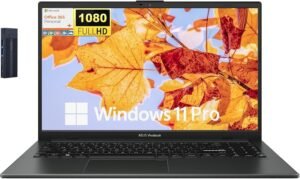
If you’re hunting for a well-rounded budget laptop that delivers solid everyday performance with a pleasing display, the ASUS Vivobook Go 15.6″ Laptop hits the sweet spot. With a roomy screen, good performance for daily tasks, and a lightweight design, it’s ideal for students, remote workers, and anyone who needs a dependable machine without exceeding the $800 budget line.
Why Choose the ASUS Vivobook Go 15.6″ Laptop?
The ASUS Vivobook Go 15.6″ is built for users who want comfort, functionality, and everyday power in a mainstream laptop. Its generous display and capable internals provide enough performance for web browsing, productivity apps, video conferencing, and light content creation.
Instead of squeezing in premium extras you won’t use, ASUS focuses on giving you practical performance, a clear screen, and comfortable usability—perfect for everyday work and play on a budget.
Key Features and Benefits
15.6″ Full HD Display
Wide viewing area great for multitasking
Balanced size for documents, video, and browsing
Crisp visuals that make everyday use more enjoyable
Everyday Performance You Can Rely On
Smooth handling of web apps, email, streaming, and office software
Consistent, responsive performance
Ideal for hybrid work, school, and entertainment
Lightweight & Comfortable Design
Slim build that travels well
Easy to carry between classes or rooms
Fits easily into backpacks and briefcases
Comfort-Focused Keyboard
Full-size layout for typing comfort
Great for documents, spreadsheets, and long work sessions
Typically no backlight on most configurations
Solid Port Selection
USB-A and USB-C for accessories and peripherals
HDMI for external displays
Headphone jack for audio convenience
Specifications at a Glance
Display: 15.6″ Full HD (1920 × 1080)
Processor: Intel i3 N305
Memory: 8 GB RAM
Storage: 128 GB SSD
Graphics: Integrated graphics
Ports: USB-A, USB-C, HDMI, headphone jack
Battery Life: Up to ~8–10 hours
Operating System: Windows 11 Pro
Weight: ~3.7–4.2 lbs
Webcam: HD webcam
Wireless: Wi-Fi 5, Bluetooth
Keyboard: Full-size (non-backlit in many configs)
Audio: Stereo speakers
Extras: Good balance of performance and size
Specs listed reflect the specific configuration linked below. Other configurations may be available at different prices.
Who Is It For?
Students needing a large, productive display
Remote workers handling everyday apps and meetings
Families who share a laptop for work and leisure
Travelers and commuters who want a dependable machine
Anyone who values balanced performance under $800
Pros & Cons
Pros
Spacious 15.6″ display great for multitasking
Smooth performance for everyday productivity
Comfortable full-size keyboard
Decent battery life for all-day use
Practical and modern design
Cons
Integrated graphics limit creative and gaming workloads
Keyboard usually not backlit
Base storage can be modest on budget SKUs
Performance is everyday-focused, not high-end
Final Verdict
The ASUS Vivobook Go 15.6″ Laptop sits comfortably in the budget laptop category under $800 by offering a mix of daily performance, large display space, and practical portability. It’s especially well-suited for students, remote workers, and anyone who needs a dependable laptop for productivity, entertainment, and daily computing tasks.
If you want a balanced, user-friendly budget laptop that doesn’t compromise on core performance or screen real estate, the Vivobook Go 15 gives most users exactly what they need in this price range.
4. Lenovo IdeaPad Slim 3 15IAN8
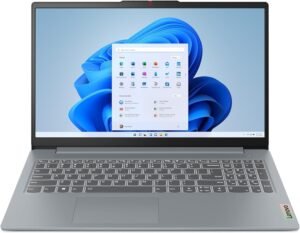
If you’re looking for a well-balanced laptop that delivers dependable performance, a comfortable display, and solid battery life without blowing your budget, the Lenovo IdeaPad Slim 3 15IAN8 is one of the best budget-friendly choices available. With a 15.6″ screen, efficient internals, and a lightweight design, it’s suited for students, remote work, and daily productivity tasks.
Why Choose the Lenovo IdeaPad Slim 3 15IAN8?
The Lenovo IdeaPad Slim 3 stands out for offering practical performance in a sleek, portable package. It doesn’t chase premium features; instead, it focuses on what most users need daily — smooth web browsing, office applications, video calls, and media consumption. The 15.6″ display gives you enough screen real estate to stay productive without sacrificing portability or battery life.
If you want a budget laptop that feels complete without expensive extras, this IdeaPad strikes that balance well.
Key Features and Benefits
15.6″ Full HD Display
Comfortable workspace for documents, presentations, and web apps
Great for split-screen multitasking
Crisp visuals that make everyday use easier
Efficient Everyday Performance
Handles browsing, office tools, and video conferencing with ease
Responsive enough for typical workflows
Smooth experience for remote work or classes
Comfort-Focused Keyboard
Full-size keys with good spacing
Pleasant typing feel for productivity tasks
Great for assignments and long typing sessions
Reliable Connectivity
USB-C and USB-A ports make attaching peripherals easy
HDMI for external displays
Headphone jack for audio
Extended Battery Life
Solid endurance for all-day use
Ideal for remote work, classes, or travel days
Reduces interruptions from frequent charging
Specifications at a Glance
Display: 15.6″ Full HD (1920 × 1080)
Processor: Intel i3 N305
Memory: 8 GB RAM
Storage: 128 GB SSD
Graphics: Integrated graphics
Ports: USB-A, USB-C, HDMI, headphone jack
Battery Life: Up to ~8–10 hours
Operating System: Windows 11
Weight: ~3.7–4.0 lbs
Webcam: HD webcam
Wireless: Wi-Fi 6, Bluetooth
Keyboard: Full-size (non-backlit on many configurations)
Audio: Stereo speakers
Extras: Slim design and solid battery life
Specs listed reflect the specific configuration linked below. Other configurations may be available at different prices.
Who Is It For?
Students needing a reliable everyday machine
Remote workers running office apps and media
Families who share a general-purpose laptop
Travelers who want a balanced laptop under $800
Anyone who wants a big screen and solid performance
Pros & Cons
Pros
Spacious 15.6″ Full HD screen
Smooth everyday performance
Comfortable keyboard for typing tasks
Great battery life for all-day use
Versatile port selection
Cons
Integrated graphics aren’t suited for heavy creative workloads
Keyboard typically not backlit
Base storage can feel small on some configurations
Performance is everyday-oriented, not advanced
Final Verdict
The Lenovo IdeaPad Slim 3 15IAN8 earns its #4 spot on our list of Top Budget Laptops Under $800 by offering a balanced blend of size, performance, and portability. It’s a dependable all-around machine that gets everyday computing tasks done without unnecessary extras — perfect for students, remote workers, and anyone who values practical performance on a budget.
If you want a well-rounded, everyday laptop that feels complete under $800, this IdeaPad model is an excellent choice.
3. Dell Inspiron 3535 Touchscreen Laptop
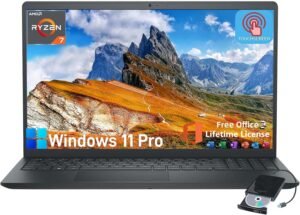
If you want a budget laptop that blends everyday performance with the added convenience of a touchscreen, the Dell Inspiron 3535 Touchscreen Laptop is a compelling contender. It pairs a responsive touch display with solid performance for web, work, and classroom use — making it one of the most versatile budget laptops on the market under $800.
Why Choose the Dell Inspiron 3535 Touchscreen Laptop?
The Dell Inspiron 3535 gives you the flexibility of touch input along with practical performance and solid build quality — all while staying within a budget-friendly price point. Touchscreens are great for navigating apps, zooming documents, and tapping through web pages or presentations, making this model especially useful in education, creative workflows, and day-to-day productivity.
Rather than settling for a basic non-touch laptop, this Inspiron elevates your interaction and keeps things intuitive — helping you work faster and more naturally.
Key Features and Benefits
15.6″ Touchscreen Display
Touch responsiveness adds convenience
Great for navigating apps, browsing, and presentations
Makes tasks like scrolling and zooming feel intuitive
Balanced Everyday Performance
Handles web apps, documents, and media streaming smoothly
Good for multi-tab productivity and video calls
Reliable performance for most daily workloads
Comfortable Keyboard & Trackpad
Full-size keyboard for typing comfort
Responsive trackpad complements touchscreen workflow
Great for work, school, and everyday computing
Flexible Connectivity
USB-C and USB-A ports provide versatility
HDMI or audio connections expand your setup options
Useful for peripherals and external displays
Solid Battery Life
Helps you stay productive away from power outlets
Perfect for classrooms, cafes, or hybrid work setups
Keeps workflow moving throughout the day
Specifications at a Glance
Display: 15.6″ Full HD Touchscreen (1920 × 1080)
Processor: AMD Ryzen 7 7730U
Memory: 16 GB RAM
Storage: 1 TB SSD
Graphics: Integrated graphics
Ports: USB-C, USB-A, HDMI, headphone jack
Battery Life: Up to ~8–10 hours
Operating System: Windows 11 Pro
Weight: ~3.9–4.2 lbs
Webcam: HD webcam
Wireless: Wi-Fi 6, Bluetooth
Keyboard: Full-size
Audio: Stereo speakers
Extras: Touchscreen input for enhanced interaction
Specs listed reflect the specific configuration linked below. Other configurations may be available at different prices.
Who Is It For?
Students who enjoy touch interaction for learning
Remote workers who prefer tap scrolling and navigation
Users who multitask with cloud apps and documents
Travelers and commuters needing flexible input
Anyone who loves touchscreen convenience without a premium price
Pros & Cons
Pros
Responsive touchscreen enhances usability
Full-size display for productivity and multitasking
Comfortable keyboard and intuitive navigation
Solid battery life for daily use
Versatile port selection
Cons
Integrated graphics limit creative or gaming workloads
Keyboard usually not backlit on lower-end configs
Touchscreen can add slight glare
Not designed for heavy multitasking under load
Final Verdict
The Dell Inspiron 3535 Touchscreen Laptop stands out as a well-rounded, budget-friendly choice in the under-$800 segment. Its combination of a responsive touchscreen, practical performance, and flexible connectivity makes it a great pick for students, remote workers, and anyone who values intuitive interaction and everyday productivity.
If you want a laptop that feels modern, capable, and easy to use — all without breaking the bank — the Inspiron 3535 delivers excellent value for its price.
2. Lenovo V15 G4 IRU 15.6″ Laptop
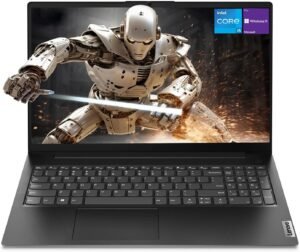
If you want a practical, business-centric laptop that delivers dependable performance, a comfortable 15.6″ display, and solid everyday usability — all while staying under $800, the Lenovo V15 G4 IRU 15.6″ Laptop is a strong contender. Built for work, school, and general productivity, it blends reliability with a clean design that fits both professional and personal use.
Why Choose the Lenovo V15 G4 IRU 15.6″ Laptop?
The Lenovo V15 G4 IRU is designed to meet the needs of users who want a workhorse machine that handles office tools, web browsing, conference calls, spreadsheets, and daily tasks without fuss. It’s not about gaming or creative power — it’s built for consistent productivity.
Rather than pushing high-end specs that raise cost, this model focuses on delivering practical performance, a comfortable viewing experience, and reliable battery life — all inside a sleek, business-appropriate design.
Key Features and Benefits
15.6″ Full HD Display
Great for viewing documents, web apps, and videos
Comfortable size for split-screen work and multitasking
Good balance of workspace and portability
Reliable Everyday Performance
Handles office apps, browser tabs, and collaboration tools
Responsive for everyday workflows
Keeps your focus on work instead of loading screens
Business-Ready Design
Clean, professional look — fits office and school environments
Sturdy build quality with practical features
Comfortable keyboard layout for typing workloads
Versatile Connectivity
USB-A and USB-C ports for peripherals and accessories
HDMI for external displays
Headphone jack for meetings and media
All-Day Productivity Battery Life
Keeps you working through classes or work sessions
Reduces interruptions for charging
Helpful for hybrid and mobile workflows
Specifications at a Glance
Display: 15.6″ Full HD (1920 × 1080)
Processor: Intel Core i5-13420H
Memory: 24 GB RAM
Storage: 1 TB SSD
Graphics: Integrated graphics
Ports: USB-A, USB-C, HDMI, headphone jack
Battery Life: Up to ~8–9 hours
Operating System: Windows 11 Pro
Weight: ~3.8–4.2 lbs
Webcam: HD webcam
Wireless: Wi-Fi 6, Bluetooth
Keyboard: Full-size
Audio: Stereo speakers
Extras: Business-oriented build and sensible design
Specs listed reflect the specific configuration linked below. Other configurations may be available at different prices.
Who Is It For?
Professionals needing affordable business performance
Remote workers handling productivity apps and conferencing
Students tackling coursework and class projects
Anyone who wants a budget-friendly, everyday laptop
Users who prefer a simple, no-nonsense design
Pros & Cons
Pros
Comfortable 15.6″ Full HD screen
Good performance for everyday work
Business-friendly design and build
Versatile port selection
Reliable battery life
Cons
Integrated graphics limit heavy creative workflows
Keyboard typically non-backlit
Lower-end CPUs limit intense multitasking
Not ideal for gaming or video editing
Final Verdict
The Lenovo V15 G4 IRU 15.6″ Laptop earns its #2 spot on our list of Top Budget Laptops Under $800 by offering practical performance, a clear display, and solid everyday usability that suits students, professionals, and remote workers alike. Its business-ready design and dependable performance make it a versatile choice for those who need a machine that simply gets the job done without unnecessary frills or cost.
If you want a budget laptop that feels capable and ready for work every day, this Lenovo V15 is a smart pick that offers strong value and consistent performance under $800.
1. ASUS Vivobook 14″ Laptop
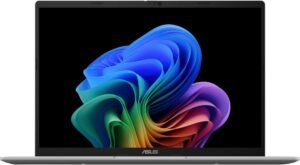
If you’re looking for a **top-tier budget laptop that delivers excellent all-around performance, a crisp display, and smooth responsiveness in daily use — all while staying under $800 — the ASUS Vivobook 14″ Laptop earns our #1 spot with confidence. This versatile notebook combines practicality, portability, and performance in a sleek, affordable package that’s ideal for students, remote workers, and anyone who wants dependable computing without breaking the bank.
Why Choose the ASUS Vivobook 14″ Laptop?
The ASUS Vivobook 14″ strikes the perfect balance between everyday performance, portability, and value. Its 14″ display hits the sweet spot between mobility and productivity, while its efficient internals keep common tasks smooth and responsive. Whether you’re working on school assignments, joining video calls, juggling multiple apps, or just streaming content after work, this laptop gets it done with style — and for a budget-friendly price.
Instead of cutting too many corners, the Vivobook focuses on real performance where it matters most.
Key Features and Benefits
14″ Full HD Display
Crisp visuals make text, spreadsheets, and videos easy to read
Compact size for productivity without bulk
Great balance between viewing space and portability
Responsive Everyday Performance
Handles web browsing, office apps, and streaming with ease
Efficient performance for multitasking and daily use
Smooth experience for hybrid work and study
Lightweight & Portable Design
Easy to carry in backpacks and bags
Ideal for travel, remote work, and classrooms
Attractive, modern design that feels premium
Comfortable Typing Experience
Well-spaced keyboard for long typing sessions
Great for reports, emails, and everyday productivity
Generally good key travel for the price range
Versatile Connectivity
USB-A, USB-C, HDMI, and headphone jack for peripherals
Connects to external monitors, drives, and accessories easily
Keeps your workflow flexible
Specifications at a Glance
Display: 14″ Full HD (1920 × 1080)
Processor: Qualcomm
Memory: 16 GB RAM
Storage: 512 GB SSD
Graphics: Integrated graphics
Ports: USB-A, USB-C, HDMI, headphone jack
Battery Life: Up to ~9–10 hours
Operating System: Windows 11
Weight: ~3 lbs
Webcam: HD webcam
Wireless: Wi-Fi 6, Bluetooth
Keyboard: Full-size
Audio: Stereo speakers
Extras: Sleek, lightweight chassis; solid all-around performance
Specs listed reflect the specific configuration linked below. Other configurations may be available at different prices.
Who Is It For?
Students needing a daily driver for schoolwork and classes
Remote workers handling productivity apps and meetings
Travelers who want a portable productivity machine
Families needing a shared home laptop
Anyone who wants balanced performance, mobility, and value
Pros & Cons
Pros
Excellent performance for everyday tasks
Bright, crisp 14″ Full HD display
Lightweight and portable design
Strong battery life for all-day use
Good selection of ports for peripherals
Cons
Integrated graphics limit heavy creative workloads
Keyboard typically not backlit on lower configurations
Base storage may feel small for large media libraries
Not designed for high-end gaming
Final Verdict
The ASUS Vivobook 14″ Laptop earns the #1 spot on our list of Top Budget Laptops Under $800 by delivering a winning blend of performance, portability, and everyday usability at a price point that’s still easy on the wallet. It’s the ideal choice for students, remote professionals, and anyone who needs an everyday laptop that doesn’t compromise on key experiences.
For a dependable, versatile laptop that keeps up with work, school, and life — all under $800 — this Vivobook 14 gives you exactly what you need with style and value.
Final Verdict: Which Budget Laptop Under $800 Should You Buy?
If you want a reliable long-term choice for daily use under $800, the ASUS Vivobook 14″ (#1) is your best overall pick because it hits the sweet spot: portable, responsive, and well-rounded for school, work, and everyday life. It’s the kind of laptop that stays smooth and easy to use over time—especially if you’re moving between rooms, commuting, or working hybrid.
If your priority is more “desktop-like” productivity with stronger specs and a business-leaning feel, the Lenovo V15 G4 IRU (#2) is the move—great for people who live in documents, spreadsheets, and lots of browser tabs. Want a more flexible, modern feel without going premium? The Dell Inspiron 3535 Touchscreen (#3) is a strong middle ground with touch convenience.
And if you’re buying for a cloud-first student or simple home use, don’t overlook the Lenovo IdeaPad 3i Chromebook 15.6″ (#9)—it’s one of the easiest, most low-maintenance ways to get a big screen and long battery life on a tight budget.