
Top 10 Ultrawide Monitors
When you want more screen space without adding a second display, ultrawide monitors offer a wider, more seamless view that’s useful for work, gaming, and media alike. From boosting productivity with side-by-side apps to enhancing immersion in games and movies, the right ultrawide monitor can transform how you use your setup.
In this guide to the best ultrawide monitors, we’ve ranked ten models that stand out across different needs and budgets. You’ll find everything from practical everyday displays to high-performance panels built for competitive gaming and creative workflows. Our selections focus on clarity, responsiveness, ergonomics, and overall usefulness, helping you choose the ultrawide monitor that fits your desk and how you actually work and play. If you’re still comparing refresh rates, panel types, screen sizes, and resolutions, our gaming monitor buying guide explains which specs actually matter for different types of setups.
Disclosure: As an Amazon Associate I earn from qualifying purchases.
Building a better desk or gaming setup?
This article is part of our Monitors & Displays hub, covering gaming monitors, ultrawides, productivity screens, and display tech for every setup.
Quick Picks: Best Ultrawide Monitors
Best Overall: Samsung 49-Inch Odyssey G9 (G95SD) (#1)
Best for Productivity: HP EliteDisplay E45c G5 (#3)
Best Gaming-Focused: Corsair XENEON 34WQHD240-C (#4)
Best OLED Value Ultrawide Monitor: Alienware AW3423DWF (#7)
How We Ranked the Best Ultrawide Monitors
We ranked these monitors using a practical, real-world scoring system that balances performance, usability, and long-term satisfaction — not just headline specs.
- Display performance: Prioritized monitors that deliver smooth motion, consistent response behavior, and stable performance for their intended use, whether that’s gaming, productivity, or mixed workloads.
- Resolution and screen layout: Ranked displays higher when their resolution and aspect ratio made sense for the screen size, offering usable workspace and clarity without unnecessary scaling or excessive hardware demands.
- Panel technology: Evaluated OLED, IPS, and VA panels based on real-world strengths such as contrast, color consistency, viewing angles, and motion handling, while accounting for their practical trade-offs.
- Gaming and sync support: Gave additional weight to models with reliable adaptive sync support and low-latency behavior, especially for ultrawides aimed at gaming or hybrid use.
- Connectivity and workflow features: Considered the usefulness of ports, docking, KVM support, and single-cable setups for modern desks and multi-device environments.
- Ergonomics and desk fit: Factored in curvature, adjustability, screen size, and overall comfort for long sessions, including how realistically each monitor fits common desk setups.
- Value within its category: Scored each monitor against direct competitors in its class — entry-level ultrawide, productivity-focused, gaming-first, OLED, or super-ultrawide — to ensure every pick earns its place in the top ten.
10. SAMSUNG 34" ViewFinity S50GC Series Ultra-WQHD Monitor
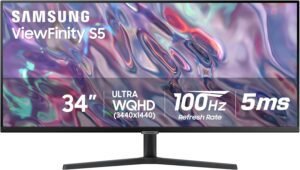
The Samsung 34″ ViewFinity S50GC is an ultrawide monitor designed for users who want a single display that handles everyday productivity, multitasking, and light gaming without stepping into premium-priced territory. At this ranking position, it earns its spot as a balanced, practical option that focuses on workspace efficiency and comfort rather than cutting-edge performance. It’s best suited for home offices, hybrid work setups, and casual entertainment where versatility matters more than specialization.
Why Choose the SAMSUNG ViewFinity S50GC?
This monitor delivers a reliable ultrawide experience that works well across multiple use cases. Compared to other monitors within this segment, it stands out for combining a wide aspect ratio, smooth motion, and built-in multitasking features in a package that feels well-rounded for daily use rather than narrowly focused on gaming or professional color work.
Key Features and Benefits
Ultrawide Screen for Multitasking
-
Expansive horizontal space makes it easier to work with multiple windows side by side
-
Reduces the need for dual-monitor setups in many desk environments
-
Helpful for spreadsheets, timelines, and wide creative canvases
Smooth Everyday Motion
-
Higher refresh rate than standard office monitors helps scrolling and cursor movement feel smoother
-
Improves the experience for light gaming and casual video playback
-
Feels more responsive during long work sessions
Built-In Multitasking Tools
-
Picture-in-Picture and Picture-by-Picture allow multiple sources on one screen
-
Useful for connecting a work laptop and personal device at the same time
-
Supports flexible workflows without extra hardware
Eye Comfort and Borderless Design
-
Eye care features are designed to reduce strain during extended use
-
Slim bezels create a cleaner look and work well in multi-monitor setups
-
Suitable for long hours at a desk
Specifications at a Glance
-
34-inch ultrawide display
-
Ultra-WQHD resolution
-
100Hz refresh rate
-
5ms response time
-
HDR10 support
-
AMD FreeSync support
-
Picture-in-Picture and Picture-by-Picture modes
-
Borderless design
-
Specifications may vary slightly by configuration or usage
Who Is It For?
-
Home office users who want more screen space without multiple monitors
-
Professionals who multitask across documents, browsers, and apps
-
Casual gamers looking for a smoother experience without high-end demands
-
Users upgrading from a standard widescreen monitor to ultrawide
Pros & Cons
Pros
-
Versatile ultrawide format suitable for work and entertainment
-
Smooth performance for everyday tasks and light gaming
-
Useful multitasking features built into the display
-
Clean, modern design that fits most desk setups
Cons
-
Not designed for competitive or high-refresh gaming
-
HDR support is basic compared to higher-end displays
-
Large size may require a deep or wide desk
Final Verdict
The Samsung 34″ ViewFinity S50GC is a sensible choice for users who want an ultrawide monitor that performs well across work, multitasking, and casual use. It sits at #10 by offering a balanced feature set that prioritizes practicality and comfort, making it a solid entry point into ultrawide displays without focusing on niche performance extremes.
9. Sceptre 34-Inch Curved Ultrawide WQHD Monitor
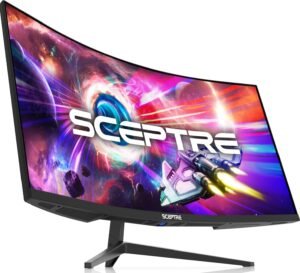
The Sceptre 34-inch Curved Ultrawide WQHD Monitor is an entry-level ultrawide designed for users who want a large, immersive workspace without advanced requirements. It’s aimed at students, first-time ultrawide buyers, and casual users who split time between schoolwork, productivity, and light gaming. At this ranking position, it earns its place by offering core ultrawide benefits with a focus on accessibility and basic performance rather than premium build or tuning.
Why Choose the Sceptre 34-Inch Curved Ultrawide?
This monitor lowers the barrier to owning an ultrawide display. Compared to similar options at this range, it prioritizes screen size, curvature, and refresh-rate headroom while keeping the overall feature set simple. It’s a practical choice for users who want more screen real estate and smoother motion without needing advanced color accuracy or professional features.
Key Features and Benefits
Curved Ultrawide Workspace
Wide 21:9 aspect ratio improves multitasking across documents and apps
Curved panel helps keep the edges of the screen more comfortable to view
Useful for timelines, spreadsheets, and split-screen workflows
High Refresh Rate Capability
Supports higher refresh rates than standard office monitors
Makes scrolling, window movement, and casual gaming feel smoother
Refresh behavior can vary by connection type and usage
Basic Gaming-Friendly Features
Fast response time helps reduce visible motion blur
Suitable for entry-level gaming and everyday use
Not intended for competitive or esports-focused play
Built-In Audio Convenience
Integrated speakers reduce the need for external audio on a desk
Useful for video calls, streaming, and casual listening
Best suited for basic audio needs
Specifications at a Glance
34-inch curved ultrawide display
WQHD resolution (3440 × 1440)
Curvature: R1500
Refresh rate: up to 180Hz / 165Hz (varies by configuration or usage)
Response time: 1ms
Color coverage: 99% sRGB
DisplayPort inputs (x2)
Built-in speakers
Who Is It For?
Students building an affordable desk setup
First-time ultrawide monitor buyers
Casual gamers who want a large, smooth display
Users focused on basic multitasking and general computing
Pros & Cons
Pros
Large ultrawide screen at an accessible entry point
Curved design enhances immersion for everyday use
Higher refresh rate support than typical budget monitors
Simple feature set that’s easy to set up and use
Cons
Build quality is basic compared to higher-ranked models
Built-in speakers are functional but limited
Not intended for color-critical or professional workflows
Final Verdict
The Sceptre 34-inch Curved Ultrawide WQHD Monitor earns its #9 ranking by making the ultrawide experience accessible to new users. It’s a sensible option for students and casual users who want more screen space and smoother motion without advanced features, positioning it as a straightforward entry point rather than a long-term upgrade display.
8. LG 34G630A-B 34-Inch Ultragear WQHD Curved Gaming Monitor
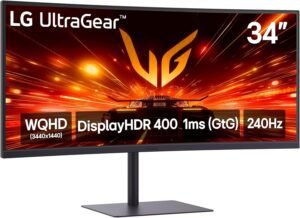
The LG 34G630A-B Ultragear is a performance-focused ultrawide monitor built for gamers who want smooth motion and responsive gameplay without stepping into high-end territory. It targets users who balance gaming with everyday computing and want a curved 34-inch display that feels fast and immersive. At this ranking position, it stands out for delivering strong gaming-oriented features while remaining versatile enough for general use.
Why Choose the LG 34G630A-B Ultragear?
This monitor earns its spot by offering a noticeably faster experience than entry-level ultrawides while maintaining solid build quality and ergonomics. Compared to other options within this category, it emphasizes refresh rate, motion clarity, and adaptive sync support, making it a better fit for users who prioritize smooth gameplay but still want an ultrawide workspace.
Key Features and Benefits
High-Refresh Ultrawide Gaming
Delivers smoother motion than standard ultrawide monitors
Improves clarity during fast camera movement and action scenes
Well-suited for immersive single-player and competitive casual gaming
Curved 34-Inch WQHD Display
Wide 21:9 layout enhances immersion in games and media
Curvature helps keep the entire screen within a comfortable viewing range
Supports multitasking alongside gaming sessions
Adaptive Sync Support
Helps reduce screen tearing and visual stutter
Contributes to a more consistent gaming experience
Works best when paired with compatible graphics hardware
Ergonomic Stand and Connectivity
Adjustable stand supports tilt, height, and swivel for comfort
Multiple input options simplify connecting PCs and consoles
USB Type-C adds flexibility for modern setups
Specifications at a Glance
34-inch curved ultrawide display
WQHD resolution (3440 × 1440)
Refresh rate: up to 240Hz (varies by configuration or usage)
Response time: 1ms
FreeSync Premium support
DisplayHDR 400 support
HDMI and DisplayPort inputs
USB Type-C connectivity
Built-in speakers
Who Is It For?
Gamers who want a faster ultrawide experience without premium-tier demands
Users upgrading from standard 60Hz or 100Hz monitors
Mixed-use setups combining gaming, media, and daily tasks
Desk setups that benefit from adjustable ergonomics
Pros & Cons
Pros
Smooth, high-refresh performance for gaming
Immersive curved ultrawide format
Strong ergonomic adjustments for long sessions
Versatile connectivity options
Cons
HDR capability is limited compared to higher-tier displays
Built-in speakers are convenient but basic
Large footprint may not suit smaller desks
Final Verdict
The LG 34G630A-B earns its #8 ranking by striking a solid balance between gaming performance and everyday usability. It’s a good fit for users who want an ultrawide monitor that feels fast and responsive while still handling general tasks comfortably, making it a strong value-oriented performance option within the list.
7. Alienware AW3423DWF Curved QD-OLED
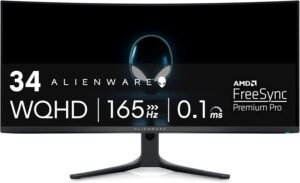
The Alienware AW3423DWF is a 34-inch ultrawide gaming monitor built around QD-OLED panel technology, aimed at users who want OLED image quality without stepping into flagship-tier models. It’s designed for gamers and visual enthusiasts who value deep contrast, fast response, and accurate color in an immersive 21:9 format. At this ranking position, it earns its place as a strong mid-range OLED option that delivers premium visuals while remaining more approachable than newer generations.
Why Choose the Alienware AW3423DWF?
This monitor offers much of the visual impact associated with higher-end OLED ultrawides while maintaining a more restrained feature set. Compared to alternatives at this ranking, it stands out for its OLED contrast, color performance, and motion clarity, making it a compelling choice for users who prioritize image quality over peak refresh rates or newer panel revisions.
Key Features and Benefits
QD-OLED Image Quality
Delivers deep blacks and high contrast for immersive visuals
Enhances detail in dark scenes without typical LCD glow
Well-suited for cinematic games and media consumption
Smooth and Responsive Gameplay
Fast response behavior helps reduce motion blur
Supports fluid gameplay across a wide range of titles
Balanced refresh performance for both single-player and competitive use
Wide Color Coverage
Produces rich, saturated colors suitable for games and creative work
Helps content appear more lifelike and consistent
Useful for users who value color accuracy alongside gaming
Ultrawide Curved Immersion
21:9 aspect ratio expands peripheral vision in supported games
Curved design keeps viewing distance more uniform across the screen
Supports multitasking when not gaming
Specifications at a Glance
34-inch curved ultrawide display
QD-OLED panel technology
21:9 aspect ratio
Refresh rate: up to 165Hz
Response time: 0.1ms
Color gamut: 99.3% DCI-P3
VESA DisplayHDR True Black 400
AMD FreeSync Premium Pro support
Who Is It For?
Gamers who want OLED contrast and color without flagship models
Users upgrading from LCD ultrawide monitors
Visual-focused players who enjoy cinematic or story-driven games
Mixed-use setups that include gaming and media viewing
Pros & Cons
Pros
Excellent contrast and black levels from QD-OLED technology
Strong color performance for gaming and media
Responsive motion handling
Immersive ultrawide curved format
Cons
Refresh rate is lower than newer OLED ultrawide models
OLED characteristics may not suit static-heavy workflows
Stand and design are focused more on gaming aesthetics
Final Verdict
The Alienware AW3423DWF earns its #7 ranking by delivering OLED-level image quality in a well-balanced ultrawide gaming monitor. It’s best suited for users who want rich visuals, fast response, and immersive gameplay without needing the latest generation features, making it a strong mid-range OLED choice within the list.
6. Dell UltraSharp U3425WE
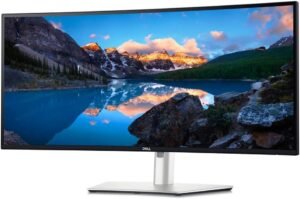
The Dell UltraSharp U3425WE is a 34-inch ultrawide monitor built for users who split their time between focused work and occasional play. It’s aimed at professionals who want a clean, accurate display paired with strong connectivity and desk efficiency rather than gaming-first features. At this ranking position, it stands out as a well-rounded option that prioritizes productivity tools while still delivering smooth, reliable everyday performance.
Why Choose the Dell UltraSharp?
This monitor offers a stronger productivity foundation than most ultrawides in this range. Compared to alternatives at this ranking, it emphasizes connectivity, device switching, and panel consistency, making it especially useful for hybrid work-from-home setups where multiple systems and peripherals need to work together seamlessly.
Key Features and Benefits
Integrated Thunderbolt Hub
Simplifies desk setups by connecting display, data, and power through one cable
Reduces cable clutter for laptops and compact workstations
Supports cleaner transitions between work devices
Built-In KVM Switching
Allows control of multiple computers with one keyboard and mouse
Useful for switching between work and personal systems
Improves workflow efficiency without extra hardware
Ultrawide Workspace for Productivity
Wide screen space supports side-by-side apps and timelines
Helps reduce reliance on dual-monitor setups
Well-suited for design, editing, and multitasking
Professional-Focused Design
Neutral styling fits office and home environments
Ergonomic adjustments support long work sessions
Emphasis on comfort and usability over visual flair
Specifications at a Glance
34-inch ultrawide display
UltraWide QHD resolution
Thunderbolt connectivity with hub functionality
Built-in KVM switch
USB-C and USB hub support
Ergonomic stand with adjustment options
Specifications may vary by configuration or usage
Who Is It For?
Designers and creators who need a wide, consistent workspace
Hybrid work-from-home professionals using multiple devices
Users who value connectivity and desk organization
Productivity-focused setups with light gaming or media use
Pros & Cons
Pros
Excellent connectivity for modern work setups
Built-in KVM simplifies multi-device workflows
Comfortable ultrawide format for productivity
Clean, professional design
Cons
Not optimized for competitive or high-refresh gaming
Visual style prioritizes function over immersion
Advanced features may be underused in single-device setups
Final Verdict
The Dell UltraSharp U3425WE earns its #6 ranking by delivering a strong balance between productivity features and everyday performance. It’s best suited for professionals and hybrid workers who want an ultrawide monitor that streamlines their setup, supports efficient multitasking, and remains versatile enough for general use outside of work hours.
5. LG 45-inch Ultragear 5K2K Curved OLED 45GX950A-B
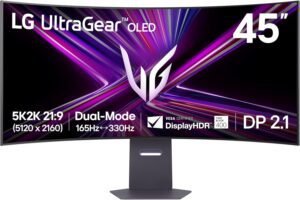
The LG 45GX950A-B is a large-format ultrawide gaming monitor designed for users who want top-tier immersion without moving to an extra-wide 49-inch format. It’s built for enthusiasts focused on visually demanding games and expansive sim setups, combining a wide canvas with OLED image quality and fast responsiveness. At this ranking position, it represents a high-end option that prioritizes both resolution and motion performance in a single display.
Why Choose the LG Ultragear 5K2K?
This monitor delivers a rare blend of high resolution, OLED contrast, and gaming-oriented responsiveness at a size that remains manageable for many desks. Compared with alternatives at this ranking, it emphasizes immersive scale and visual clarity while maintaining features that support smooth gameplay across a wide range of titles.
Key Features and Benefits
Large 45-Inch Ultrawide Immersion
Expansive screen enhances presence in open-world and simulation games
Wide aspect ratio supports deeper peripheral awareness
Reduces the need for multi-monitor setups
OLED Visual Performance
Delivers deep blacks and strong contrast for cinematic scenes
Maintains consistent image quality across the wide panel
Enhances detail in dark and high-contrast environments
High-Performance Gaming Focus
Designed for smooth, responsive gameplay
Supports adaptive sync technologies to reduce visual artifacts
Suitable for fast-paced and visually complex titles
Flexible Connectivity and Power Delivery
USB Type-C connection simplifies modern PC and laptop setups
Power delivery support can reduce cable clutter
Multiple input options support varied gaming systems
Specifications at a Glance
45-inch curved ultrawide display
5K2K WUHD resolution (5120 x 2160)
OLED panel technology
Refresh rate: up to 165Hz
Response time: 0.03ms
NVIDIA G-Sync support
AMD FreeSync Premium Pro support
HDR True Black 400 support
USB Type-C with up to 90W power delivery
DisplayPort 2.1 support
Dual-Mode functionality (behavior may vary by configuration or usage)
Who Is It For?
Enthusiast gamers seeking immersive ultrawide gameplay
Simulation and racing setups that benefit from extra screen height
Users who want OLED visuals without a 49-inch display
High-end PC builds designed for demanding games
Pros & Cons
Pros
Large, immersive ultrawide format
OLED contrast and image quality
Strong motion handling for gaming
Modern connectivity options
Cons
Size may be excessive for smaller desks
OLED characteristics may not suit static-heavy workloads
High resolution requires a capable graphics system
Final Verdict
The LG 45GX950A-B earns its #5 ranking by offering a premium ultrawide experience that balances size, resolution, and gaming performance. It’s best suited for dedicated gamers and sim enthusiasts who want an immersive OLED display with strong responsiveness, without moving to the widest form factors available.
4. Corsair XENEON Curved QD-OLED 34WQHD240-C
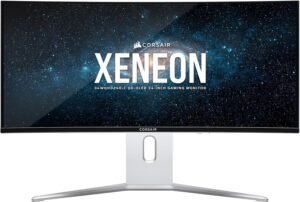
The Corsair XENEON 34WQHD240-C is a gaming-first ultrawide monitor designed for players who prioritize speed, clarity, and color depth in a competitive setting. Built around a 34-inch curved QD-OLED panel, it targets esports-focused users and high-refresh enthusiasts who want an immersive 21:9 display without sacrificing responsiveness. At this ranking position, it stands out as one of the most gaming-optimized ultrawides in the list.
Why Choose the Corsair XENEON?
This monitor pairs a very high refresh rate with OLED-level contrast and color performance. Compared with other options at this ranking, it places a stronger emphasis on fast-paced gameplay, motion clarity, and adaptive sync compatibility, making it better suited for competitive and reaction-driven titles.
Key Features and Benefits
QD-OLED Visual Clarity
Delivers deep blacks and strong contrast for clear scene separation
Produces rich, vibrant colors that enhance game visuals
Maintains consistent image quality across the curved panel
Ultra-High Refresh Gaming Experience
Designed for extremely smooth motion during fast gameplay
Reduces perceived blur in quick camera movements
Well-suited for shooters, racing games, and esports titles
Fast Response Characteristics
Minimizes ghosting and motion artifacts
Helps maintain visual clarity during rapid on-screen action
Supports responsive input feedback
Adaptive Sync and Modern Connectivity
Compatible with variable refresh technologies to reduce tearing
Multiple connection options support modern PCs and consoles
USB-C adds flexibility for streamlined setups
Specifications at a Glance
34-inch curved ultrawide display
QD-OLED panel technology
WQHD resolution (3440 x 1440)
Refresh rate: up to 240Hz
Response time: 0.03ms GtG
G-SYNC Compatible
AMD FreeSync Premium support
True Black HDR400 support
HDMI 2.1, DisplayPort 1.4, USB-C connectivity
Who Is It For?
Competitive gamers focused on high refresh and low latency
Esports players who benefit from wide field-of-view displays
Users upgrading from LCD gaming ultrawides
High-performance gaming setups with capable GPUs
Pros & Cons
Pros
Exceptional motion clarity for fast-paced games
Strong contrast and color performance from QD-OLED
Wide ultrawide format enhances immersion
Modern connectivity options for gaming systems
Cons
OLED characteristics may not suit static-heavy productivity use
White design may not match all setups
Feature set is heavily gaming-focused
Final Verdict
The Corsair XENEON 34WQHD240-C earns its #4 ranking by delivering a gaming-focused ultrawide experience centered on speed, contrast, and immersion. It’s best suited for competitive and high-refresh gamers who want OLED image quality paired with top-tier motion performance in a 34-inch ultrawide format.
3. HP EliteDisplay E45c G5 45-inch DQHD Curved Monitor
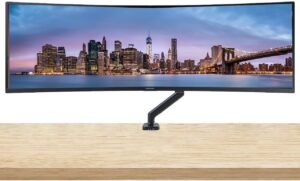
The HP EliteDisplay E45c G5 is a large-format ultrawide monitor designed to replace traditional dual-monitor office setups with a single, seamless workspace. Built for professional environments, it targets users who spend most of their day multitasking across spreadsheets, documents, dashboards, and communication tools. At this ranking position, it stands out as a productivity-first display that emphasizes ergonomics, connectivity, and consistency over entertainment or gaming features.
Why Choose the HP EliteDisplay E45c G5?
This monitor focuses squarely on professional workflows. Compared with other ultrawides at this ranking, it does a better job integrating docking features, network connectivity, and workspace ergonomics into one display, making it especially effective for office and enterprise-style setups where reliability and efficiency matter more than refresh rate.
Key Features and Benefits
Single-Screen Replacement for Dual Monitors
Extra-wide display allows multiple full-size windows side by side
Eliminates bezel gaps found in dual-monitor setups
Simplifies window management for complex workflows
Integrated Docking and Connectivity
Built-in dock reduces the need for external hubs
Ethernet support enables stable wired network connections
Simplifies laptop-based desk setups with fewer cables
Curved Display for Long Work Sessions
Gentle curve keeps content within a comfortable viewing distance
Reduces head and eye movement across wide spreadsheets
Supports better focus during extended office use
Business-Focused Ergonomics
Adjustable stand supports healthier posture
Desk mount compatibility adds flexibility for custom setups
Designed to fit cleanly into professional workspaces
Specifications at a Glance
45-inch curved ultrawide display
DQHD resolution (5120 x 1440)
Integrated docking functionality
Ethernet connectivity
DisplayPort input
Built-in speakers
Desk mount stand included
Who Is It For?
Office professionals managing multiple applications at once
Analysts working with large spreadsheets and dashboards
Corporate and enterprise desk setups
Users replacing dual monitors with a single large display
Pros & Cons
Pros
Excellent replacement for dual-monitor productivity setups
Strong connectivity and docking features
Comfortable viewing experience for long workdays
Clean, business-oriented design
Cons
Not intended for gaming or high-refresh use
Large size requires ample desk space
Entertainment features are minimal
Final Verdict
The HP EliteDisplay E45c G5 earns its #3 ranking by delivering a focused, professional ultrawide experience built around productivity and workflow efficiency. It’s best suited for office and business users who want a reliable, ergonomic display that consolidates multiple screens and devices into one streamlined workstation.
2. Dell Alienware 34" Curved 240Hz QD-OLED (AW3425DW)
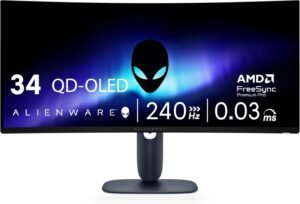
The Dell Alienware AW3425DW is a 34-inch ultrawide gaming monitor built around a QD-OLED panel, designed for users who want top-tier motion performance without giving up image quality. It targets competitive gamers who also care about color accuracy for creative work, offering a balance between speed, contrast, and clarity. At this ranking position, it stands out as a near-flagship ultrawide that excels across both gaming and creator-focused tasks.
Why Choose the Dell Alienware AW3425DW?
This monitor combines a very high refresh rate with OLED-level contrast and accurate color reproduction. Compared with other options at this ranking, it delivers a more complete blend of low latency, visual depth, and consistency, making it suitable for users who switch between competitive play and content creation.
Key Features and Benefits
QD-OLED Visual Performance
Deep blacks and strong contrast improve scene clarity
Rich color output supports visually detailed games and media
Consistent image quality across the curved ultrawide panel
240Hz High-Refresh Gaming
Smooth motion improves tracking in fast-paced games
Reduces perceived blur during quick camera movement
Supports responsive gameplay for competitive titles
Fast Response and Low Latency
Quick pixel response helps maintain sharp motion
Supports precise input timing during gameplay
Suitable for reaction-based gaming scenarios
Ultrawide Immersion with Curvature
21:9 aspect ratio expands horizontal field of view
Curved screen keeps edges more comfortable to see
Useful for multitasking outside of gaming
Specifications at a Glance
34.2-inch curved ultrawide display
WQHD resolution (3440 x 1440)
QD-OLED panel technology
Refresh rate: up to 240Hz
Response time: 0.03ms
Curvature: 1800R
AMD FreeSync Premium Pro support
VESA AdaptiveSync support
DisplayHDR True Black 400
Who Is It For?
Competitive gamers who benefit from high refresh and low latency
Content creators who want strong contrast and color accuracy
Users upgrading from LCD ultrawide gaming monitors
Mixed-use setups combining gaming and creative workflows
Pros & Cons
Pros
Excellent motion clarity for fast-paced gaming
Strong contrast and color performance from QD-OLED
Immersive ultrawide curved format
Well-suited for both gaming and creative tasks
Cons
OLED characteristics may not suit static-heavy desktop use
Requires capable hardware to fully utilize high refresh rates
Design and features are gaming-centric
Final Verdict
The Dell Alienware AW3425DW earns its #2 ranking by delivering a rare combination of high-refresh gaming performance and OLED-level image quality. It’s best suited for users who want a fast, visually rich ultrawide monitor that performs well in competitive games while remaining capable for creative and productivity-focused work.
1. Samsung 49-Inch Odyssey G9 (G95SD)
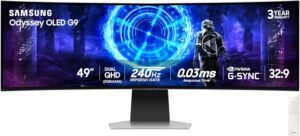
The Samsung Odyssey G9 (G95SD) is a 49-inch super ultrawide monitor built for users who want a single display to handle immersive gaming, cinematic media, and large-scale multitasking. With a dual-QHD canvas and a pronounced curve, it’s designed to replace multi-monitor setups while delivering fast, visually rich performance. At the top of the ranking, it stands out for combining expansive workspace with high-end gaming capability in one display.
Why Choose the Samsung Odyssey G9?
This monitor delivers breadth and performance without forcing compromises. Compared with other ultrawides at this ranking, it offers a larger continuous workspace alongside high refresh gaming and OLED contrast, making it equally effective for play and productivity-focused desktops.
Key Features and Benefits
Massive Dual-QHD Ultrawide Workspace
Extra-wide screen replaces two standard monitors seamlessly
Supports complex multitasking with multiple full-size windows
Enhances immersion in supported games and widescreen content
QD-OLED Image Quality
Deep blacks and strong contrast improve visual depth
Rich colors enhance games, movies, and creative content
Consistent image quality across the wide curved panel
High-Refresh Gaming Performance
Smooth motion benefits fast-paced and competitive games
Helps reduce perceived blur during quick on-screen action
Adaptive sync support improves visual consistency
Curved Design with Ergonomic Adjustments
Curvature keeps edges within a comfortable viewing range
Adjustable stand supports long sessions at a desk
Glare-reducing surface helps maintain clarity in bright rooms
Specifications at a Glance
49-inch curved ultrawide display
Dual QHD resolution (5120 x 1440)
QD-OLED panel technology
Refresh rate: up to 240Hz
Response time: 0.03ms
G-Sync Compatible
AMD FreeSync Premium Pro support
Glare-free display surface
Ergonomic stand with adjustment options
Who Is It For?
Gamers seeking maximum immersion on a single display
Users replacing dual-monitor or triple-monitor setups
Multitaskers working with large timelines, dashboards, or multiple apps
Media enthusiasts who value wide-format viewing
Pros & Cons
Pros
Extremely wide, seamless workspace
Strong contrast and color from QD-OLED
Smooth, high-refresh gaming performance
Effective for both productivity and entertainment
Cons
Very large footprint requires substantial desk space
OLED characteristics may not suit static-heavy workflows
Setup and positioning require careful planning
Final Verdict
The Samsung Odyssey G9 (G95SD) earns its #1 ranking by delivering a rare combination of scale, visual quality, and performance. It’s best suited for users who want one display to handle immersive gaming and serious multitasking without the complexity of multiple monitors, making it the most complete ultrawide option in the list.
Final Verdict: Which Ultrawide Monitor Should You Buy?
The best ultrawide monitor ultimately comes down to how you use your desk every day. Some setups demand speed and responsiveness for competitive gaming, while others benefit more from screen space, connectivity, and comfort for long work sessions. This list reflects that reality by covering a wide range of use cases rather than pushing a single “one-size-fits-all” option.
If you want the most complete ultrawide experience available, the Samsung Odyssey G9 (G95SD) (#1) stands out for combining an expansive dual-QHD workspace with strong gaming performance in a single display. For users focused primarily on productivity, the HP EliteDisplay E45c G5 (#3) offers a practical replacement for dual monitors with business-ready features and excellent ergonomics. Competitive and high-refresh gamers will find the Corsair XENEON 34WQHD240-C (#4) and Dell Alienware AW3425DW (#2) better suited to fast-paced play, while OLED fans looking for strong visuals without flagship-level demands will appreciate the Alienware AW3423DWF (#7).
Whether you’re upgrading a home office, building a gaming setup, or trying to replace multiple screens with one clean workspace, the monitors in this top ten were chosen to represent the strongest options in their respective categories. Choosing the right ultrawide is less about chasing specs and more about matching the display to your workflow, desk space, and how you actually use your system day to day.