
Top 10 Gaming Mice for FPS Gaming
In FPS games, your mouse is your aim. A great FPS mouse should feel like an extension of your hand—light enough for fast flicks, stable enough for smooth tracking, and consistent enough to build muscle memory. The problem is: the “best” mouse isn’t always the most expensive one. Shape, weight balance, sensor consistency, click feel, and wireless latency matter more than flashy features.
For this Top 10 Gaming Mice for FPS Gaming list, we ranked options that support real FPS fundamentals—precision, speed, and control—from budget-friendly performers to esports-grade wireless legends.
Disclosure: As an Amazon Associate I earn from qualifying purchases.
Upgrading your gaming setup?
This guide is part of our Gaming Gear category, where we review keyboards, mice, controllers, headsets, and accessories for every type of gamer.
Quick Picks: Best Gaming Mice for FPS Gaming
Best Overall for FPS: Logitech G PRO X Superlight 2 (#1)
Best Ergonomic FPS Pick: Razer DeathAdder V4 Pro (#2)
Best Budget Wireless That Still Performs: Logitech G305 Lightspeed (#5)
Best Ambidextrous Starter Upgrade: Corsair M75 Wireless (#10)
How We Ranked the Best Gaming Mice for FPS Gaming
We scored each mouse based on what actually impacts FPS performance and comfort:
Aim performance: sensor accuracy/consistency, tracking stability, lift-off behavior
Weight + balance: quick flick potential without feeling “floaty” or unstable
Shape for FPS grips: palm vs claw vs fingertip comfort, hump placement, side contour
Clicks & scroll: crisp primary clicks for rapid firing, reliable scroll for weapon swaps
Wireless quality: latency and stability in 2.4 GHz mode (Bluetooth treated as “casual use”)
Feet + glide feel: smooth, predictable movement on common mousepads
Software & profiles: only counted as a positive when it adds value without being annoying
Value: performance per dollar for competitive play (not just features)
10. Corsair M75 Wireless
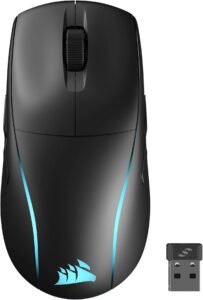
If you’re looking for a versatile and high-performance wireless gaming mouse that’s comfortable for both left and right-handed use, the Corsair M75 Wireless Gaming Mouse is a standout option. Blending accurate tracking, solid battery life, and a lightweight design, it’s built to please both casual gamers and competitive FPS players.
In this review, we’ll walk through the M75’s best features, who it’s best for, and why it’s worth considering for your next upgrade.
Why Choose the Corsair M75?
The Corsair M75 Wireless strikes a great balance between performance, comfort, and accessibility. It combines an ambidextrous shape with strong wireless technology and a responsive sensor — making it a versatile choice whether you’re into fast-paced shooters or everyday gaming.
Key Features and Benefits
Accurate and Fast Tracking
High-precision sensor with adjustable DPI
Smooth tracking ideal for FPS games
Great responsiveness across mouse speeds
Accurate input for both low-sens and high-sens players
Reliable Wireless Connectivity
Wireless 2.4 GHz mode for low-latency gaming
Bluetooth for everyday use and multi-device switching
Wired mode via USB-C when preferred
No lag compromises during intense play
Ambidextrous Comfortable Design
Symmetrical shape fits both hands naturally
Not too heavy — easy to move quickly
Good for fingertip, claw, or hybrid grips
Suitable for a wide range of play styles
Customizable RGB Lighting
Vibrant RGB via Corsair iCUE
Lighting syncs with other Corsair peripherals
Multiple effects and profiles available
Simple control from software
Solid Battery Life
Long wireless battery life (varies with lighting settings)
Quick USB-C charging
Great for marathon gaming sessions
Reduces downtime between plays
Specifications at a Glance
Sensor: High-precision optical sensor
DPI Range: Adjustable
Connection: Wireless 2.4 GHz / Bluetooth / USB-C wired
Shape: Ambidextrous
Buttons: Programmable via iCUE
Lighting: RGB via Corsair iCUE
Who Is It For?
FPS gamers who want strong tracking without wires
Left-handed or ambidextrous users
Gamers who switch between devices (PC, laptop, etc.)
Players with versatile grip styles
Anyone who wants solid performance at a reasonable price
Pros & Cons
Pros
Accurate, responsive sensor
Wireless performance with low latency
Comfortable ambidextrous design
Good battery life
RGB customization with iCUE
Works with Bluetooth and wired modes
Cons
Not as light as some ultralight esports mice
Bluetooth mode isn’t ideal for competitive play
iCUE software required for full feature control
Slight learning curve for advanced settings
Final Verdict
If you’re building a well-rounded gaming setup or upgrading from a basic mouse, the Corsair M75 Wireless Gaming Mouse is a smart choice. It offers the performance and responsiveness serious gamers want, with the comfort and versatility that casual players appreciate.
It may not be the absolute lightest or fastest mouse on the market, but for most FPS players — especially those who value wireless freedom without sacrificing precision — the M75 Wireless delivers exactly what you’d hope for: reliable performance, flexible connectivity, and a comfortable ambidextrous design.
9. Endgame Gear XM2we
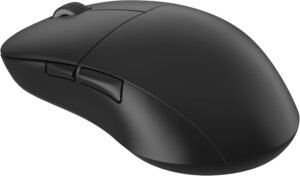
If you’re on the hunt for a high-performance FPS gaming mouse with minimalist design and serious accuracy, the Endgame Gear XM2we Gaming Mouse deserves a top spot on your radar. Designed with competitive players in mind, this lightweight wired mouse delivers excellent tracking, crisp clicks, and a no-nonsense feature set that’s ideal for FPS games.
In this review, we’ll break down what makes the XM2we special and why it’s a strong choice for gamers of all levels.
Why Choose the Gear XM2we?
The Endgame Gear XM2we stands out for combining professional-level sensor performance with a streamlined, lightweight form factor. It doesn’t chase gimmicks — instead it focuses on delivering precision and stability that FPS players value most.
Whether you’re dominating in Valorant, CS:GO, Apex Legends, or quake-fast shooters, this mouse offers the control and speed serious players demand.
Key Features and Benefits
Precision Hero Sensor for Competitive Play
High-precision optical sensor designed for clean aim
Extreme accuracy across DPI range
Great tracking for flick shots and tracking targets
Excellent consistency in fast-paced gaming
Featherlight Yet Built for Control
Lightweight design for quick movement
Balanced feel that supports clutched flicks
Great for claw and fingertip grips
Helps reduce fatigue in long gaming sessions
Responsive Switches & Click Feel
Crisp, low-latency buttons
Satisfying click feel without noise overload
Excellent responsiveness for competitive FPS play
Consistent output for mechanical accuracy
Clean Minimalist Aesthetic
Subtle design that fits any desk setup
No distracting RGB lighting
Focused on performance rather than flash
Great choice for serious gamers or minimalists
Plug-and-Play Compatibility
Wired USB connection for zero latency
Works instantly on Windows systems
No software required for basic use
Optional software for DPI and button customization
Specifications at a Glance
Sensor: High-precision optical sensor
DPI Range: Adjustable
Connection: Wired USB
Weight: Very lightweight
Grip Style: Ideal for claw / fingertip grips
Lighting: Minimalist (non-RGB) or subtle accent
Who Is It For?
Competitive FPS players
Users who prefer lightweight mice
Claw or fingertip grip enthusiasts
Minimalist desk setups
Gamers who prioritize performance over bells and whistles
Pros & Cons
Pros
Very responsive and accurate sensor
Lightweight yet controlled feel
Crisp, responsive buttons
Minimalist design frees up focus
Excellent competitive performance
No software needed for basic plug-and-play
Cons
No RGB lighting (may disappoint some buyers)
Wired only — no wireless mode
Minimal design may feel “plain” to aesthetic seekers
Advanced customization may require extra software
Final Verdict
If you’re building a serious FPS gaming setup or upgrading from a basic mouse, the Endgame Gear XM2we Gaming Mouse is a smart choice for competitive players. Its precision sensor and lightweight form factor offer performance that can help improve aim consistency and tracking — especially in fast-paced shooters.
It may not have flashy features like RGB lighting or wireless connectivity, but for gamers who want pure performance without distraction, the XM2we delivers exactly what matters most: clean, predictable control and rapid responsiveness.
8. Razer Viper V3 Pro
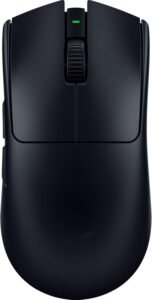
If you’re searching for a top-tier wireless gaming mouse that blends ultralight agility, pro-level responsiveness, and competitive-grade features, the Razer Viper V3 Pro Wireless Esports Gaming Mouse is one of the best options available for FPS players. Built for precision and performance, this mouse delivers elite tracking, blister-fast responsiveness, and a design tuned for fast flicks and seamless control.
Why Choose the Viper V3 Pro?
The Viper V3 Pro takes everything that made the Viper lineup successful and pushes it further. With an ultralight build, industry-grade sensor, and pro-ready wireless tech, it’s engineered to help competitive players achieve lower click latency and more accurate tracking—core fundamentals in FPS games like Valorant, CS2, and Apex Legends.
Key Features and Benefits
Ultralight, Competition-Focused Design
Extremely lightweight build (≈54 g) for fast flicks and quick corrections
Reduces wrist and arm fatigue during long FPS sessions
Balanced weight distribution for smooth tracking and control
Symmetrical shape works well for claw and fingertip grip styles
Razer Focus Pro 35K Gen-2 Optical Sensor
Up to 35,000 DPI with exceptional tracking accuracy
Consistent performance at both low and high sensitivities
Excellent micro-adjustments for precision aiming
Reliable tracking across common mousepad surfaces
Razer HyperSpeed Wireless Performance
2.4 GHz HyperSpeed wireless designed for competitive gaming
Ultra-low latency comparable to wired mice
Stable connection with no noticeable dropouts during gameplay
USB-C wired mode available for charging or wired play
8,000 Hz HyperPolling Support
Supports up to 8,000 Hz polling rate with HyperPolling dongle
Reduces input delay and improves motion responsiveness
Smoother cursor updates during fast flicks and tracking
Especially beneficial for high-refresh-rate monitors
Gen-3 Optical Mouse Switches
Fast, crisp actuation with minimal debounce delay
Consistent click feel for rapid firing in FPS games
Optical design improves durability over mechanical switches
Rated for long-term competitive use
Long Battery Life
Up to ~95 hours of wireless playtime (depending on settings)
Fewer interruptions for charging between sessions
Efficient power usage despite high polling capabilities
USB-C charging keeps downtime minimal
Minimalist, Performance-First Build
No RGB lighting to reduce weight and distractions
Clean, esports-focused aesthetic
Six programmable buttons for essential binds only
Designed to disappear in hand and build muscle memory
Specifications at a Glance
Sensor: Razer Focus Pro 35K Gen-2 optical
DPI: Up to ~35,000 DPI
Polling Rate: Up to 8,000 Hz HyperPolling
Connection: HyperSpeed Wireless (2.4 GHz) + Wired USB-C
Weight: ~54 g ultra-light design
Buttons: 6 programmable
Battery Life: Up to ~95 hours (varies by settings)
Lighting: Minimal or none (performance-focused)
Who Is It For?
Competitive FPS players who value lightning-fast aim and motion control
Gamers who prefer ultralight wireless mice with elite sensor tech
Claw or fingertip grip enthusiasts
Players who want pro-grade polling and minimal lag without cables
Pros & Cons
Pros
Extremely lightweight (~54 g) ideal for fast flicks and tracking
High-precision Focus Pro sensor with broad DPI range
8,000 Hz HyperPolling delivers very low wireless latency
Long battery life for marathon sessions
Symmetrical design supports multiple grip styles
Cons
Minimalist feature set (no RGB or extra macro buttons)
Symmetrical form may lack ergonomic flair for some palm grippers
Performance is best felt on competitive, low-latency setup
Final Verdict
If you want a competitive-grade wireless FPS mouse that feels precise, fluid, and fast, the Razer Viper V3 Pro Wireless Esports Gaming Mouse is a compelling choice. Its ultralight design and HyperPolling responsiveness give you an edge in flick-heavy shooters and high-tempo matches, while the high-end sensor provides consistent tracking where it matters most. Though it skews toward performance over bells-and-whistles, that’s exactly what serious FPS players are looking for: sheer control, accuracy, and speed.
7. BenQ ZOWIE EC2-CW
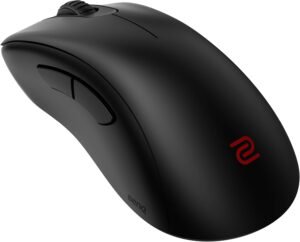
If you’re searching for a high-performance FPS gaming mouse built with competitive play as the top priority, the ZOWIE EC2-CW Gaming Mouse is one of the most trusted options available. Designed with esports professionals in mind, this wireless mouse delivers exceptional sensor accuracy, an iconic ergonomic shape, and a distraction-free experience focused entirely on performance.
In this review, we’ll break down what makes the EC2-CW special and why it remains a favorite among serious FPS players.
Why Choose the EC2-CW?
The ZOWIE EC2-CW stands out by doing one thing extremely well: delivering consistent, reliable performance for competitive FPS gaming. Instead of flashy features or complex software, ZOWIE focuses on shape, sensor stability, and muscle-memory-friendly design.
Whether you’re grinding ranked matches in CS:GO, Valorant, Apex Legends, or other tactical shooters, the EC2-CW offers the precision and control that professional players rely on.
Key Features and Benefits
Tournament-Grade Sensor Performance
High-precision optical sensor tuned for competitive play
Consistent tracking with no acceleration or smoothing
Excellent control for flick shots and micro-adjustments
Reliable performance at low and mid DPI settings
Legendary Ergonomic Shape
Classic EC-series ergonomic design
Optimized for right-handed users
Extremely comfortable for palm and claw grip styles
Helps maintain consistent aim over long sessions
Wireless Performance Without Compromise
Low-latency wireless connectivity designed for tournaments
Stable signal with no noticeable input delay
Docking station doubles as wireless receiver
Wired option available when charging
Crisp Clicks & Scroll Feel
Well-tuned main buttons with fast response
Consistent, tactile click feedback
Scroll wheel designed for precise weapon switching
Reliable side buttons with clean actuation
No-Nonsense, Software-Free Design
No driver or software installation required
DPI, polling rate, and lift-off distance adjustable via hardware buttons
Plug-and-play functionality on any PC
Perfect for LAN events and competitive environments
Specifications at a Glance
Sensor: High-precision optical sensor
DPI Range: Adjustable via onboard controls
Connection: Wireless (with wired charging support)
Shape: Ergonomic, right-handed
Grip Style: Ideal for palm and claw grips
Lighting: None (performance-focused design)
Who Is It For?
Competitive FPS players
Esports and tournament gamers
Palm and claw grip users
Gamers who want wireless performance without distractions
Players who value consistency over customization
Pros & Cons
Pros
Extremely consistent and accurate tracking
Iconic ergonomic shape trusted by pros
Low-latency wireless performance
No software required
Excellent build quality
Great for competitive FPS games
Cons
No RGB lighting
Limited customization compared to software-driven mice
Not ideal for fingertip grip users
Premium price for a minimalist feature set
Final Verdict
If you’re building a serious competitive FPS setup or upgrading from a standard gaming mouse, the ZOWIE EC2-CW Gaming Mouse is a rock-solid choice. Its ergonomic shape, flawless tracking, and tournament-ready wireless performance make it a reliable weapon for players who demand consistency above all else.
It doesn’t chase trends like RGB lighting or deep software customization, but for gamers who want pure performance, muscle-memory-friendly design, and zero distractions, the EC2-CW delivers exactly what matters most: predictable control, comfort, and competitive-grade precision.
6. Glorious Model O2 Wireless
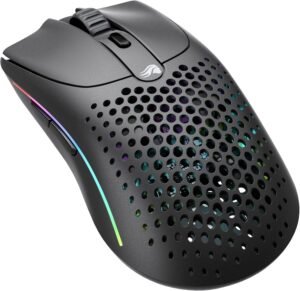
If you’re looking for a fast, lightweight wireless gaming mouse that doesn’t sacrifice performance for convenience, the Glorious Model O2 Wireless is one of the most compelling choices on the market. Built with competitive FPS players in mind, this mouse blends ultra-responsive tracking, long battery life, and a featherweight design — all without the distraction of bells and whistles.
In this review, we’ll break down what makes the Model O2 Wireless stand out and why it’s a strong pick for gamers who want both speed and freedom.
Why Choose the Model O2?
The Glorious Model O2 Wireless shines because it hits the sweet spot between lightweight agility and strong wireless performance. It’s designed to give you confident control in fast-paced shooters without the drag of cords or the weight of heavier gaming mice.
Whether you’re fragging in Valorant, tracking aim in CS:GO, or engaging in high-tempo FPS battles, this mouse delivers the speed and responsiveness serious players crave.
Key Features and Benefits
Featherlight Wireless Design
Ultra-lightweight for quick, precise movement
Wireless without the usual drag or lag
Ideal for claw and fingertip grips
Helps reduce fatigue in marathon gaming sessions
High-Precision Optical Sensor
Accurate tracking at competitive DPI levels
Excellent for flick shots and micro-adjustments
Consistent performance across surfaces
Great balance of speed and fine control
Low-Latency Wireless Connectivity
Glorious “2.4 GHz competitive grade” wireless
Reliable connection with minimal latency
Bluetooth mode available for multi-device use
USB-C wired mode when preferred
Strong Battery Life
Long-lasting wireless playtime
Quick USB-C charging
Keeps you gaming without frequent interruptions
Perfect for long sessions and practice runs
Customizable RGB Lighting
RGB effects with Glorious Core software
Sync lighting with compatible gear
Multiple lighting profiles available
Subtle RGB adds flair without distraction
Specifications at a Glance
Sensor: High-precision optical sensor
DPI Range: Adjustable for competitive play
Connection: Wireless (2.4 GHz), Bluetooth, Wired USB-C
Weight: Ultra-light
Grip Style: Claw / fingertip / hybrid
Lighting: RGB via Glorious Core
Who Is It For?
FPS gamers who want fast, responsive control
Players who prefer wireless freedom
Claw and fingertip grip enthusiasts
Competitors and casual players alike
Users with high-tempo aiming styles
Pros & Cons
Pros
Extremely lightweight yet strong wireless
Accurate, responsive optical sensor
Long battery life
Multiple connectivity modes
Clean aesthetic with RGB flair
Cons
May not feel as premium as some heavy-build mice
Bluetooth mode not ideal for competitive play
RGB and advanced tweaks need software
Some might prefer a more ergonomic shape
Final Verdict
If you’re building a slick, high-performance FPS setup or upgrading from a heavier or wired mouse, the Glorious Model O2 Wireless Gaming Mouse is an excellent choice. It strikes a rare balance between lightweight agility, competitive tracking, and wireless convenience — all in one package.
It may not be the most feature-packed mouse in the world, but for gamers who want speed, freedom, and reliability, the Model O2 Wireless delivers exactly what matters: fast, predictable control and fluid responsiveness.
5. Logitech G305 Lightspeed Wireless
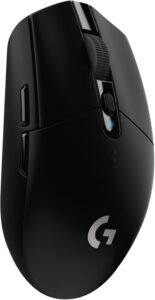
If you’re looking for a reliable wireless gaming mouse that offers great performance without a premium price tag, the Logitech G305 Lightspeed Wireless Gaming Mouse deserves serious consideration. Designed to deliver responsive tracking, low-latency wireless, and a simple yet efficient form factor, the G305 provides excellent value for FPS gamers who want performance without unnecessary bells and whistles.
In this review, we’ll break down what makes the G305 Lightspeed a standout budget wireless mouse and why it’s a strong pick for gamers of all levels.
Why Choose the G305 Lightspeed?
The Logitech G305 Lightspeed Wireless offers competitive-grade wireless performance without breaking the bank. With Logitech’s trusted Lightspeed technology and a proven optical sensor, this mouse delivers accurate tracking and reliable performance that punch well above its price point.
Whether you’re fragging in Valorant, lining up shots in CS:GO, or grinding ranked games in Apex Legends, the G305 combines simplicity and performance in a way that’s hard to beat in its class.
Key Features and Benefits
Lightspeed Wireless Technology
Low-latency wireless designed for gaming
Same wireless performance as many premium models
No perceptible lag or lag spikes
Stable connection that holds up during intense play
Pro-Grade Optical Sensor
Accurate and responsive optical sensor
Excellent for fast movements and precision aiming
Great tracking for both flick shots and micro adjustments
Performs well across a range of DPI settings
Lightweight and Comfortable Design
Compact, lightweight build for agile movement
Comfortable shape suitable for claw and fingertip grips
Balanced design reduces hand fatigue
Ideal for extended gaming sessions
Long Battery Life
Efficient power usage for extended play
Can last for days of gaming on a single AA battery
Easy to replace battery; no recharging required
Reliable performance without frequent downtime
Simple, No-Frills Customization
Button programming via Logitech G HUB
Adjustable DPI levels
Profile saving for different games
Works great straight out of the box
Specifications at a Glance
Sensor: High-performance optical sensor
DPI Range: Adjustable via G HUB
Connection: Lightspeed Wireless
Weight: Lightweight (around 99g with battery)
Grip Style: Claw / fingertip
Lighting: No RGB (performance-focused)
Who Is It For?
FPS gamers wanting a solid wireless mouse on a budget
Users who value reliable performance without extra features
Players with claw or fingertip grip styles
Gamers who prefer simplicity and consistency
Anyone building a wireless competitive setup without a premium budget
Pros & Cons
Pros
Reliable Lightspeed wireless performance
Strong tracking for FPS gameplay
Lightweight and comfortable design
Excellent battery life
Great value for the price
Simple setup with optional software customization
Cons
No RGB lighting (may disappoint some)
Only one battery type (AA)
Limited advanced features compared to premium mice
No dedicated DPI display
Final Verdict
If you’re building a competitive gaming setup on a budget or want a wireless performance mouse that just works, the Logitech G305 Lightspeed Wireless Gaming Mouse hits all the right notes. It delivers great tracking, low-latency responsiveness, and long battery life — all wrapped in a simple, comfortable design that’s ideal for FPS players.
It might lack flashy lighting or the bells and whistles of high-end models, but for gamers who want straightforward, dependable performance at a sensible price point, the G305 Lightspeed Wireless delivers exactly what matters most: solid, predictable precision with wireless freedom.
4. SteelSeries Aerox 3 Wireless
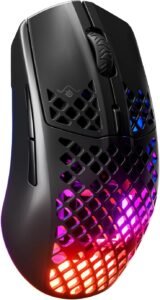
If you’re searching for a lightweight gaming mouse that blends speed, precision, and wireless freedom, the SteelSeries Aerox 3 Wireless stands out as one of the most compelling options available. Designed for gamers who value agility and responsiveness, this mouse delivers a competitive edge while keeping battery life and durability strong.
In this review, we’ll break down what makes the Aerox 3 Wireless a top pick for competitive gamers, FPS players, and anyone who wants excellent wireless performance without the weight of traditional gaming mice.
Why Choose the Aerox 3?
The SteelSeries Aerox 3 Wireless is engineered to provide buttery smooth movement, ultra-lightweight comfort, and strong wireless connectivity. Whether you’re grinding ranked matches or playing casual sessions, the Aerox 3 Wireless keeps input lag low and control crisp — all in a design that’s as comfortable as it is efficient.
Key Features and Benefits
Ultra-Lightweight Performance
Weighs significantly less than many competitors (around 66g)
Lightweight design reduces fatigue in long sessions
Ideal for shooters, MOBAs, and fast-tempo games
Aggressive glide for quick flicks and directional control
Reliable Wireless Connectivity
Supports 2.4 GHz wireless for minimal latency
Bluetooth mode for multi-device flexibility
Wired USB-C option for charging or low-latency play
Stable connection with minimal dropouts
Strong Battery Life
Long battery performance between charges
Bluetooth mode extends battery life even further
Quick-charge support keeps you in the game
LED indicator for remaining battery status
High Precision Sensor
TrueMove Air sensor for accurate tracking
DPI range suitable for casual to competitive play
Zero acceleration for reliable cursor behavior
Works well on a wide range of mousepads
Customizable RGB and Software
RGB lighting zones for personalization
Custom button mapping and profiles via SteelSeries Engine
Adjustable performance settings (DPI, lift-off, etc.)
Sync lighting with other SteelSeries gear
Specifications at a Glance
Sensor: TrueMove Air
Connectivity: 2.4 GHz wireless / Bluetooth / wired USB-C
Weight: ~66g (ultra-light)
Battery Life: Long-lasting (varies by mode)
RGB Zones: Customizable
Software: SteelSeries Engine
Who Is It For?
FPS and competitive players who want lightweight precision
Gamers who value wireless freedom
Users with smaller to medium hands
Anyone who wants quick, responsive movement
Players who like a balance of performance and portability
Pros & Cons
Pros
Extremely lightweight for fast movement
Strong wireless performance
Versatile connectivity options
Accurate sensor with smooth tracking
Customizable RGB lighting
Comfortable ergonomic shape
Cons
Not ideal for very large hands (prefers claw/fingertip grip)
Battery life varies significantly by mode
Lacks onboard memory for profiles
Not as many buttons as larger gaming mice
Final Verdict
If you’re building your first competitive gaming setup or upgrading from a bulky or wired mouse, the SteelSeries Aerox 3 Wireless is an excellent choice. It delivers lightweight design, reliable wireless performance, and precise tracking — all in a sleek, gamer-friendly package.
It may not satisfy players who prefer extra programmable buttons or prefer larger mice, but for most gamers — especially FPS and fast-paced players — the Aerox 3 Wireless offers exactly what you want: speed, accuracy, and freedom from cables without sacrificing performance.
3. Logitech G502 X PLUS Wireless
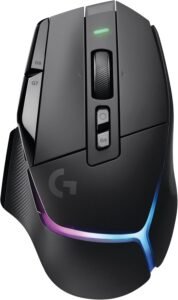
If you’re looking for a wireless gaming mouse that pairs cutting-edge performance with advanced features and customization, the Logitech G502 X PLUS Wireless Gaming Mouse is one of the most compelling picks on the market. Built on the legacy of the G502 series — a favorite of competitive players and productivity users alike — this model adds wireless convenience without compromising responsiveness or functionality.
In this review, we’ll break down what makes the G502 X PLUS Wireless stand out and why it’s a strong pick for FPS gamers and everyday players alike.
Why Choose the G502 X PLUS?
The Logitech G502 X PLUS Wireless brings the beloved G502 platform into a modern wireless ecosystem with LIGHTSPEED responsiveness, robust customization, and premium build quality. Whether you’re fragging in Valorant, tracking targets in CS:GO, or leveling up in RPGs and MOBAs, this mouse delivers accuracy, comfort, and a rich feature set that appeals to both competitive players and power users.
Key Features and Benefits
LIGHTSPEED Wireless Technology
Competitive-grade low-latency wireless
Uncompromised responsiveness
No cable drag — freedom without lag
Reliable connection with strong range
HERO Optical Sensor
Ultra-precise tracking up to very high DPI
Great accuracy for FPS, MOBA, and action titles
Smooth tracking across surfaces
Exceptional consistency for mapping movements
Programmable Buttons & Controls
Multiple programmable buttons (usually ~11)
Easy macro assignment via Logitech G HUB
On-the-fly controls for DPI/preset switching
Ideal for games that benefit from extra binds
Comfortable Ergonomic Design
Well-contoured shape for right-handed users
Comfortable for extended gaming sessions
Thumb rest and button placement support performance
Excellent balance between precision and comfort
Premium RGB Lighting
Full RGB lighting with LIGHTSYNC
Sync effects with other Logitech gear
Customizable profiles via G HUB
Adds aesthetic flair without distraction
Specifications at a Glance
Sensor: HERO Optical Sensor
DPI Range: Adjustable (up to high DPI)
Connection: LIGHTSPEED Wireless + Wired USB-C
Programmable Buttons: ~11
Weight: Moderate for precision + comfort
Lighting: RGB via LIGHTSYNC
Software: Logitech G HUB
Who Is It For?
FPS gamers who want extra control buttons
Competitive players transitioning from wired to wireless
Users who like heavy customization (macros, buttons)
Players who want robust RGB + performance mix
Gamers and creators who benefit from versatile key binds
Pros & Cons
Pros
Low-latency LIGHTSPEED wireless
Excellent HERO sensor tracking
Lots of programmable buttons
Comfortable ergonomic design
RGB lighting customization
Great all-around performance
Cons
More expensive than basic gaming mice
Heavier than ultralight competitors
Some users may not need all buttons
Software customization required for full feature access
Final Verdict
If you’re building a well-rounded gaming setup — especially if you play a mix of FPS, MOBA, and productivity-focused titles — the Logitech G502 X PLUS Wireless Gaming Mouse is a powerful pick that combines precision, customization, and wireless freedom in one package.
It may be overkill for players who want the simplest, lightest mouse possible, but for anyone who wants button versatility, RGB customization, and competitive-grade wireless performance, the G502 X PLUS delivers exceptional value and performance exactly where it counts: accuracy, control, and ergonomic comfort.
2. Razer DeathAdder V4 Pro Wireless
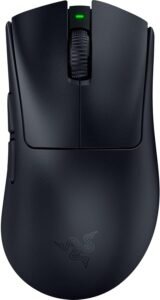
If you’re hunting for a premium wireless gaming mouse that combines a legendary ergonomic design with modern performance and responsiveness, the Razer DeathAdder V4 Pro Wireless Gaming Mouse deserves serious attention. With its acclaimed shape, low-latency wireless, and advanced sensor tech, this mouse delivers the speed, comfort, and precision FPS gamers demand.
In this review, we’ll break down what makes the DeathAdder V4 Pro Wireless a top pick for competitive players and everyday gamers alike.
Why Choose the DeathAdder V4 Pro?
The Razer DeathAdder series has long been one of the most popular gaming mice in the world — and the V4 Pro Wireless continues that legacy with upgraded tech. It combines a proven ergonomic shape with next-generation sensors and wireless technology to deliver a balanced performer that’s at home in FPS, MOBA, and action games.
Whether you’re tracking enemies in FPS matches or handling fast flick shots in battle arenas, this mouse offers the comfort and control players appreciate.
Key Features and Benefits
Razer HyperSpeed Wireless
Low-latency wireless designed for competitive gaming
Transmits data faster than many standard wireless connections
Stable performance with minimal lag or dropouts
Wireless freedom without sacrificing responsiveness
Razer Focus Pro 30K Sensor
Industry-leading optical sensor up to 30,000 DPI
Highly accurate tracking with precise responsiveness
Great control for both fast flicks and micro adjustments
Consistent performance across different surfaces
Ergonomic DeathAdder Shape
Classic right-handed ergonomic form
Comfortable for long sessions
Excellent palm grip support
Natural hand placement reduces fatigue
Extended Battery Life
Long battery endurance even with RGB enabled
USB-C fast charging support
Keeps players gaming for hours
Reliable wireless performance session after session
Chroma RGB Customization
Razer Chroma RGB lighting with 16.8 million colors
Sync lighting with games, gear, and hardware
Create custom lighting profiles in Synapse
Adds style without distracting from gameplay
Advanced Software Support
Razer Synapse for buttons, macros, and profiles
On-the-fly DPI switching
Full customization of lighting and performance
Save profiles to cloud
Specifications at a Glance
Sensor: Razer Focus Pro 30K optical sensor
DPI Range: Up to 30,000 DPI
Connection: Razer HyperSpeed Wireless + Bluetooth + Wired USB-C
Shape: Ergonomic, right-handed
Lighting: Razer Chroma RGB via Synapse
Software: Razer Synapse
Buttons: Multiple programmable buttons
Who Is It For?
Competitive FPS and action gamers
Fans of ergonomic, palm-friendly shapes
Players who want wireless performance without compromise
Users who like customizable profiles and lighting
Anyone who plays long sessions and needs comfort
Pros & Cons
Pros
Ultra-responsive HyperSpeed wireless
Excellent sensor precision up to 30,000 DPI
Ergonomic comfort with classic DeathAdder shape
Strong battery life
Deep customization via Synapse
RGB lighting that syncs with the ecosystem
Cons
Premium price tag
Synapse software required for full feature access
Slightly heavier than ultralight alternatives
Bluetooth mode not ideal for competitive play
Final Verdict
If you’re building a high-performance gaming setup or upgrading from a basic mouse, the Razer DeathAdder V4 Pro Wireless Gaming Mouse is a strong contender. It blends the comfortable ergonomic design that millions of gamers love with modern sensor precision, responsive wireless tech, and robust customization.
It may be more than casual players need, but for competitive gamers and those who want premium comfort and performance in one package, the DeathAdder V4 Pro Wireless delivers exactly what matters most: high-precision responsiveness, ergonomic comfort, and reliable wireless freedom.
1. Logitech G PRO X Superlight 2 Wireless
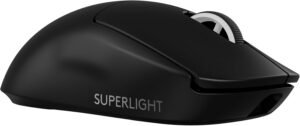
If you’re searching for a top-tier wireless gaming mouse that delivers elite speed, pinpoint accuracy, and unmatched responsiveness, the Logitech G PRO X Superlight 2 Wireless Gaming Mouse is one of the best choices available today. Designed for competitive FPS gamers and esports enthusiasts, this mouse takes the established Superlight legacy and elevates it with improved sensor technology, robust wireless performance, and refined ergonomics.
In this review, we’ll break down what makes the PRO X Superlight 2 Wireless stand out and why it’s a top pick for serious gaming setups.
Why Choose the G PRO X Superlight 2?
The Logitech G PRO series has long been a standard-bearer for esports performance, and the Superlight line sets the bar for ultralight wireless gaming mice. With its featherlight design, industry-leading sensor, and Logitech’s proprietary LIGHTSPEED Wireless technology, the PRO X Superlight 2 offers competitive players the speed and precision they crave — without the drag of a cable.
Whether you’re smashing headshots in Valorant, chaining eliminations in Apex Legends, or grinding ranked in CS:GO, this mouse gives you a competitive advantage through performance and simplicity.
Key Features and Benefits
Ultralight Build for Speed and Control
Extremely lightweight design (typically <60g)
Reduces arm strain and increases flick speed
Great for claw and fingertip grip styles
Enhances agility during fast aim adjustments
HERO 2 Optical Sensor
Next-generation sensor precision
Extremely accurate tracking for precise aim
Stable performance across a wide DPI range
Exceptional consistency for competitive shooters
LIGHTSPEED Wireless Technology
Pro-grade wireless with low latency
Delivers virtually no perceptible lag
Stable connection throughout gameplay
Allows wireless performance comparable to wired
Strong Battery Life
Excellent endurance for long gaming sessions
Logitech power management minimizes battery drain
Quick USB-C charging
Keeps you playing without frequent recharging
Minimalist, Performance-First Design
No unnecessary weight-adding features
Clean and focused form factor
No RGB lighting (performance prioritized)
Subtle Logitech branding
Software Customization (Optional)
Customize DPI, buttons, and performance via Logitech G HUB
No software required to use the mouse — plug & play supported
Easy profile switching and macro support
Software only enhances, never required to perform
Specifications at a Glance
Sensor: HERO 2 optical sensor
DPI Range: Adjustable (up to very high DPI)
Connection: LIGHTSPEED Wireless + Wired USB-C
Weight: Ultralight (~<60g)
Grip Style: Primarily claw / fingertip
Lighting: None (performance-focused)
Software: Logitech G HUB (optional)
Who Is It For?
Competitive FPS gamers (Valorant, CS:GO, Apex Legends)
Players who prefer ultralight, agile mice
Claw and fingertip grip enthusiasts
Gamers who want elite wireless performance
Users who value speed and precision over flashy features
Pros & Cons
Pros
Extremely lightweight for fast aim and movement
Top-tier HERO 2 sensor for precision
Low-latency LIGHTSPEED wireless technology
Strong battery life
Plug-and-play simplicity with optional software
Minimalism increases performance focus
Cons
No RGB lighting for aesthetics
No onboard storage for profiles (software-based)
May be too light for heavy palm grip users
Premium price tag — performance first
Final Verdict
If you’re building a competitive gaming setup or upgrading from a heavier mouse, the Logitech G PRO X Superlight 2 Wireless Gaming Mouse is an elite choice worth every cent. Its ultralight design, exceptional sensor accuracy, and low-latency wireless performance make it a favorite among serious FPS gamers and esports enthusiasts.
It may not have flashy features like RGB lighting or tons of onboard buttons, but for players who want pure competitive performance, the PRO X Superlight 2 delivers exactly what matters most: fast, predictable control and smooth responsiveness every time you play.
Final Verdict: Which Gaming Mouse Should You Buy?
If your goal is pure FPS performance, the Logitech G PRO X Superlight 2 (#1) is the easiest top pick because it nails the fundamentals: ultralight control, elite wireless responsiveness, and a competition-proven shape that works for a lot of players. It’s built to disappear in your hand—which is exactly what you want when you’re building muscle memory.
If you prefer a more supportive, ergonomic feel for long sessions, the Razer DeathAdder V4 Pro (#2) is the better match—especially for palm and relaxed claw grips—while still delivering top-tier wireless performance. Want more buttons and a do-everything mouse that still works well in shooters? The Logitech G502 X PLUS (#3) is the most versatile choice, just know it’s heavier than pure esports mice.
On tighter budgets, the Logitech G305 Lightspeed (#5) remains one of the best “cheap but competitive” options, and the Corsair M75 Wireless (#10) is a solid starting point if you want ambidextrous comfort + flexible connectivity.
Bottom line: choose based on shape + weight first, then sensor/wireless. When those match your grip and sensitivity, your aim improves faster—and stays consistent.