
Top 10 Budget Gaming Monitors in 2026
Gaming monitors now come in a much wider range of refresh rates, panel types, resolutions, and gaming-focused features than they did just a few years ago. Choosing the right one usually comes down to comparing how each display handles motion clarity, image quality, responsiveness, screen size, and overall usability for the types of games you actually play. If you’re still deciding what specifications matter most, our guide on how to choose a gaming monitor breaks down refresh rates, resolutions, panel types, and other key features to consider before buying.
Some monitors focus heavily on competitive esports performance with extremely high refresh rates and lower resolutions, while others prioritize sharper 1440p visuals, stronger HDR presentation, or more versatile everyday use. The differences can noticeably impact everything from fast-paced shooters to open-world gaming, streaming, and general desktop comfort.
This guide starts with a quick comparison table followed by detailed breakdowns of the top budget gaming monitors across multiple categories and use cases. The structure makes it easier to compare the strengths, trade-offs, and overall value of each option before narrowing down the right fit for your setup.
For more monitor recommendations and display comparisons, browse our monitor and display category guides.
Building a better desk or gaming setup?
This article is part of our Monitors & Displays hub, covering gaming monitors, ultrawides, productivity screens, and display tech for every setup.
Comparison Table (Top Picks)
The table below highlights the key differences between the top budget gaming monitors in this guide. It’s designed to help you quickly compare screen size, refresh focus, and overall use case before diving into the full breakdowns.
| Product | Best For | Key Strength | Weight / Size | Connectivity | Notable Trade-Off |
|---|---|---|---|---|---|
| Gigabyte M27Q2 | Mixed gaming + productivity | Strong all-around balance | 27-inch | HDMI / DP / USB-C | HDR less impactful than Mini-LED |
| AOC Q27G3XMN | Immersive AAA gaming | Strong HDR and contrast | 27-inch | HDMI / DP | Less focused on esports performance |
| MSI G274QPF-QD | Hybrid gaming setups | Strong color and responsiveness | 27-inch | HDMI / DP / USB-C | Requires stronger hardware for 1440p |
| Dell S2725DSM | Productivity + gaming | Better ergonomics and comfort | 27-inch | HDMI / DP | Lower refresh than esports-focused options |
| Acer Nitro XV272U | First 1440p upgrade | Sharp visuals with high refresh | 27-inch | HDMI / DP | More demanding than 1080p monitors |
| ASUS TUF VG249Q | Everyday competitive gaming | Reliable all-around performance | 24-inch | HDMI / DP | Lower resolution than 1440p alternatives |
| KTC H25T7-3 | Competitive FPS gaming | Affordable 240Hz gameplay | 24.5-inch | HDMI / DP | Less immersive for cinematic games |
Quick Picks
Based on the comparison above, these picks stand out for different gaming styles, setup priorities, and long-term upgrade goals.
Best Overall — Gigabyte M27Q2 (#1)
Combines sharp 1440p visuals, strong gaming responsiveness, and practical productivity features in a way that suits most setups.
Best for Immersive Gaming — AOC Q27G3XMN (#2)
Mini-LED backlighting and stronger contrast help cinematic and HDR-supported games feel more visually engaging.
Best 1440p Upgrade — Acer Nitro XV272U (#5)
Moves beyond standard 1080p gaming with sharper visuals and a more spacious overall gaming experience.
Best for Competitive FPS Games — KTC H25T7-3 (#7)
Focused on high refresh competitive play with a smaller screen size that works well for fast reaction-based shooters.
Best Budget Starter Pick — KTC H24F8 (#10)
Keeps the focus on responsive gameplay and high refresh performance for first-time gaming monitor buyers.
10. KTC H24F8
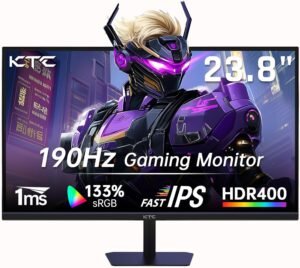
Built for gamers who want a smoother experience without spending heavily, the KTC H24F8 focuses on high refresh gameplay and responsive everyday performance. Its fast IPS panel and 180Hz refresh rate help it stand out among entry-level gaming monitors, especially for competitive titles and first PC setups.
Why It Made the List
- 180Hz refresh rate provides noticeably smoother gameplay than standard 60Hz displays
- Fast IPS panel improves motion clarity and viewing angles compared to many budget VA alternatives
- Simple gaming-focused design suited for entry-level and mid-range setups
- Adaptive sync support helps reduce screen tearing during fast-paced gameplay
Trade-Offs
- Build quality and stand adjustments are more basic than higher-tier monitors
- HDR support is limited compared to more premium gaming displays
- 24-inch size may feel small for immersive single-player gaming
Best For:
Gamers building a first budget gaming setup who want high refresh gameplay for competitive titles without moving into higher-priced 1440p monitors.
Final Verdict
For players building a first gaming setup, the H24F8 focuses on the features that matter most for competitive gameplay without adding unnecessary extras. It makes the most sense for budget-conscious players focused on esports and everyday multiplayer gaming.
9. Samsung Odyssey G3 24"
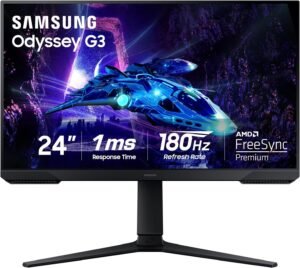
Designed for gamers who want a recognizable gaming monitor brand without moving into higher-priced territory, the Samsung Odyssey G3 balances smooth refresh rates with practical everyday usability. Its adjustable stand and gaming-focused feature set help it feel more refined than many ultra-budget alternatives.
Why It Made the List
- 180Hz refresh rate helps gameplay feel smoother and more responsive during fast-paced matches
- Adjustable stand improves comfort compared to many entry-level gaming monitors
- Gaming-focused features are designed to support competitive and everyday multiplayer use
- Samsung branding and broader availability make it feel like a safer mainstream choice
Trade-Offs
- Image quality and contrast may vary depending on settings and usage
- Limited screen size can feel restrictive for multitasking or immersive gaming
- Build materials are simpler than more premium gaming displays
Best For:
Gamers looking for an affordable high-refresh monitor from a widely recognized brand for multiplayer gaming, console setups, and daily gaming and desktop use.
Final Verdict
Buyers wanting a more recognizable gaming monitor brand may find the Odyssey G3 easier to trust than many lesser-known ultra-budget alternatives. It fits well for buyers who want dependable everyday gaming performance without overcomplicating their setup.
8. LG UltraGear 24GN60R-B
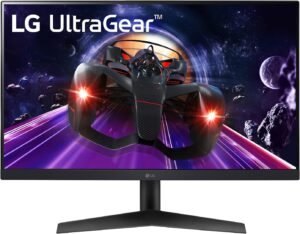
The LG UltraGear 24GN60R-B is a straightforward gaming monitor designed for players who want dependable high-refresh performance without moving into more expensive esports or 1440p territory. It earns this position in the ranking by balancing responsiveness, image consistency, and long-term usability in a way that feels practical for everyday gaming setups.
Best For:
Gamers who want a reliable 1080p high-refresh monitor for mixed multiplayer, single-player, and everyday PC use.
Real-World Performance
Fast-paced shooters feel fluid and easy to track during quick movement, while the IPS panel helps maintain consistent image quality across different viewing angles. The overall experience feels practical rather than aggressively esports-focused, making it easier to use for both gaming and general desktop tasks over longer sessions.
What Stands Out
- IPS panel helps colors and viewing angles look more consistent during everyday use
- High refresh gameplay feels noticeably smoother than standard office displays
- Gaming-focused tuning creates a cleaner overall experience without excessive sharpening or oversaturation
- Simple design fits well in both gaming and mixed-use desk setups
Who Is It For?
- Mainstream gamers upgrading from older 60Hz monitors
- Students using one display for gaming and schoolwork
- Casual competitive players who want smoother gameplay without chasing esports-level refresh rates
- Buyers prioritizing brand familiarity and long-term reliability
Pros & Cons
Pros
- Flexible performance for both gaming and general desktop tasks
- IPS panel improves image consistency compared to many budget VA alternatives
Cons
- Lower refresh rate than some newer budget esports monitors
- Stand adjustments are more limited than higher-tier gaming displays
Bottom Line
Among the simpler 1080p gaming monitors in this ranking, the 24GN60R-B stands out for delivering a comfortable and consistent everyday experience. Its mix of reliability, responsiveness, and straightforward usability makes it an easy fit for mainstream gaming setups.
7. KTC H25T7-3
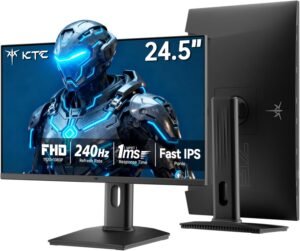
Focused primarily on competitive gaming, the KTC H25T7-3 is designed for players who care more about responsiveness and motion clarity than higher resolutions or cinematic visuals. It ranks this high because affordable 240Hz monitors have become far more accessible, giving esports-focused players smoother gameplay without moving into premium pricing territory.
Best For:
Competitive multiplayer players who mainly play fast-paced shooters like Valorant, CS2, and Apex Legends at high frame rates.
Real-World Performance
Fast movement appears cleaner and easier to track compared to standard 144Hz displays, especially during quick flicks and rapid camera movement. The smaller screen size and 1080p resolution also help maintain a focused competitive feel that works well for desk setups centered around esports gaming rather than immersive single-player experiences.
What Stands Out
- 240Hz refresh rate helps gameplay feel more responsive during competitive matches
- Fast IPS panel improves visibility during quick movement and rapid tracking
- Adjustable stand supports better comfort during longer gaming sessions
- Compact screen size useful for focused competitive setups
- Adaptive sync support helps reduce tearing during fast-paced gameplay
Who Is It For?
- Competitive FPS players prioritizing refresh rate over higher resolution
- Gamers using mid-range PCs capable of pushing very high frame rates
- Players building esports-focused desk setups
- Users who prefer smaller, more performance-oriented displays
Pros & Cons
Pros
- High refresh gameplay feels noticeably smoother in competitive titles
- Ergonomic stand adjustments improve long-session usability
Cons
- 1080p resolution feels less sharp than newer budget 1440p monitors
- Less suited for immersive AAA gaming or productivity-focused use
Bottom Line
Competitive players focused heavily on reaction speed and motion clarity will likely appreciate the H25T7-3 more than higher-resolution alternatives. It makes the most sense for players focused heavily on competitive multiplayer gaming rather than visual immersion or multitasking.
6. ASUS TUF VG249Q
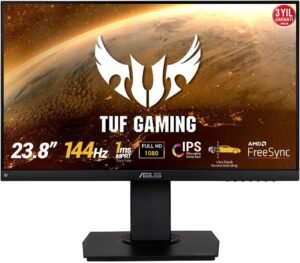
The ASUS TUF VG249Q is an all-around 1080p gaming monitor aimed at players who want dependable high-refresh performance without chasing extreme esports specifications. It fits comfortably in the middle of this ranking because it combines responsive gameplay, consistent image quality, and a more established gaming monitor lineup that many buyers already recognize.
Best For:
Gamers upgrading from older 60Hz monitors who want a reliable 1080p display for everyday multiplayer gaming, console use, and long-term general use.
Real-World Performance
Motion handling remains consistent across both competitive matches and casual gaming sessions. The IPS panel also helps the monitor feel more comfortable for mixed use, including browsing, streaming, and general desktop work between gaming sessions.
What Stands Out
- IPS panel helps maintain more consistent colors and viewing angles during everyday use
- High refresh gameplay feels noticeably smoother than standard office or older gaming monitors
- Gaming-focused tuning is designed to improve responsiveness without feeling overly aggressive
- Broad compatibility makes it easy to use across both PC and console setups
- Simple design fits naturally into most desk setups without looking overly flashy
Who Is It For?
- Players moving from standard 60Hz displays to their first gaming monitor
- Console and PC gamers sharing one primary display
- Users who want a recognizable gaming monitor brand with a straightforward setup experience
- Gamers looking for an adaptable monitor instead of an esports-only display
Pros & Cons
Pros
- Balanced mix of responsiveness, usability, and image consistency
- Works well for both gaming and general desktop use
Cons
- Lower refresh rate than some newer esports-focused budget monitors
- 1080p resolution feels less sharp compared to newer 1440p alternatives
Bottom Line
For users wanting a straightforward upgrade from older 60Hz displays, the VG249Q offers a practical balance between gaming responsiveness and everyday usability. It makes the most sense for buyers who want smoother gameplay and reliable everyday performance without overcomplicating their setup.
5. Acer Nitro XV272U
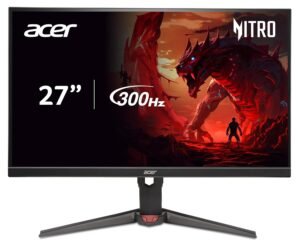
The Acer Nitro XV272U is where this ranking starts shifting into the modern 1440p gaming sweet spot. Designed for gamers moving beyond basic 1080p displays, it combines sharper image quality with the smoother feel that high-refresh gaming monitors are known for, giving it enough versatility for both competitive shooters and larger cinematic games.
Best For:
Gamers upgrading to their first 1440p high-refresh monitor for a mix of competitive multiplayer and visually demanding single-player games.
Real-World Performance
Gameplay feels noticeably sharper and more detailed than standard 1080p monitors, especially in open-world and cinematic games. Fast-paced titles also benefit from the smoother high-refresh experience, while the larger screen size gives games and everyday desktop use a more spacious feel overall.
What Stands Out
- 1440p resolution improves image sharpness and desktop workspace compared to standard 1080p displays
- Faster motion appears cleaner during both competitive matches and everyday gaming sessions
- IPS panel is designed to provide more consistent color and viewing angles during everyday use
- Adjustable stand improves comfort for longer gaming or work sessions
- Works well as a balance between gaming performance and general-purpose usability
Who Is It For?
- Gamers moving from entry-level 1080p monitors to a more modern setup
- Players with mid-range or stronger gaming PCs targeting higher frame rates
- Users who split time between competitive shooters and immersive AAA games
- Buyers wanting a larger display that still feels responsive during fast gameplay
Pros & Cons
Pros
- Sharper and more immersive gaming experience than typical 1080p displays
- Well-rounded mix of responsiveness, image quality, and usability
Cons
- Performance requirements are higher than standard 1080p gaming monitors
- HDR experience is more limited than higher-end premium displays
Bottom Line
Gamers moving into 1440p for the first time will likely notice the XV272U’s sharper presentation immediately, especially in larger open-world and cinematic games. It works naturally for gamers looking to make a meaningful upgrade from older or lower-resolution setups.
4. Dell S2725DSM
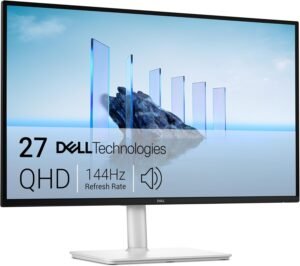
The Dell S2725DSM is a 27-inch QHD gaming monitor designed for users who want a more balanced experience that works for both gaming and everyday productivity. It ranks highly because it combines smooth refresh rates, sharper 1440p visuals, and a more refined overall design that feels comfortable for long-term daily use.
Why Choose the Dell S2725DSM?
Compared to many gaming-focused budget monitors, the S2725DSM puts more emphasis on usability, ergonomics, and overall desktop comfort without giving up the smoother feel that high-refresh gaming provides. It stands out as a practical option for buyers who split time between gaming, work, streaming, and general PC use.
Key Features and Benefits
QHD Resolution and High Refresh Gaming
- Sharper image quality helps games and desktop content look more detailed than standard 1080p displays
- Fast-paced multiplayer games feel cleaner during rapid movement and camera transitions
- Larger 27-inch screen creates a more spacious workspace for multitasking
- Balanced tuning helps the monitor transition naturally between gaming and desktop tasks
Adjustable Ergonomic Stand
- Height, tilt, pivot, and swivel adjustments help improve desk comfort
- Easier to position correctly during long gaming or work sessions
- More flexible setup experience than many entry-level gaming monitors
- Useful for mixed-use desks where viewing angles frequently change
IPS Panel and Everyday Usability
- IPS panel is designed to provide more consistent viewing angles and color presentation
- Cleaner image consistency helps with both gaming and productivity tasks
- Works naturally in setups that alternate between gaming, browsing, and media use
- Less aggressively styled than many gaming-focused alternatives
Specifications at a Glance
- 27-inch display
- QHD resolution (2560×1440)
- Up to 144Hz refresh rate
- IPS panel
- Adaptive sync support available
- Ergonomic stand with multiple adjustment options
- HDMI and DisplayPort connectivity
Who Is It For?
- Gamers wanting one monitor for both gaming and productivity
- Users upgrading from older 1080p office or gaming displays
- Buyers prioritizing ergonomics and long-session comfort
- People who prefer a cleaner, less aggressive gaming monitor design
Pros & Cons
Pros
- Balanced mix of gaming smoothness and general desktop comfort
- Ergonomic stand adds meaningful comfort improvements
- 1440p resolution feels noticeably sharper than standard 1080p
Cons
- Lower refresh rate than some esports-focused alternatives
- Less gaming-focused tuning than higher-end competitive monitors
Final Verdict
Users splitting time between gaming, work, and general desktop use may appreciate the S2725DSM’s more refined and productivity-friendly approach. It makes the most sense for users who want smoother gaming performance while also prioritizing comfort, workspace flexibility, and everyday usability.
3. MSI G274QPF-QD
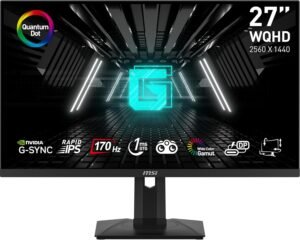
The MSI G274QPF-QD is a 27-inch QHD gaming monitor aimed at users who want a more premium-feeling experience without stepping into significantly higher price tiers. It ranks near the top of this list because it balances gaming responsiveness, sharper visuals, and stronger overall image quality in a way that works well across both gaming and everyday desktop use.
Why Choose the MSI G274QPF-QD?
Among the 1440p monitors in this ranking, the G274QPF-QD stands out for combining fast gaming performance with richer color presentation and a more refined overall viewing experience. It feels less stripped down than many budget-focused gaming displays, making it easier to recommend for users who split time between gaming, streaming, content consumption, and productivity.
Key Features and Benefits
Fast IPS Gaming Experience
- Motion remains fluid during both competitive shooters and more cinematic games
- Fast IPS panel helps motion appear cleaner during quick camera movement
- Responsive feel works well for shooters, racing games, and fast multiplayer titles
- Adaptive sync support is designed to reduce tearing during gameplay
Sharper 1440p Visuals
- QHD resolution improves detail and desktop workspace compared to 1080p monitors
- Larger screen size creates a more immersive feel in single-player and open-world games
- Better clarity helps text and interface elements appear cleaner during daily use
- Balanced resolution works well for both gaming and productivity
More Premium Overall Presentation
- Wider color support helps games and media appear more vibrant
- Monitor design feels more polished than many entry-level gaming displays
- USB-C connectivity may improve compatibility for some mixed-device setups
- Suitable for users wanting a monitor that feels versatile beyond gaming alone
Specifications at a Glance
- 27-inch display
- QHD resolution (2560×1440)
- Up to 170Hz refresh rate
- IPS panel
- Adaptive sync support available
- USB-C, HDMI, and DisplayPort connectivity
- HDR support available
Who Is It For?
- Gamers building a long-term 1440p setup
- Users mixing competitive gaming with everyday productivity
- Players wanting stronger image quality without moving into premium-tier pricing
- PC users who regularly switch between gaming, streaming, and desktop work
Pros & Cons
Pros
- Strong balance of responsiveness and image quality
- 1440p resolution feels noticeably sharper than standard 1080p displays
- More refined overall presentation than many budget gaming monitors
Cons
- HDR performance is still limited compared to higher-end display technologies
- Requires a capable PC to fully benefit from higher refresh gameplay at 1440p
Final Verdict
Players wanting stronger color presentation and sharper 1440p visuals without stepping into premium-tier pricing will likely find the G274QPF-QD especially appealing. It suits users who want smoother gameplay, sharper visuals, and stronger everyday usability in a single display.
2. AOC Q27G3XMN
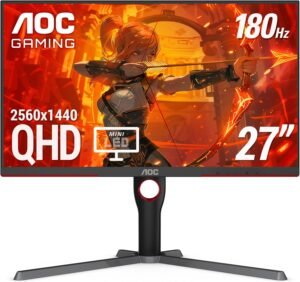
The AOC Q27G3XMN is a 27-inch QHD gaming monitor designed for players who care as much about visual immersion as they do smooth gameplay. It ranks near the top of this list because it delivers a more premium-looking gaming experience than most budget-focused monitors, especially in darker games and HDR-supported content.
Why Choose the AOC Q27G3XMN?
What separates the Q27G3XMN from many similarly priced gaming monitors is its Mini-LED backlighting and local dimming approach, which can create noticeably stronger contrast and a more dynamic image in supported games and media. It feels more cinematic than typical budget IPS gaming displays while still maintaining the responsiveness expected from a modern high-refresh monitor.
Key Features and Benefits
Mini-LED Backlighting and Local Dimming
- Dark scenes and highlights typically appear more defined than on standard edge-lit displays
- Improved contrast helps games feel more immersive during cinematic scenes
- HDR-supported content can appear more impactful depending on game and media support
- Better separation between bright and dark areas improves perceived depth in many games
QHD High Refresh Gaming
- 1440p resolution provides sharper detail than standard 1080p gaming monitors
- Rapid movement appears cleaner during competitive matches and fast-paced gameplay
- Larger screen size handles both immersive gaming and everyday desktop tasks comfortably
- Adaptive sync support is designed to reduce tearing during gameplay
More Premium Visual Presentation
- Color presentation is typically more vibrant than many entry-level gaming monitors
- Suited for players who prioritize image quality alongside responsiveness
- Stronger visual depth helps single-player games feel more engaging
- More cinematic overall presentation than many esports-focused alternatives
Specifications at a Glance
- 27-inch display
- QHD resolution (2560×1440)
- Up to 180Hz refresh rate
- Mini-LED backlighting
- Adaptive sync support available
- HDMI and DisplayPort connectivity
- HDR support available
Who Is It For?
- Gamers focused on immersive AAA and single-player experiences
- Users wanting stronger HDR presentation without moving into OLED pricing
- Players upgrading from standard IPS or VA gaming monitors
- PC gamers who want a balance between visual quality and smooth gameplay
Pros & Cons
Pros
- More immersive contrast and HDR presentation than many budget gaming monitors
- 1440p resolution and high refresh combination feels modern and versatile
- Strong overall visual experience for gaming and media consumption
Cons
- HDR experience can vary depending on game support and settings
- Less esports-focused than some competitive gaming alternatives
Final Verdict
Players prioritizing HDR presentation and stronger contrast will likely appreciate the Q27G3XMN more than traditional budget IPS alternatives. It appeals more to players who value immersion, contrast, and stronger HDR presentation alongside high-refresh motion clarity.
1. Gigabyte M27Q2
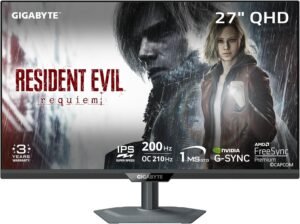
The Gigabyte M27Q2 takes the top spot in this ranking because it delivers one of the strongest overall balances of gaming performance, image quality, and day-to-day desktop use in the budget gaming monitor category. Designed for gamers who want a display that can comfortably handle competitive gaming, immersive single-player titles, and general desktop work, it fits especially well as a long-term all-around upgrade.
Why Choose the Gigabyte M27Q2?
What helps the M27Q2 stand out is how well it blends high-refresh gaming with practical everyday features that many budget gaming monitors overlook. It feels less specialized than esports-only displays while still maintaining the responsiveness and visual clarity most gamers are looking for in a well-rounded 1440p setup.
Key Features and Benefits
Balanced 1440p High Refresh Experience
- QHD resolution helps games and desktop content appear sharper than standard 1080p displays
- Fast-paced games maintain a responsive and fluid feel across multiple genres
- Larger screen size creates a more immersive overall experience
- Suited for users who want one monitor for both gaming and mixed desktop tasks
IPS Panel and Everyday Usability
- IPS panel is designed to provide more consistent viewing angles and image presentation
- Desktop work, browsing, and media consumption feel more comfortable during long sessions
- Versatile image tuning works well across different game genres and general use
- Cleaner visual presentation than many lower-end gaming monitors
Productivity-Friendly Features
- KVM functionality can simplify switching between multiple connected devices
- USB-C connectivity may improve compatibility for mixed-device setups
- Adjustable stand helps improve long-session comfort
- Works naturally in hybrid gaming and work-from-home environments
Specifications at a Glance
- 27-inch display
- QHD resolution (2560×1440)
- High refresh rate support available
- IPS panel
- Adaptive sync support available
- HDMI, DisplayPort, and USB-C connectivity
- KVM functionality available
- Height and tilt adjustment support
Who Is It For?
- Gamers building a long-term 1440p setup
- Users splitting time between gaming and productivity work
- Players wanting one monitor that handles multiple use cases well
- Buyers upgrading from older 1080p gaming or office displays
Pros & Cons
Pros
- Strong balance between gaming responsiveness and everyday usability
- 1440p resolution and high refresh pairing feels modern and versatile
- Productivity-focused features add flexibility beyond gaming alone
Cons
- Requires a capable PC to fully benefit from higher refresh gameplay at 1440p
- HDR experience is more limited than premium Mini-LED or OLED displays
Final Verdict
For most gamers, the M27Q2 strikes one of the most complete balances between gaming performance, desktop usability, and long-term versatility. It fits especially well for users wanting one display that can comfortably handle competitive gaming, immersive titles, and everyday desktop work.
Use-Case Sections (e.g., “Best for FPS”, “Best for Travel”)
Best for Competitive FPS Gaming — KTC H25T7-3
Players focused heavily on reaction speed and fast-paced multiplayer games will likely benefit more from the H25T7-3 than the larger 1440p options in this ranking. Its smaller screen size and 240Hz-focused approach help keep movement easier to track during rapid camera flicks and close-range engagements. For games like Valorant, CS2, and Apex Legends, it feels more purpose-built for competitive play than visually immersive gaming.
Best for All-Around Gaming and Productivity — Gigabyte M27Q2
The M27Q2 stands out as one of the most versatile monitors in this guide because it handles gaming, desktop work, streaming, and general multitasking comfortably without leaning too heavily toward one specific niche. It feels more adaptable than esports-focused displays while still maintaining the responsiveness most gamers want for modern multiplayer titles. The additional productivity-focused features also make it easier to use as a primary long-term monitor.
Best for First 1440p Upgrade — Acer Nitro XV272U
For gamers moving from older 1080p displays, the XV272U offers one of the most noticeable visual upgrades in this ranking without becoming overly specialized or difficult to drive. Games appear sharper and more spacious, especially in larger open-world titles and cinematic single-player experiences. Compared to the 1080p monitors lower in the list, it creates a more modern overall gaming experience while still remaining practical for competitive games.
Best for HDR and Immersive AAA Gaming — AOC Q27G3XMN
The Q27G3XMN is particularly well suited for players who spend more time in cinematic single-player games than purely competitive shooters. Its stronger contrast and Mini-LED approach help darker scenes and lighting effects appear more dramatic than typical budget IPS monitors. Compared to the more esports-focused displays in this ranking, it places greater emphasis on atmosphere, visual depth, and immersion.
Best for Budget Gaming Setups — KTC H24F8
The H24F8 makes the most sense for buyers building a first gaming setup who want smoother gameplay without immediately jumping into higher-priced 1440p monitors. It focuses on the core features that matter most for multiplayer gaming while avoiding unnecessary extras that raise overall cost. Compared to standard office displays or older 60Hz monitors, it still delivers a noticeably more responsive gaming experience for everyday play.
How We Ranked
These gaming monitors were evaluated based on how well they balance gaming performance, image quality, usability, and overall value for different types of players. We also considered how each monitor fits specific gaming scenarios, from competitive esports to immersive 1440p gaming setups.
Refresh Rate and Motion Handling
Smooth gameplay was one of the biggest ranking factors, especially for competitive multiplayer gaming. Higher refresh rates and cleaner motion handling can make fast movement easier to follow during shooters, racing games, and reaction-heavy gameplay.
Resolution and Visual Clarity
We looked closely at how much visual improvement each monitor offers for everyday gaming and desktop use. While 1080p still works well for budget and esports-focused setups, 1440p options generally provide a sharper and more spacious experience.
Panel Quality and Everyday Use
Gaming monitors are often used for more than gaming alone, so overall image consistency and general desktop comfort also mattered. IPS and Mini-LED displays that handled mixed-use tasks more naturally ranked higher for versatility.
Ergonomics and Usability
Stand adjustments, connectivity options, and overall ease of use helped separate some monitors from more basic alternatives. Features that improve long-session comfort or simplify mixed gaming and productivity setups were given additional consideration.
Use-Case Flexibility
Some monitors are designed mainly for competitive gaming, while others work better as all-around displays. Rankings were influenced by how effectively each monitor serves its intended audience without feeling overly specialized or restrictive.
How to Use This List
The best gaming monitor depends heavily on the types of games you play, your PC hardware, and whether you prioritize responsiveness, immersion, or everyday versatility. The comparison table and use-case sections are designed to help narrow down which monitor fits your setup most naturally.
Final Verdict
The best budget gaming monitor ultimately depends on the type of games you play, the hardware you’re using, and whether you prioritize competitive responsiveness, sharper visuals, or a more balanced everyday experience. Some players will benefit more from smaller high-refresh esports displays, while others may prefer moving into 1440p for improved clarity, immersion, and desktop versatility.
For competitive multiplayer gaming, monitors like the KTC H25T7-3 (#7) focus heavily on refresh rate and motion clarity to support faster reaction-based gameplay. More balanced 1440p options such as the Acer Nitro XV272U (#5) and Gigabyte M27Q2 (#1) are better suited for players who want a mix of competitive gaming, immersive single-player experiences, and general desktop use. Meanwhile, displays like the AOC Q27G3XMN (#2) place more emphasis on contrast and HDR presentation for players who care more about cinematic visuals and atmosphere.
For most buyers, choosing the right monitor comes down to finding the balance between refresh rate, resolution, screen size, and long-term usability that fits naturally into their setup and the types of games they play most often.