
Monitor Arm vs Monitor Stand: Which Is Better for Your Desk?
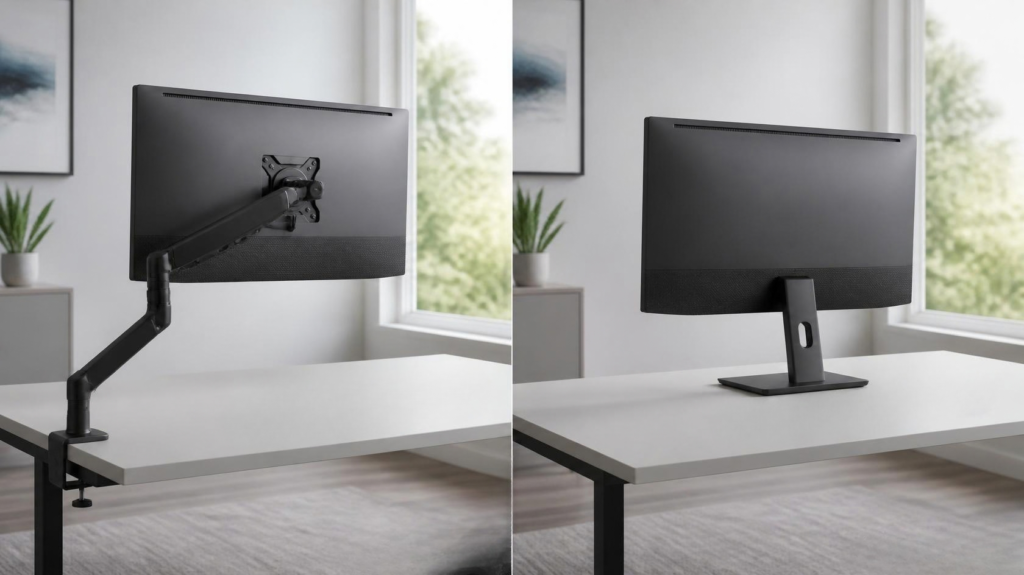
Choosing between a monitor arm and a traditional monitor stand might seem like a small decision, but it can have a noticeable impact on your desk space, comfort, and how flexible your setup is.
The stand included with your monitor is often perfectly usable. It supports the display, requires little or no installation, and costs you nothing extra. A monitor arm, however, can free up desk space and give you much more control over the height, angle, and position of your screen.
So, when comparing a monitor arm vs monitor stand, which is actually better?
For most people who want maximum adjustability and a cleaner workspace, a monitor arm offers more flexibility. A good monitor stand can still be the better choice if you rarely reposition your screen, already have sufficient adjustment, or simply don’t want to spend extra money on your setup.
This guide compares monitor arms and stands across ergonomics, desk space, gaming, productivity, multi-monitor setups, compatibility, cost, and long-term value to help you decide which makes more sense for your desk.
For more ways to improve your setup, browse our tech accessories guides and rankings covering workspace, charging, connectivity, and productivity gear.
Understanding the Difference
Before comparing the two, it’s important to understand what actually changes when you replace your monitor’s original stand with an arm.
What a Monitor Stand Does
A monitor stand is the base and support structure that sits directly on your desk and holds the monitor upright.
Most desktop monitors include a stand in the box. Basic models may offer little more than tilt adjustment, while better stands can support height adjustment, swivel, rotation, and sometimes portrait orientation.
The biggest advantage is simplicity. Attach the stand, place the monitor on your desk, and you’re ready to go.
The downside is that the base occupies permanent desk space. Your positioning options are also limited by whatever adjustments the manufacturer built into the stand.
What a Monitor Arm Does
A monitor arm replaces the original stand and attaches the monitor to an adjustable support mounted to your desk.
Most use either a desk clamp or grommet mount. The monitor itself typically attaches using a standardized VESA mounting pattern.
Depending on the arm, you may be able to adjust:
- Monitor height
- Viewing distance
- Tilt
- Swivel
- Rotation
- Side-to-side positioning
Many modern arms use gas springs or mechanical spring systems that allow the display to move relatively easily while remaining in position once released.
Why Most Monitors Come with Stands
A stand works with the monitor immediately and doesn’t require users to have a VESA-compatible desk setup or purchase another accessory.
It is also the simplest solution for the widest range of buyers.
Manufacturers can design the included stand around the specific monitor’s size and weight, eliminating many of the compatibility questions associated with aftermarket monitor arms.
Why Many Users Upgrade to a Monitor Arm
The main monitor arm benefits are additional positioning flexibility and reduced use of desktop space.
Instead of having a large base underneath the display, the monitor is supported from a smaller mounting point near the back of the desk.
That can be especially useful for small desks, multi-monitor setups, standing desks, and workstations where the monitor needs to move frequently.
Monitor Arm vs Monitor Stand at a Glance
Here is the basic difference between a monitor stand vs monitor arm:
| Category | Monitor Arm | Monitor Stand |
|---|---|---|
| Cost | Additional purchase | Usually included |
| Desk Space | Excellent | Depends on base size |
| Ergonomics | Excellent with proper adjustment | Good if stand is adjustable |
| Adjustability | Usually extensive | Varies significantly |
| Productivity | Very flexible | Good for fixed setups |
| Gaming | Excellent positioning flexibility | Usually sufficient |
| Cable Management | Often integrated | Varies |
| Multi-Monitor Setups | Excellent | Can become crowded |
| Standing Desks | Excellent | Good if height is sufficient |
| Installation | Requires setup | Very simple |
| Long-Term Flexibility | Excellent | Limited to stand design |
Neither option automatically makes a setup better. The biggest question is whether you will actually benefit from the additional flexibility of an arm.
Desk Space and Setup Aesthetics
One of the most immediately noticeable differences between a monitor arm and stand is how much of your desk remains usable.
How Much Desk Space Does a Monitor Arm Actually Save?
A monitor arm doesn’t eliminate the monitor’s footprint entirely. The clamp or grommet still requires some space, and the arm itself usually extends behind or above the desk.
What it eliminates is the large base directly underneath the monitor.
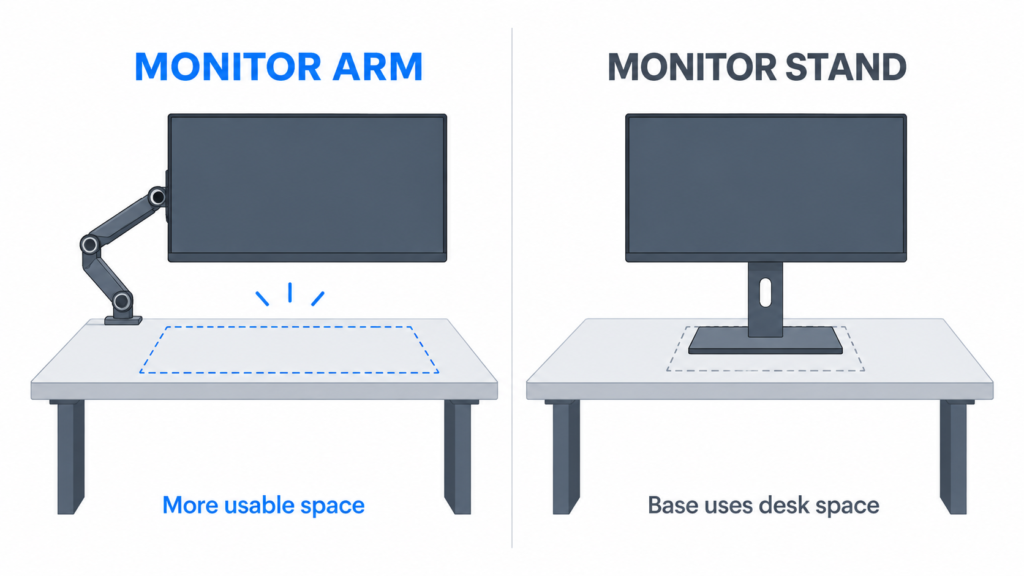
This can make the area beneath your display usable for other purposes.
Depending on your setup, that could mean more room for:
- A keyboard
- Large mouse pad
- Speakers
- Laptop
- Docking station
- Charging devices
- Controllers
- Other desk accessories
The difference is most substantial when your monitor has a particularly large stand or when you’re working with a shallow or narrow desk.
On a very large desk with a compact monitor stand, the extra space may be much less important.
Cleaner Cable Management and Reduced Clutter
Many monitor arms include channels or clips that allow display and power cables to run along the arm instead of hanging behind the monitor.
That can create a cleaner appearance, especially when the monitor is positioned away from the wall.
Cable management isn’t automatic, though. You still need enough cable length to allow the arm to move freely, and cables shouldn’t be pulled tight when the monitor is repositioned.
Which Option Looks Better in a Modern Desk Setup?
This mostly comes down to personal preference.
Monitor arms can create a floating-screen appearance with very little visible hardware underneath the display. This works particularly well with minimalist workstations.
A high-quality factory stand can also look excellent and may match the monitor’s design better than an aftermarket arm.
If you’re trying to improve more than just your monitor positioning, our guide to desk setup optimization covers monitor placement, cable management, accessories, and other ways to create a more functional workspace.
The Best Choice for Small Desks and Limited Workspaces
A monitor arm for a small desk can be particularly useful because every bit of available surface space matters.
This applies to:
- Small home offices
- Dorm rooms
- Compact computer desks
- Corner desks
- Shared workspaces
Moving the monitor support toward the rear edge of the desk can leave considerably more usable space in front of you.
Just make sure the desk itself is suitable for a clamp or grommet mount before assuming an arm will work.
Ergonomics and Comfort
Ergonomics is one of the biggest reasons people consider replacing their original monitor stand.
But a monitor arm isn’t automatically ergonomic simply because it moves.
Better Monitor Positioning for Eye-Level Viewing
A monitor arm makes it easier to raise or lower your screen until it reaches a comfortable position.
For a typical setup, your monitor should be positioned so you can view the screen comfortably without repeatedly tilting your head upward or downward.
An arm can be especially useful if the included monitor stand has little or no height adjustment.
Adjusting Viewing Distance and Screen Angle
Height isn’t the only consideration.
A monitor arm can also allow you to move the display closer or farther away, tilt it, rotate it, or move it sideways.
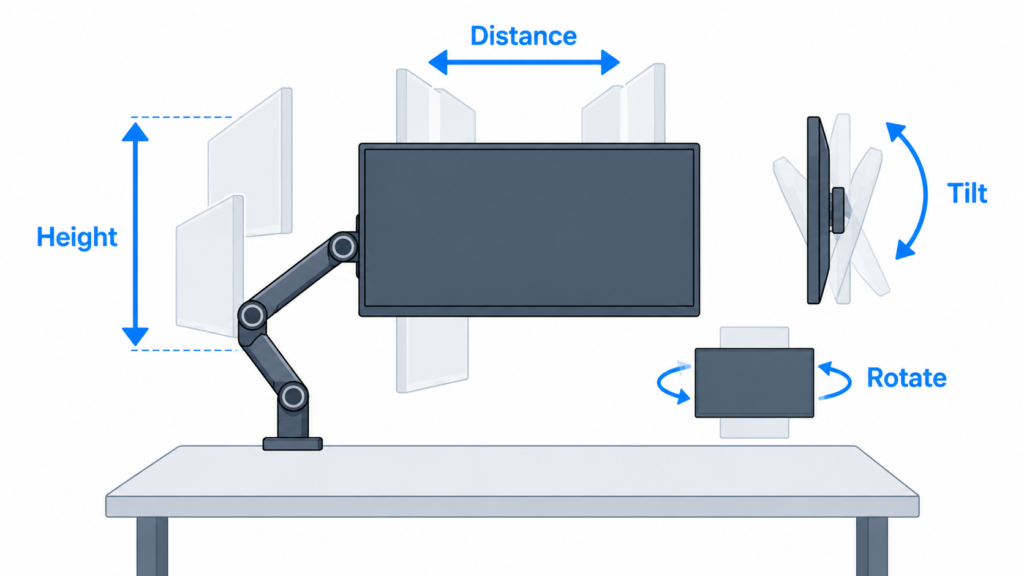
That flexibility becomes useful when your working position changes throughout the day.
You might pull the monitor closer when reading small text, push it farther away when watching content, or reposition it when sharing the screen with someone else.
Reducing Neck and Back Strain
Proper monitor positioning can contribute to a more comfortable workstation because you aren’t constantly adapting your body to a poorly positioned display.
However, a monitor arm isn’t a cure for poor posture.
Chair height, desk height, keyboard and mouse placement, viewing distance, and your sitting habits all contribute to workstation ergonomics.
The real advantage of a monitor arm is that it gives you more control over one important part of that setup.
When a Monitor Stand Is Ergonomically Sufficient
Not everyone needs an arm.
Many premium monitors already include excellent stands with height, tilt, swivel, and rotation adjustment.
If you can comfortably position your monitor using its existing stand, replacing it solely for ergonomic reasons may provide very little benefit.
The biggest difference tends to appear with budget monitors that include basic fixed-height stands.
In that situation, an aftermarket arm can add adjustment that the original monitor simply doesn’t provide.
Recommended Monitor Height and Placement
There isn’t one exact monitor position that works for every person, screen size, and desk.
As a general starting point:
- Keep the monitor directly in front of your primary seating position.
- Position it at a comfortable viewing distance.
- Adjust the height so you aren’t repeatedly tilting your head upward.
- Tilt the screen to maintain a comfortable viewing angle.
- Reduce glare from nearby lights and windows.
The goal isn’t to hit a perfect measurement. It’s to create a position where you can view the display naturally without continually adjusting your neck or posture.
Productivity Benefits for Work and Study
A monitor arm doesn’t make your computer faster, but the added flexibility can make a workstation easier to adapt throughout the day.
Faster Adjustments Throughout the Day
With a properly adjusted arm, moving the monitor can take only a few seconds.
You can bring the display forward for focused work, push it backward when you need more desk space, rotate it into portrait orientation if supported, or move it aside temporarily.
A traditional stand can sometimes make the same adjustments, but its movement is usually more limited.
Workspace Flexibility and Multitasking
Flexible positioning is particularly useful if your desk serves multiple purposes.
Someone might use the same workspace for office work during the day, gaming at night, and studying or creative work in between.
Instead of designing the entire desk around one permanent monitor position, an arm lets the display adapt to the task.
Work-From-Home Advantages
Monitor arms can be useful in home offices where space is limited or multiple activities happen at the same workstation.
During a video call, for example, you can reposition the display and webcam. When the call ends, the monitor can return to its normal working position.
They can also work well with shared desks because different users can reposition the monitor for their height and seating position.
Benefits for Different Types of Professionals
The value of additional monitor movement depends heavily on what you do at the desk.
Programmers and Developers
Developers may benefit from portrait monitor orientation for viewing longer sections of code or from multiple displays positioned closely together.
Finance and Spreadsheet Users
Large spreadsheets and dashboards often benefit from multi-monitor setups. Arms can make it easier to align multiple displays while reducing the amount of desk space occupied by several individual bases.
Designers and Creative Professionals
Designers, editors, and other creative professionals may benefit from being able to change viewing distance and reposition larger displays.
General Office Productivity
For email, documents, web browsing, and everyday office tasks, a monitor arm’s main benefits are comfort, desk space, and flexibility rather than a direct increase in productivity.
Gaming Considerations
The monitor arm vs stand for gaming comparison is slightly different because monitor positioning can affect comfort without affecting the actual performance of the computer.
Monitor Placement and Gaming Comfort
Gamers often spend long periods in one position.
Being able to control monitor height, angle, and viewing distance can help create a more comfortable gaming position, especially if the factory stand has limited adjustment.
Some players also prefer bringing the monitor closer for competitive games and moving it farther away for more relaxed gaming.
Extra Desk Space for Mouse Movement
Desk space can matter considerably for players who use low mouse sensitivity.
A large mouse pad combined with a full-size keyboard can consume most of a smaller gaming desk.
Removing a large monitor base can create additional room for mouse movement and make it easier to arrange peripherals.
Do Monitor Arms Improve Gaming Performance?
A monitor arm will not increase FPS, reduce input latency, improve refresh rate, or make your GPU render games faster.
Its benefits are physical rather than computational.
Better positioning may make your gaming setup more comfortable, but it doesn’t change the underlying performance of your PC or monitor.
If you’re interested in the hardware and settings that actually affect gaming speed and responsiveness, see what actually improves gaming performance.
How Competitive Gamers Use Monitor Arms
Some competitive players use monitor arms because they prefer very specific screen positions.
An arm can allow the display to sit closer to the player without requiring the monitor’s base to occupy the same area as the keyboard and mouse.
However, this is largely personal preference.
Tournament setups, esports desks, screen sizes, and individual playing styles vary significantly. You don’t need a monitor arm to play competitively.
Dual Monitor and Ultrawide Setups
Monitor mounting becomes more important as displays get larger or as more monitors are added to a desk.
Why Monitor Arms Excel in Multi-Monitor Setups
Two individual monitor stands mean two separate bases taking up desk space.
Using arms can move those support points toward the back of the desk while giving you more control over the alignment between displays.
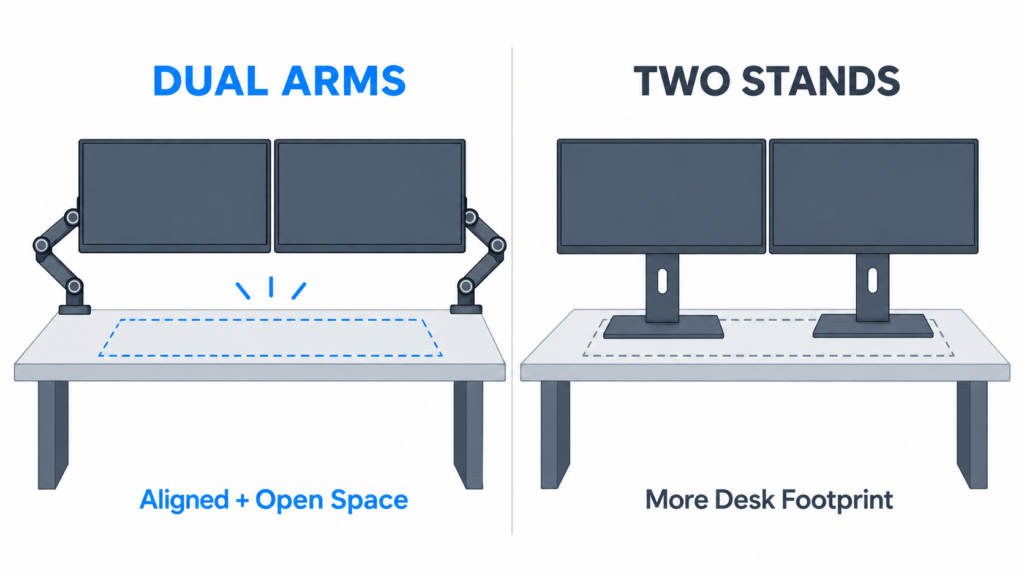
That makes it easier to adjust:
- Screen height
- Distance between displays
- Viewing angle
- Symmetry
- Orientation
This is one of the strongest arguments for a monitor arm vs stand for dual monitors.
Dual Monitor Arms vs Dual-Monitor Mounts
You can mount two monitors using separate single-monitor arms or one dual-monitor mounting system.
Separate arms generally provide more independent positioning.
A dual mount can reduce the number of mounting points and create a cleaner installation, but the range of movement depends heavily on its design.
Neither option is universally better. Consider monitor size, weight, desired positioning, and how frequently each screen will move.
Using Monitor Stands with Two Monitors
There is nothing wrong with using the original stands for a dual-monitor setup.
If your desk is large enough and the monitors align properly, two stands can be simple and effective.
The disadvantages become more apparent when the stands have large bases, different height ranges, or limited adjustment.
Choosing Between Dual Monitors and an Ultrawide
Mounting is only one consideration when deciding between two screens and one large display.
Dual monitors provide independent displays and considerable layout flexibility, while ultrawides provide a large continuous workspace without a bezel between screens.
Our ultrawide vs dual monitors comparison breaks down the differences in productivity, gaming, desk space, multitasking, and overall usability.
Standing Desk Compatibility
Monitor arms and standing desks are often paired because both are designed around adjustability.
Why Monitor Arms Pair Well with Standing Desks
When you switch between sitting and standing, your relationship to the monitor changes.
A monitor arm gives you additional control over screen height and angle if your preferred monitor position isn’t identical in both positions.
Height Adjustments and Frequent Position Changes
If you alternate frequently between sitting and standing, an arm with smooth movement can make small adjustments easier.
You may not need to reposition the screen every time the desk moves, but having the option can be useful.
Do Monitor Arms Move with Standing Desks?
Yes, when the monitor arm is mounted directly to the desktop.
Because the mounting point rises and lowers with the desk, the monitor moves with it.
You should still account for cable length and make sure nothing becomes stretched or caught when the desk changes height.
Compatibility and Installation
Compatibility is one area where a traditional stand has a major advantage: the included stand is already designed for the monitor.
Buying an arm requires a few additional checks.
Checking Monitor Arm Compatibility
Before purchasing an arm, check three major specifications:
VESA support: The monitor needs compatible mounting holes or an appropriate adapter.
Size limits: Manufacturers often provide recommended screen-size ranges.
Weight limits: The arm must support the actual weight of the monitor.
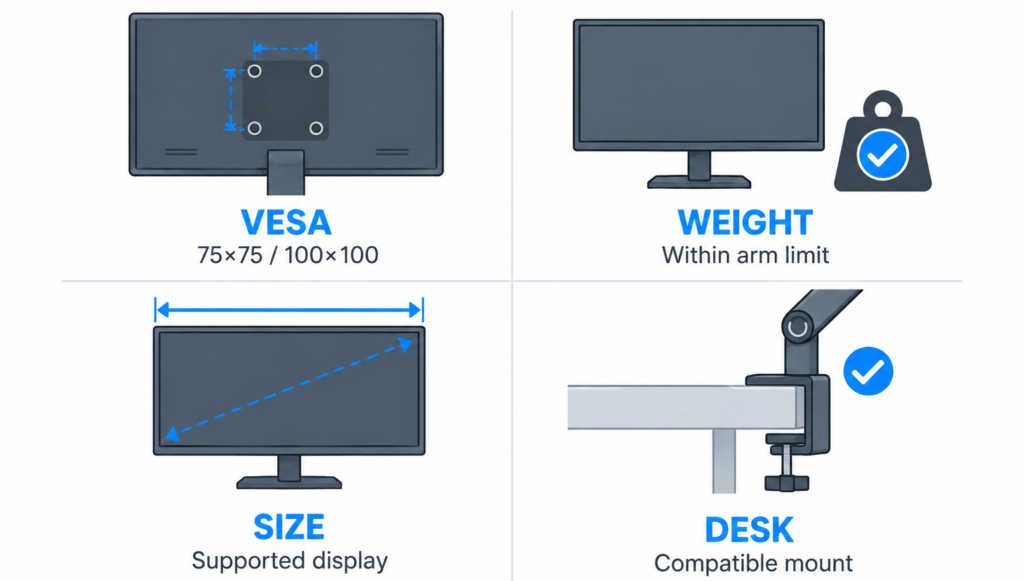
Weight is particularly important. Screen size alone doesn’t determine whether an arm can safely support a display.
Understanding VESA Mount Standards
VESA mounting standards define the spacing of mounting holes on the back of compatible monitors.
Two common patterns are:
- 75 × 75 mm
- 100 × 100 mm
Many monitor arms support both.
Don’t assume compatibility based only on appearance. Check the specifications for both your monitor and the arm before purchasing.
Support for Ultrawide and Heavy Monitors
A monitor arm for an ultrawide monitor needs to support the display’s weight and dimensions.
Large ultrawides can place more stress on the arm than smaller displays. An arm that works perfectly with a lightweight 24-inch monitor may struggle to hold a much larger screen in position.
If you’re shopping for an arm rather than deciding whether you need one, our Top 10 monitor arms ranking compares options for different monitor sizes and setups.
Installation Requirements and Desk Strength
Most monitor arms attach in one of two ways.
Clamp mounts attach around the edge of the desktop.
Grommet mounts attach through a hole in the desk.
You need to check the arm’s supported desk-thickness range and make sure the mounting location is strong enough.
Some desks have hollow-core construction, glass surfaces, unusual edges, or structural designs that make clamp mounting difficult or inappropriate.
Common Concerns About Damage and Stability
A properly installed monitor arm on a compatible desk shouldn’t automatically damage the desk.
Problems are more likely when too much force is concentrated on a weak surface, the mounting hardware is overtightened, the desk isn’t suitable for the mount, or the monitor exceeds the arm’s capacity.
Stability also depends on the quality of the arm and desk.
Some monitor wobble can originate from the desk itself. If the desktop shakes when you type or move the mouse, an arm may transmit that movement to the display.
Renting, Temporary Setups, and Removal
A monitor stand can make more sense for temporary workstations because there is nothing attached to the desk.
Clamp-mounted arms are removable, but they still require installation and can potentially leave marks depending on the desk material and mounting pressure.
If you rent or frequently move your setup, consider how easily you’ll be able to install and remove the arm.
Cost, Value, and Long-Term Ownership
The original monitor stand has one unbeatable advantage: you already paid for it when you bought the monitor.
Typical Monitor Arm Price Ranges
Monitor arms range from inexpensive basic mounts to premium models designed for heavy monitors, ultrawides, or highly adjustable professional workstations.
Price often increases with:
- Weight capacity
- Build quality
- Adjustment range
- Gas-spring mechanisms
- Multi-monitor support
- Cable management
- Warranty and support
The cheapest arm isn’t necessarily the best value if it struggles to keep your monitor in position.
What You Get for the Additional Cost
You’re primarily paying for flexibility.
A good monitor arm can remain useful even when you replace your monitor, provided the new display remains within its compatibility limits.
That gives a quality arm potential long-term value beyond a single monitor.
When a Monitor Stand Offers Better Value
A stand is difficult to beat if your needs are simple.
Stick with your existing stand if:
- It already reaches a comfortable height.
- You don’t need additional desk space.
- You rarely reposition the monitor.
- You’re satisfied with its appearance.
- You want to avoid another purchase.
For a casual fixed workstation, upgrading to an arm simply because it looks better may not provide enough practical value to justify the expense.
Do Premium Monitor Arms Justify Their Price?
Sometimes.
Premium arms tend to make the most sense with expensive, large, or heavy displays or in workstations where the monitor moves frequently.
Better adjustment mechanisms, stronger construction, and higher weight capacities can become important in those situations.
For a lightweight monitor that will barely move after installation, a premium arm may provide features you never use.
Durability and Reliability
Both monitor stands and quality monitor arms can last for years, but they fail in different ways.
Expected Lifespan of a Monitor Arm
There is no universal lifespan because construction quality, monitor weight, adjustment frequency, and mechanism design all matter.
A well-built arm used within its rated limits can potentially outlast the monitor attached to it.
Sagging, Drifting, and Loosening Over Time
One of the most common complaints with adjustable arms is a monitor that gradually moves out of position.
This can happen because:
- Tension isn’t adjusted correctly.
- The monitor is too heavy.
- Joints loosen.
- Internal mechanisms wear over time.
Some arms allow tension to be adjusted to match the weight of the monitor.
If the display continually sinks after proper adjustment, the arm may not be suitable for its weight.
Reliability Differences Between Arms and Stands
A traditional stand is mechanically simpler.
Once positioned, there are usually fewer moving parts and fewer potential adjustment issues.
An arm introduces additional joints and mechanisms in exchange for much greater flexibility.
That doesn’t make arms unreliable—it simply makes build quality and proper setup more important.
Maintenance and Adjustment Requirements
Monitor stands generally require almost no maintenance.
An arm may occasionally need tension adjustment or tightening, particularly after extended use or after switching to a different monitor.
Check mounting hardware periodically and follow the manufacturer’s installation and adjustment instructions.
Which Option Is Best for Your Setup?
The better choice depends less on whether arms or stands are universally superior and more on what your workstation actually needs.
Students and Dorm Rooms
Small dorm desks make desk space valuable, so an arm can be useful.
However, students should make sure the desk can accept a mount—especially when using furniture supplied by a school or rental property.
If mounting isn’t practical, the original stand is the safer and simpler choice.
Home Office Setups
A monitor arm can be a worthwhile home-office upgrade if you spend many hours at your desk.
The ability to fine-tune positioning, reclaim surface space, and adapt the workstation for different tasks can be particularly useful for full-time remote work.
Gaming Setups
Gamers benefit most from the extra desk space and positioning flexibility.
An arm is especially useful with large mouse pads, smaller desks, or setups where the monitor is frequently moved closer to the player.
It won’t improve game performance, though, so don’t treat it as a required gaming upgrade.
Content Creation Workstations
Video editors, photographers, designers, streamers, and other creators often have complicated desk layouts involving multiple screens and additional hardware.
Monitor arms can help make better use of the available space while allowing displays to be repositioned around cameras, microphones, control surfaces, and other equipment.
Programming and Development Work
Developers using multiple monitors or portrait-oriented secondary displays can benefit significantly from flexible mounting.
A monitor arm can also make it easier to align displays with different dimensions.
Ultrawide Monitor Users
An arm can work extremely well with an ultrawide, but compatibility becomes more important as displays become larger and heavier.
Check the monitor’s weight, VESA pattern, and the arm’s specifications carefully.
A strong factory stand may be preferable to an underpowered arm.
Budget-Conscious Buyers
If your monitor’s included stand already does everything you need, keep it.
A monitor arm is an optional accessory—not a requirement for a good computer setup.
If you are deciding where accessories like monitor arms should fit into your overall upgrade priorities, our guide on how to choose the right tech accessories for your setup explains how to focus on upgrades that solve actual problems rather than simply adding more gear.
Monitor Arm Pros and Cons
Advantages
More positioning flexibility: Adjust height, viewing distance, tilt, swivel, and sometimes rotation.
More usable desk space: Removes the large monitor base from the center of your workspace.
Better for multiple monitors: Makes alignment and positioning easier.
Useful with standing desks: Allows additional adjustment when changing working positions.
Cleaner appearance: Can create a floating-monitor look and improve cable routing.
Long-term flexibility: A compatible arm can potentially be reused with future monitors.
Drawbacks
Additional cost: You’re replacing a stand that was already included.
Compatibility requirements: Monitor weight, VESA pattern, and desk construction all matter.
Installation: Requires more setup than a normal stand.
Potential stability issues: Poor-quality arms or unstable desks can cause wobble.
May require adjustment: Tension and joints may occasionally need to be retuned.
Monitor Stand Pros and Cons
Advantages
Usually included: No additional purchase is necessary.
Simple installation: Designed specifically for the monitor.
Reliable: Fewer moving components can mean fewer adjustment issues.
No desk mounting required: Useful for desks that can’t support clamps or grommets.
Can offer excellent ergonomics: Premium height-adjustable stands may provide all the positioning you need.
Drawbacks
Uses desk space: Large bases can occupy a significant portion of smaller desks.
Limited movement: Adjustment depends entirely on the stand’s design.
Less flexible for multiple monitors: Individual bases can make alignment more difficult.
Harder to reposition: Even adjustable stands generally provide less freedom than a good arm.
Final Verdict: Monitor Arm vs Monitor Stand
The right choice depends on what you’re trying to improve.
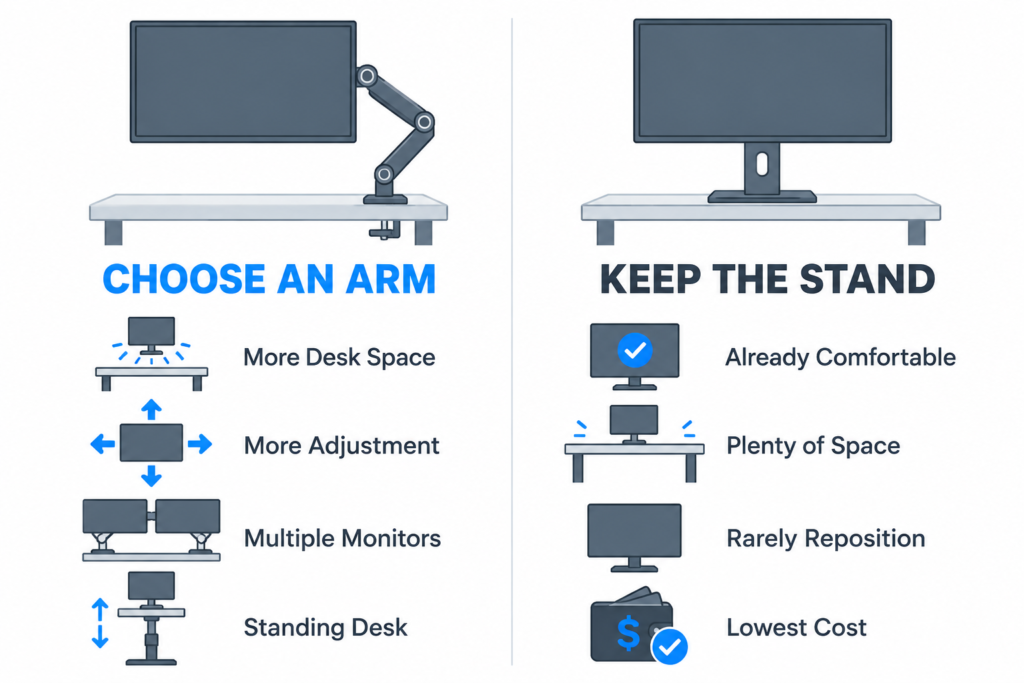
Choose a Monitor Stand If:
- You want the cheapest solution.
- Your included stand already provides enough adjustment.
- You rarely reposition your display.
- You have plenty of desk space.
- Your desk isn’t suitable for mounting.
- You prefer the simplest possible setup.
There is no reason to replace a good monitor stand simply because monitor arms have become popular.
Choose a Monitor Arm If:
- You want more control over monitor positioning.
- You need additional usable desk space.
- Your current stand has poor height adjustment.
- You use multiple monitors.
- You use a standing desk.
- You frequently reposition your display.
- You want a cleaner, more flexible workstation.
Which Is Better for Most Setups?
A monitor arm offers greater flexibility than a traditional stand and can be a worthwhile upgrade for users who need better positioning, more desk space, or easier multi-monitor management.
But the difference matters only if you take advantage of those benefits.
A good height-adjustable monitor stand can already provide a comfortable experience for a fixed workstation. In that situation, switching to an arm may be more of a convenience or aesthetic upgrade than a necessity.
The best approach is to identify what’s actually wrong with your current setup.
If the stand is taking up valuable space, can’t reach a comfortable position, or makes a multi-monitor setup difficult to manage, a monitor arm directly addresses those problems.
If your monitor is already comfortable, stable, and well positioned, keeping the stand is perfectly reasonable.
Frequently Asked Questions
Is a monitor arm really worth it?
A monitor arm can be worth it if you need more desk space, better positioning, easier monitor adjustments, or improved flexibility for a multi-monitor or standing-desk setup.
If your existing stand already provides comfortable positioning and you rarely move the screen, the improvement may be relatively small.
Do monitor arms save space?
Yes, monitor arms can free up usable surface space by removing the large monitor base from the center of the desk.
The amount of space saved depends on the size of your original stand and how the arm is mounted.
Are monitor arms safe?
A properly installed monitor arm should be safe when the monitor and desk are within the manufacturer’s specified weight, size, and mounting limits.
Problems can occur when an arm is overloaded, improperly installed, or mounted to a desk that isn’t strong enough to support it.
Can any monitor use a monitor arm?
No.
The monitor must have a compatible mounting system, typically VESA mounting holes, or support an appropriate adapter.
You also need to confirm that the arm supports the monitor’s size and weight.
Do monitor arms help posture?
A monitor arm can make it easier to position the display at a comfortable height, distance, and angle.
However, the arm itself doesn’t correct posture. Chair position, desk height, keyboard placement, movement habits, and other factors still matter.
Are monitor arms good for gaming?
Yes, particularly if you want additional desk space or more control over the monitor’s position.
They don’t increase FPS, refresh rate, or gaming performance, but they can make a gaming setup more flexible and comfortable.
Do monitor arms wobble?
Some can.
Wobble may come from the arm, mounting point, or desk itself. A sturdy arm mounted correctly to a stable desk should generally provide a more stable experience than a cheap arm attached to a flexible desktop.
Are monitor stands outdated?
No.
Monitor stands remain a simple, reliable, and cost-effective way to support a display. Many modern monitors include excellent height-adjustable stands that provide enough flexibility for most users.
Is a monitor arm necessary for dual monitors?
No.
Two monitors can work perfectly well on their original stands. Arms become more useful when you want to reclaim desk space, improve alignment, or position the displays more precisely.
How much weight can a monitor arm hold?
It depends entirely on the model.
Always compare the arm’s specified weight capacity with the actual weight of your monitor. Don’t assume an arm is compatible based only on screen size.
Should I use a monitor arm with an ultrawide monitor?
A monitor arm can be an excellent option for an ultrawide because it frees desk space and provides more positioning flexibility.
However, larger ultrawide monitors can be heavy. Make sure the arm explicitly supports the monitor’s weight, size, and VESA mounting pattern before installing it.