
Top 10 Monitor Arms
A good monitor arm is one of the fastest ways to upgrade your desk setup. It frees up space, improves posture, and makes your screen easier to position for work, gaming, studying, or creative projects. You don’t need a premium budget to get real ergonomic benefits—many solid arms offer smooth adjustment, sturdy support, and clean cable management at reasonable prices.
In this list, we ranked the best monitor arms (single and dual) based on stability, adjustability, build quality, ease of installation, and overall value—so you can pick the right mount for your monitor size, desk type, and workflow. If you’re planning other upgrades alongside your monitor arm, our guide on how to choose the right tech accessories for your setup can help you prioritize what your workspace actually needs.
Disclosure: As an Amazon Associate I earn from qualifying purchases.
Exploring more everyday tech accessories?
This post is part of our Tech Accessories category, featuring chargers, hubs, stands, mounts, and must-have add-ons that make your tech setup better.
Quick Picks: Best Monitor Arms
Best Overall: Ergotron LX Pro Desk Mount (#1)
Best Dual-Monitor Setup: VARIDESK Dual-Monitor Arm 180° (#3)
Best Budget Starter Option: SIIG Desk Monitor Arm (#10)
How We Ranked the Best Monitor Arms
We ranked each monitor arm using real-world desk and productivity criteria, including:
Ergonomics & range of motion (height, tilt, swivel, rotation, and how easily you can fine-tune your screen)
Stability & build quality (wobble resistance, materials, and how well it holds position over time)
Monitor compatibility (VESA support, screen size range, and weight capacity for common monitors)
Mounting flexibility (clamp vs grommet options and how well it fits different desk thicknesses)
Ease of installation (how quickly most users can set it up, plus adjustability after install)
Cable management (channels/clips that keep the setup clean and reduce desk clutter)
Overall value (performance and features relative to price—not just the cheapest option)
Only monitor arms that deliver a noticeable upgrade over stock stands made the list.
10. SIIG Desk Monitor Arm
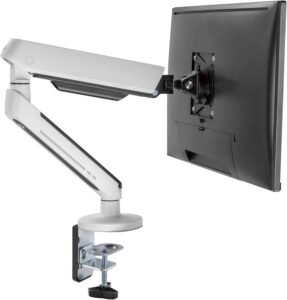
The SIIG Desk Monitor Arm is a budget-friendly option that adds adjustability and workspace freedom without unnecessary complexity. It elevates your display from its stand, freeing up desk space while offering essential tilt and swivel adjustments — perfect for home offices and compact workstations.
Why Choose the SIIG Desk Monitor Arm?
The SIIG Desk Monitor Arm isn’t a heavyweight competitor with premium features — instead, it focuses on core monitor adjustability and value. It allows you to raise your screen to eye level, tilt toward your line of sight, and swivel as needed — easing neck strain and improving ergonomics over static monitor stands.
It’s ideal if you want a simple upgrade that gets your screen in a more comfortable position without complexity or high cost.
Key Features and Benefits
Elevates Your Screen for Better Ergonomics
Raises your monitor to eye level
Helps reduce neck and shoulder strain
Makes long hours at your desk more comfortable
Tilt & Swivel Adjustments
Easy screen tilt for optimal viewing
Swivel left and right to share content
Keeps your workflow dynamic
Compact, Space-Saving Design
Frees up desk space underneath your monitor
Keeps your area cleaner and more organized
Great for minimalist setups
Easy to Install
Quick clamp installation
No complicated tools required
Fast upgrade to an adjustable workspace
Cable Management Ready
Keeps cables organized and tucked away
Cleaner look for professional desks
Helps reduce clutter
Specifications at a Glance
Monitor Size Supported: Up to 34″
Weight Capacity: Approximately 4 – 19.8 lbs
Mount Type: Clamp and grommet compatible
Tilt Range: ~-45° to +45°
Swivel Range: ~180°
Rotation (Pivot): 360°
Material: Aluminum/steel construction
Cable Management: Integrated clips/ties
Use Case: Basic ergonomic positioning and space-saving monitor arm
Who Is It For?
Remote workers on a budget
Users with small to medium size displays
People seeking simple ergonomic improvements
Students or first-time monitor arm buyers
Compact desks or home office nooks
Pros & Cons
Pros
Affordable entry price
Easy clamp installation
Improves ergonomic viewing height
Helps reduce desk clutter
Simple and effective cable routing
Cons
Lower weight limit than premium models
Limited adjustment range
Not suited for heavy or ultra-wide screens
Fewer advanced articulation options
Final Verdict
The SIIG Desk Monitor Arm holds its own at #10 on this list by delivering essential ergonomic positioning and space-saving features at a wallet-friendly price. It’s a great choice if you want to elevate your display, reduce strain, and free up desk space without investing in a premium mount.
While it doesn’t offer all the articulation or weight capacity of higher-end models, it gives you practical improvements that make everyday work-from-home tasks more comfortable and productive.
9. ErgoFocus Single Monitor Mount Arm (Freelift Pro)
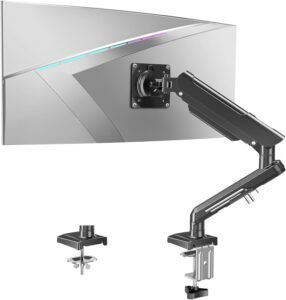
The ErgoFocus Single Monitor Mount Arm (Freelift Pro) delivers smooth, professional-grade adjustability without unnecessary extras. Designed for stability, ease of movement, and everyday comfort, it’s a great fit for home offices, work-from-home setups, and productivity-focused desks.
Why Choose the ErgoFocus Single Monitor Mount Arm?
The ErgoFocus Freelift Pro is built around core ergonomic performance — height adjustment, tilt, swivel, and rotation — allowing you to position your monitor exactly where you need it for comfort and productivity. Instead of adding decorative features, it focuses on smooth motion, wide compatibility, and long-term desk comfort.
For users who want a dependable, professional-looking monitor arm that simply works, this model delivers excellent value.
Instead of relying on a fixed stand or cluttered desk setup, the ErgoFocus arm gives you a more flexible and ergonomic setup.
Key Features and Benefits
Full Motion Ergonomics
Height adjustment helps reduce neck and shoulder strain
Tilt and swivel allow precise screen positioning
360° rotation supports portrait and landscape orientation
Ideal for long work sessions and multi-tasking
Gas-Spring Freelift System
Smooth, one-touch monitor adjustment
Effortless repositioning without tools
Stays firmly in place once set
Supports frequent adjustments throughout the day
Wide Monitor Compatibility
Fits monitors from 17″ to 32″
Supports weights from 4.4 to 22 lbs
Compatible with VESA 75×75 and 100×100
Works well with most modern flat and curved displays
Clean Desk Mount Design
Secure desk clamp mounting
Saves valuable desk space
Keeps monitors elevated and work areas uncluttered
Ideal for minimalist and professional setups
Integrated Cable Management
Built-in channels keep cables organized
Reduces desk clutter
Helps maintain a clean, professional appearance
Specifications at a Glance
Monitor Size Supported: 17″–32″
Weight Capacity: 4.4–22 lbs
Mount Type: Desk clamp
VESA Compatibility: 75×75 / 100×100
Adjustment: Height, tilt, swivel, rotation
Arm Type: Gas-spring (Freelift Pro)
Material: Steel and aluminum construction
Cable Management: Integrated channels
Use Case: Ergonomic productivity and workspace optimization
Who Is It For?
Remote and hybrid workers
Professionals who want ergonomic flexibility
Users with single-monitor desk setups
People upgrading from fixed monitor stands
Anyone seeking a clutter-free workspace
Pros & Cons
Pros
Smooth gas-spring height adjustment
Wide monitor size and weight support
Full motion flexibility (tilt, swivel, rotation)
Saves desk space and improves ergonomics
Clean, professional appearance
Integrated cable management
Cons
No RGB or decorative features
Single-monitor support only
Clamp mount requires compatible desk thickness
More expensive than basic fixed arms
Final Verdict
The ErgoFocus Single Monitor Mount Arm (Freelift Pro) earns its place at #9 by delivering exactly what most users need from a monitor arm: smooth adjustment, strong support, and reliable ergonomics. It prioritizes comfort, productivity, and desk organization over flashy extras — making it an excellent choice for professional and work-focused environments.
If you want a dependable, Amazon-available monitor arm that improves posture, frees desk space, and adapts easily to your workflow, the ErgoFocus Freelift Pro is a smart and practical upgrade.
8. HUANUO Single Monitor Mount (13″–32″)
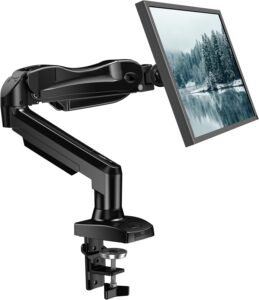
The HUANUO Single Monitor Mount is a reliable, adjustable option that improves ergonomics without the bulk of heavy-duty mounts. Designed for productivity-focused setups, it delivers smooth articulation, solid build quality, and flexible mounting options — making it ideal for home offices, work-from-home setups, and hybrid workspaces.
Why Choose the HUANUO Single Monitor Mount?
For most users, the goal isn’t extreme weight capacity — it’s comfortable positioning, stability, and ease of use. The HUANUO Single Monitor Mount strikes that balance well, supporting a wide range of common monitor sizes while offering smooth height, tilt, swivel, and rotation adjustments.
Instead of settling for a fixed stand or an arm that feels flimsy, this mount provides dependable support and ergonomic flexibility without unnecessary complexity.
Key Features and Benefits
Solid Weight Support for Everyday Monitors
Supports monitors from 4.4 to 19.8 lbs
Ideal for standard 24″–32″ displays
Keeps screens stable without sagging
Great upgrade from stock monitor stands
Smooth Tilt, Swivel & Rotation
Adjust viewing angle to reduce neck and eye strain
Tilt up/down for glare reduction
Swivel side to side for collaboration
Pivot 360° for portrait or landscape orientation
Gas-Spring Assisted Movement
Smooth, responsive adjustments
Easy one-hand positioning
Holds monitor firmly once set
Designed for daily repositioning
Clamp & Grommet Mounting Options
Secure desk clamp for most standard desks
Grommet mount included for clean, permanent installs
Works with a variety of desk styles and thicknesses
Saves valuable desk space
Integrated Cable Management
Built-in channels keep cables organized
Reduces clutter and visual distractions
Creates a tidy desk layout
Specifications at a Glance
Monitor Size Supported: 13″–32″
Weight Capacity: 4.4–19.8 lbs
Mount Type: Desk clamp or grommet
VESA Compatibility: 75×75 / 100×100
Tilt Range: ~-45° to +45°
Swivel Range: ~180°
Rotation (Pivot): 360°
Material: Steel and aluminum construction
Cable Management: Integrated routing
Use Case: Everyday ergonomic productivity setups
Who Is It For?
Remote and hybrid workers
Users with standard-sized monitors
Home office and productivity-focused setups
Anyone upgrading from a fixed monitor stand
People who want ergonomic flexibility without bulk
Pros & Cons
Pros
Supports a wide range of monitor sizes
Smooth gas-spring assisted adjustment
Clamp and grommet mounting options included
Full motion ergonomics (tilt, swivel, rotation)
Cable management keeps desks tidy
Excellent value for everyday use
Cons
Not designed for ultra-heavy or oversized monitors
Single-monitor support only
Less robust than true heavy-duty arms
Desk clamp requires compatible desk thickness
Final Verdict
The HUANUO Single Monitor Mount earns its place at #8 by delivering dependable ergonomics, smooth motion, and flexible mounting for the monitors most people actually use. It doesn’t try to be overbuilt or flashy — instead, it focuses on comfort, stability, and ease of adjustment.
If you want a well-priced, Amazon-available monitor arm that improves posture, frees desk space, and adapts easily to your workflow, the HUANUO Single Monitor Mount is a practical and productivity-boosting choice.
7. Kanto DML1000 Desktop Monitor Arm
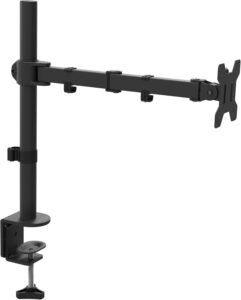
The Kanto DML1000 Desktop Monitor Arm is a well-rounded option that balances ease of use, reliable adjustment, and solid build quality. It blends smooth articulation with a straightforward installation, making it a dependable upgrade over basic stands.
Why Choose the Kanto DML1000 Desktop Monitor Arm?
The Kanto DML1000 delivers ergonomic adjustability and dependable motion without complexity. Whether you’re shifting between focused work, collaborative sessions, or long hours of typing and viewing, this arm lets you reposition your display easily — reducing neck strain and improving comfort.
Rather than settling for a fixed monitor stand, it brings flexible positioning and a clean desk aesthetic to your workspace.
Key Features and Benefits
Wide Range of Motion
Tilt, swivel, and rotation for personalized viewing
Helps position your display for comfort
Easy re-adjustment throughout the day
Smooth, Gas-Spring Adjustment
Effortless movement with solid support
Arms stay where you set them
Ideal for frequently repositioning your screen
Sturdy Construction
Durable materials provide stability
Supports typical workstation needs
Minimal wobble during typing and navigation
Space-Saving Desk Clamp
Frees up desk space underneath your monitor
Clean, organized workspace
Works well on smaller desks
Built-In Cable Management
Keeps cords tidy and out of the way
Supports a streamlined desk setup
Less visual clutter improves focus
Specifications at a Glance
Monitor Size Supported: Up to 34″
Weight Capacity: ~8–20 lbs
Mount Type: Clamp / Grommet compatible
Tilt Range: ~-45° to +45°
Swivel Range: ~180°
Rotation (Pivot): 360°
Material: Aluminum/steel build
Cable Management: Integrated routing clips
Use Case: Everyday ergonomic adjustment and space-saving setup
Who Is It For?
Remote workers seeking better monitor ergonomics
Professionals with medium-sized displays
Users who shift between sitting and standing
Anyone who wants a clean, organized desk
Hybrid workers with flexible setups
Pros & Cons
Pros
Balanced adjustability for tilt, swivel, and rotation
Smooth movement with gas-spring support
Sturdy construction feels reliable
Cable management keeps desks tidy
Easy installation with clamp or grommet
Cons
Mid-range weight capacity isn’t suited for very heavy displays
Not as feature-rich as premium arms
Installation takes moderate effort
Limited aesthetic customization
Final Verdict
The Kanto DML1000 Desktop Monitor Arm holds a strong spot at #7 on this list by offering reliable motion, solid build quality, and everyday ergonomic benefits — all without overcomplicating your setup. If you want a dependable monitor arm that’s easy to use, improves posture, and keeps your desk tidy, this model performs reliably across daily use at a sensible price.
For most home office and productivity-focused workstations, the DML1000 is a dependable choice that elevates comfort and keeps your setup organized.
6. Desky Single Slim Aluminium Monitor Arm
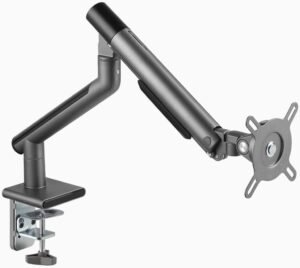
The Desky Single Slim Aluminum Monitor Arm blends modern design with practical adjustability. It’s ideal for users who value aesthetics and ergonomics — helping you position your screen for comfort while keeping your desk clean and minimal.
Why Choose the Desky Single Slim Aluminium Monitor Arm?
The Desky Single Slim model stands out with its lightweight aluminium construction, clean lines, and refined aesthetic — making it a great fit for modern home offices or minimalist workspaces. Despite its slim profile, it offers smooth tilt, swivel, and rotation adjustments, so you can find the perfect viewing angle for productivity tasks, video calls, coding sessions, or creative work.
Rather than settling for a bulky or basic stand, this arm gives you elevated ergonomics and a premium look that enhances your entire setup.
Key Features and Benefits
Elegant Aluminium Design
Lightweight yet strong construction
Clean, modern look that complements any desk
Feels premium without being bulky
Adjustable Viewing Angles
Tilt up/down for comfortable viewing
Swivel left/right for shared screens
360° rotation for portrait or landscape use
Smooth Articulation System
Easy movement with reliable tension
Holds screens steadily at chosen positions
Great for constantly shifting tasks
Slim, Space-Saving Profile
Keeps desk area open and uncluttered
Compatible with small and large workspaces
Ideal for minimalist productivity setups
Integrated Cable Management
Keeps cords tucked neatly along the arm
Reduces desk clutter and visual noise
Helps maintain a clean, organized workspace
Specifications at a Glance
Monitor Size Supported: Up to ~32″
Weight Capacity: ~8–19 lbs
Mount Type: Clamp / Grommet compatible
Tilt Range: ~-45° to +45°
Swivel Range: ~180°
Rotation (Pivot): 360°
Material: Premium aluminium
Cable Management: Integrated routing
Use Case: Minimalist ergonomics for workstations
Who Is It For?
Remote workers who want a modern, minimalist setup
Professionals who appreciate premium materials and design
Users with medium-to-large displays
Anyone who values both function and aesthetics
Hybrid workers looking for a sleek desk upgrade
Pros & Cons
Pros
Slim, elegant aluminium build
Smooth tilt, swivel, and rotation
Helps keep desks clean and uncluttered
Strong support for a range of monitor sizes
Integrated cable routing enhances aesthetics
Cons
Lighter arms may not suit extremely heavy monitors
Fewer premium features than high-end articulating arms
Some installation effort required
Best for single-monitor ergonomic setups
Final Verdict
The Desky Single Slim Aluminium Monitor Arm earns its place at #6 on this list by combining style and substance in a refined package that enhances both ergonomics and workspace design. Whether you’re working on documents, attending video calls, or organizing multiple windows, this arm gives you the adjustability you need with a premium look that elevates your desk.
If you want a sleek, minimalist ergonomic solution that doesn’t compromise on functionality, this Desky arm is a top choice for modern work-from-home setups.
5. Fellowes Platinum Series Single Monitor Arm
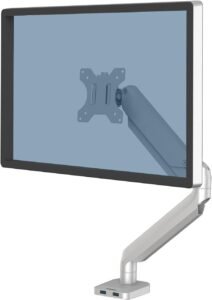
The Fellowes Platinum Series Single Monitor Arm combines sturdy construction with refined adjustability. Its sleek design, smooth motion, and solid build make it ideal for professionals who want ergonomic comfort without sacrificing a clean aesthetic.
Why Choose the Fellowes Platinum Series Single Monitor Arm?
The Fellowes Platinum Series isn’t just another monitor arm — it’s designed to deliver consistent movement, adjustable flexibility, and a premium feel that elevates your workstation. Whether you’re switching between sitting and standing, adjusting for video calls, or fine-tuning your display for coding and documents, this arm provides effortless adjustment with a polished look that complements most workspaces.
Rather than settling for static monitor stands or less refined arms, it brings premium ergonomics and durability to the forefront.
Key Features and Benefits
Fluid Monitor Articulation
Smooth tilt, swivel, and rotation for ergonomic positioning
Helps reduce neck and eye strain
Keeps your display in the ideal line of sight
Heavy-Duty Construction
Durable materials provide stability and years of use
Confident support for a wide range of monitors
Great for demanding daily workflows
Adjustable Height & Reach
Easily lift or lower your display for posture comfort
Extend or retract as needed for shared viewing
Keeps your setup adaptable and productive
Sleek, Professional Aesthetic
Clean lines and refined finish fit any office style
Integrates seamlessly into both home and corporate setups
Enhances visual appeal without distraction
Cable Management Integration
Built-in routing keeps cables tidy and out of sight
Reduces desk clutter
Helps maintain a focused workspace
Specifications at a Glance
Monitor Size Supported: Up to ~34″
Weight Capacity: ~8–22 lbs
Mount Type: Clamp / Grommet compatible
Tilt Range: ~-45° to +45°
Swivel Range: ~180°
Rotation (Pivot): 360°
Material: High-grade aluminum/steel
Cable Management: Integrated clips/routing
Use Case: Premium ergonomic adjustment and workspace optimization
Who Is It For?
Remote workers who want premium ergonomics
Professionals with medium to large displays
Users who shift posture between sitting and standing
Hybrid workers who prioritize both comfort and design
Anyone who wants a long-lasting, reliable monitor arm
Pros & Cons
Pros
Smooth tilt, swivel, and rotation
Holds displays stably
Premium build quality and materials
Sleek, professional look
Cable management keeps setups tidy
Cons
Higher price point than basic arms
Slightly more effort to install
Not ideal for extremely heavy or ultra-wide displays
Fewer advanced built-in features than some premium competitors
Final Verdict
The Fellowes Platinum Series Single Monitor Arm earns its spot at #5 on this list by delivering solid construction, smooth motion, and ergonomic flexibility that make long workdays more comfortable and productive. Its refined aesthetic and thoughtful engineering elevate both form and function, making it a strong fit for home offices, hybrid workspaces, and professional desks.
If you want a premium-feeling monitor arm with dependable performance and style, this Fellowes model provides exceptional value and versatility.
4. Kanto DML2000 Dual Monitor Mount
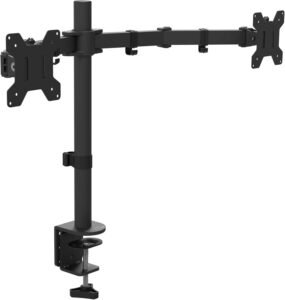
The Kanto DML2000 Dual Monitor Mount is a versatile solution for boosting productivity with two displays. With smooth adjustability and a strong build, it’s ideal for remote workers, multitaskers, and anyone who thrives with more screen real estate.
Why Choose the Kanto DML2000 Dual Monitor Mount?
Switching between apps, reference material, spreadsheets, and communication tools can feel cramped on a single screen. The Kanto DML2000 Dual Monitor Mount transforms your setup into a dual-monitor productivity powerhouse by freeing up desk space and aligning your displays for comfort and focus.
Instead of juggling windows or stacking screens awkwardly, this mount gives you smooth tilt, swivel, and rotation along with sturdy support for two monitors — keeping your workspace organized and comfortable throughout your workday.
Key Features and Benefits
Dual-Monitor Ergonomics
Position two displays at eye level
Reduces neck strain and encourages better posture
Makes multitasking and reference work easier
Independent Adjustment for Each Arm
Tilt, swivel, and rotate each monitor separately
Align screens for optimal focus and comfort
Ideal for workflows involving multiple apps or data streams
Smooth, Stable Articulation
Easy repositioning with reliable gas springs
Arms hold screens securely once placed
Perfect for frequent adjustments throughout the day
Clutter-Free Desk Setup
Frees up desk surface under monitors
Creates an organized, professional look
Helps reduce visual distractions
Cable Management Built In
Integrated clips and channels route cables neatly
Keeps cords out of sight
Enhances workspace focus
Specifications at a Glance
Monitor Size Supported: Up to ~27″ per monitor
Weight Capacity: ~8–19 lbs per arm
Mount Type: Clamp / Grommet compatible
Tilt Range: ~-45° to +45°
Swivel Range: ~180°
Rotation (Pivot): 360° per arm
Material: Aluminum/steel construction
Cable Management: Integrated routing clips
Use Case: Dual-monitor ergonomic productivity setups
Who Is It For?
Remote workers who use multiple applications at once
Professionals with dual monitors for multitasking
Designers, analysts, and developers
Anyone who benefits from extended screen space
Hybrid workers seeking improved desk organization
Pros & Cons
Pros
Supports two monitors independently
Smooth tilt, swivel, and rotation
Frees up desk space
Cable management keeps setups tidy
Strong and reliable build quality
Cons
Dual setup requires more desk space overall
Installation is more involved than single arms
Not ideal for very large or ultra-wide displays
Heavier monitors may require tension adjustment
Final Verdict
The Kanto DML2000 Dual Monitor Mount earns its spot at #4 by delivering stable, adjustable support for two displays, helping you create a productive, ergonomic workspace. Its smooth articulation and thoughtful cable management make it a great dual-monitor upgrade for anyone who wants to reduce neck strain, improve posture, and keep multiple apps visible at once.
If your work benefits from extra screen real estate — whether for spreadsheets, dashboards, or multitasking across tools — this dual monitor mount is a reliable and versatile choice.
3. VARIDESK Dual-Monitor Arm 180°
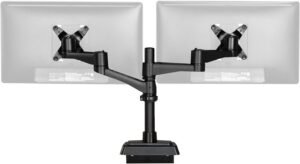
The VARIDESK Dual-Monitor Arm 180° is built to maximize productivity with two screens while keeping your setup clean and ergonomic. It combines extended articulation with a trusted build, giving you smooth adjustment and flexibility for daily work-from-home and hybrid setups.
Why Choose the VARIDESK Dual-Monitor Arm 180°?
For multitaskers and professionals who juggle spreadsheets, reference materials, and communication tools side by side, having two screens positioned correctly makes all the difference. The VARIDESK Dual-Monitor Arm 180° lets you adjust tilt, swivel, and rotation independently for each monitor while enabling wide horizontal reach and spacious placement — ideal for collaborative work or multitasking heavy workflows.
Instead of squeezing two monitors onto a fixed desk stand or dealing with mismatched heights, it gives you ergonomic alignment, smooth motion, and efficient space usage so you can stay comfortable and organized throughout the day.
Key Features and Benefits
True Dual-Monitor Support
Holds two screens side by side with independent adjustment
Improves multitasking and reference viewability
Helps keep both displays at comfortable eye-level heights
Wide 180° Horizontal Reach
Ample side-to-side movement for flexible layouts
Great for shared viewing or window-splitting workflows
Expands workspace potential
Smooth Articulation and Tension Control
Gas-spring motion for effortless repositioning
Arms stay in place once adjusted
Fine-tune with minimal effort throughout your workday
Desk-Clearing Design
Clamps or grommets free up surface space
Ideal for smaller desks or multi-device workstations
Helps maintain a clean, professional setup
Cable Management Built In
Integrated routing keeps cords out of sight
Reduces visual clutter
Enhances focus and desk appeal
Specifications at a Glance
Monitor Size Supported: Up to ~27″ per monitor
Weight Capacity: Approximately 8–20 lbs per arm
Mount Type: Clamp / Grommet compatible
Tilt Range: ~-45° to +45°
Swivel Range: ~180° per arm
Rotation (Pivot): 360°
Material: High-grade aluminum/steel
Cable Management: Integrated clips and channels
Use Case: Dual-monitor ergonomic productivity setups
Who Is It For?
Remote workers with multiple screen workflows
Professionals who juggle spreadsheets, design tools, and messaging apps
Hybrid workers who switch between tasks frequently
Anyone who needs side-by-side reference and productivity screens
Users who value clean desks and organized workspaces
Pros & Cons
Pros
Independent adjustment for two monitors
Wide 180° range for flexible positioning
Smooth, gas-spring articulation
Keeps desk space open and organized
Helpful cable management features
Cons
Installation takes a bit longer than single arms
Larger dual setup requires more desk width
Not ideal for ultra-wide or very heavy displays without adjustments
May require fine-tuning tension for heavier monitors
Final Verdict
The VARIDESK Dual-Monitor Arm 180° earns its spot at #3 on this monitor arm list by combining wide flexibility, dual-screen ergonomics, and smooth motion — all while keeping your workspace tidy and professional. It’s a great choice for anyone who thrives on multitasking, reference viewing, or extended screen real estate without sacrificing comfort.
If your work depends on seeing multiple apps or windows simultaneously, this dual-monitor arm gives you the adjustment range and stability you need to stay productive day after day.
2. Ergotron LX Desk Monitor Arm
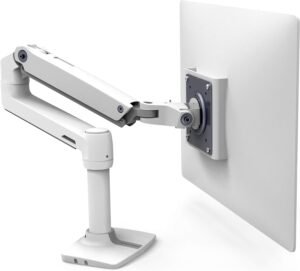
The Ergotron LX Desk Monitor Arm is a best-in-class option that combines premium engineering, effortless adjustability, and long-term durability. Designed for professionals, hybrid workers, and anyone who spends hours interacting with their screen, this arm elevates ergonomics and efficiency with smooth motion and robust support.
Why Choose the Ergotron LX Desk Monitor Arm?
The Ergotron LX Desk Monitor Arm has earned a reputation as one of the most reliable and versatile monitor mounts available. It combines premium construction with fluid adjustability, offering height, tilt, swivel, and rotation controls that make it easy to personalize your viewing experience.
Instead of settling for a fixed stand or a low-end arm that limits adjustability, the LX model gives you the flexibility to move your monitor to the perfect position — enhancing comfort, reducing strain, and improving focus throughout your workday.
Key Features and Benefits
Exceptional Ergonomic Adjustment
Smooth and responsive tilt, swivel, and height control
Reduces neck, shoulder, and eye strain
Helps you maintain healthy posture during long sessions
360° Rotation and Wide Swivel
Easily rotate between portrait and landscape
Great for design, coding, or long document viewing
Swivel expands your workspace layout possibilities
Premium Gas-Spring Motion
Effortless repositioning with minimal force
Arm stays precisely where you place it
Ideal for desks that support dynamic workflows
Extended Reach for Flexible Workspaces
Long arm span helps position monitors further or closer
Useful for larger desks, dual setups, or corner stations
Keeps your screen optimized for comfort and productivity
Integrated Cable Management
Built-in routing keeps cords hidden and tidy
Reduces visual clutter
Enhances your focus and desk appeal
Specifications at a Glance
Monitor Size Supported: up to ~34″ (varies by weight)
Weight Capacity: Varies by configuration
Lift/Height Range: ~13″ (33 cm)
Tilt: ~+70° / -5°
Pan/Swivel: ~360°
Rotation (Pivot): 360°
VESA: 75×75 / 100×100
Who Is It For?
Professionals who want top-tier ergonomic adjustability
Remote and hybrid workers with long hours at the desk
Creatives, developers, and multitaskers with demanding workflows
Users with larger or heavier monitors
Anyone who values premium build quality and smooth motion
Pros & Cons
Pros
Best-in-class adjustability for tilt, height, swivel, and rotation
Effortless gas-spring motion
Handles large monitors with ease
Sleek, premium build quality
Cable management keeps desks tidy
Cons
Higher price point than most arms
Installation takes some time
Overkill for very small or lightweight setups
Premium features come with premium cost
Final Verdict
The Ergotron LX Desk Monitor Arm earns the #2 spot on our Top 10 Monitor Arms list because it sets the benchmark for ergonomic flexibility, build quality, and smooth motion. Whether you’re typing documents, attending video calls, crunching data, or designing graphics, this mount makes it easier to position your display for optimal comfort and productivity.
If you want a premium monitor arm that performs day after day and enhances your work-from-home or office setup with superior adjustability, the Ergotron LX is an investment that pays dividends in comfort, efficiency, and workspace design.
1. Ergotron LX Pro Desk Mount
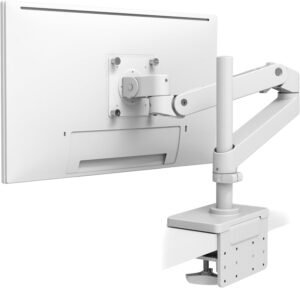
The Ergotron LX Pro Desk Mount is a top-tier monitor arm that blends professional-grade adjustability with rock-solid stability. It delivers smooth motion, extended reach, and superb build quality — perfect for heavy users, dual-monitor setups, and anyone who values ergonomic comfort and longevity.
Why Choose the Ergotron LX Pro Desk Mount?
The Ergotron LX Pro Desk Mount is part of one of the most respected monitor arm lines in ergonomics. It combines professional-grade motion with premium materials and engineering, giving you effortless height, tilt, swivel, and rotation control that stays rock steady no matter how you adjust your display.
Compared with basic or mid-range arms, the LX Pro offers extended reach, refined adjustability, and class-leading stability — all of which contribute to a more comfortable, productive, and personalized workspace.
Key Features and Benefits
Outstanding Ergonomic Motion
Smooth height, tilt, swivel, and pivot adjustments
Helps reduce neck and shoulder strain
Easy repositioning throughout the workday
Extended Reach & Flexibility
Arm extends displays further away for deeper workspaces
Great for corner setups, dual configurations, or rotating displays
Keeps your screen right where you need it
Premium Build Quality
Durable aluminum and steel construction
Engineered to last for years of use
Feels solid and stable even with heavier displays
Clean, Floating Aesthetic
Minimal visual footprint
Elegant addition to professional and home offices alike
Elevates the look of your workspace
Integrated Cable Management
Sleek routing keeps cords organized
Helps eliminate desk clutter
Improves focus and organization
Specifications at a Glance
Monitor Size Supported: Up to ~34″+
Weight Capacity: Varies by configuration
Tilt: ~85° (↑70° / ↓15°)
Mount Type: Clamp or grommet compatible
Swivel Range: ~180°+
Rotation (Pivot): 360°
Material: Premium aluminum/steel
Cable Management: Integrated routing channels
Use Case: Pro ergonomic adjustment and premium productivity
Who Is It For?
Remote workers who want best-in-class ergonomic adjustability
Professionals with large or heavy monitors
Hybrid workers switching between tasks and postures
Designers, developers, and multitaskers with heavy workflows
Anyone who appreciates premium craftsmanship and stability
Pros & Cons
Pros
Best-in-class ergonomic motion
Extended reach and flexible positioning
Strong stability
Sleek, minimalist design
Cable management keeps desks tidy
Cons
Higher price than budget arms
Installation can be more involved
May be overkill for small, lightweight monitors
Premium features come at a premium cost
Final Verdict
The Ergotron LX Pro Desk Mount earns the #1 spot on our list because it delivers professional-grade flexibility, strength, and refinement in one cohesive package. Its premium motion range and build quality make it a joy to use every day — whether you’re typing, calling, designing, or analyzing data.
If you want a monitor arm that feels like a true productivity tool rather than an accessory, this Ergotron mount is one of the best investments you can make for your workspace.
Final Verdict: Which Monitor Arm Should You Buy?
If you want the best overall experience—smooth adjustment, rock-solid stability, and long-term durability—the Ergotron LX Pro Desk Mount (#1) is the clear top pick. It feels like a true productivity tool: easy to reposition, stable once set, and built to last through years of daily use.
For most people who want premium ergonomics without going all-in, the Ergotron LX Desk Monitor Arm (#2) is an excellent “sweet spot” choice. And if your workflow is better with two screens, the VARIDESK Dual-Monitor Arm 180° (#3) is the best dual-monitor option for flexibility and positioning.
On a tighter budget, the HUANUO (#8) and SIIG (#10) arms still deliver the most important benefits—better posture and more desk space—without spending premium money. Pick based on your monitor’s weight/size, whether you need dual screens, and how often you plan to reposition your display.