
Top 10 USB-C Hubs and Docking Stations
The best USB-C hubs and docking stations turn a single laptop port into a full workstation — adding monitors, USB accessories, SD cards, Ethernet, and reliable charging with far less desk clutter. The tricky part is that not all USB-C docks behave the same: some are travel hubs meant for one display, others are true desktop docks built for multiple monitors, faster transfers, and stable wired internet.
In this Top 10 list, we ranked the best USB-C hubs and docking stations for real-world setups—from portable everyday hubs to multi-display desk docks—so you can pick the right one based on your laptop, monitors, and workflow.
Hubs: usually bus-powered, travel-friendly, typically one display
Docks: desk-first, often with better stability, sometimes own power brick, better Ethernet and multi-display
Disclosure: As an Amazon Associate I earn from qualifying purchases.
Exploring more everyday tech accessories?
This post is part of our Tech Accessories category, featuring chargers, hubs, stands, mounts, and must-have add-ons that make your tech setup better.
Quick Picks: Best USB-C Hubs and Docking Stations
Best Overall (Future-Proof Pick): Anker Prime Thunderbolt 5 (#1)
Best Triple-Display Workstation Dock: Satechi Triple 4K Display (#3)
Best Budget Dual-Monitor Desk Dock: Targus USB-C Universal (#8)
How We Ranked the Best USB-Hubs and Docking Stations
We scored each hub/dock using the factors that actually matter once you plug everything in:
Display support (the big one)
Single vs dual vs triple displays
Resolution/refresh expectations (ex: 4K 30Hz vs 4K 60Hz)
Compatibility gotchas (especially macOS vs Windows)
Charging + power delivery reliability
Whether it can consistently power laptops under load
Pass-through PD on hubs vs dedicated power bricks on desktop docks
Port selection that matches real setups
USB-A for peripherals, USB-C for fast storage
HDMI/DP for monitors
SD/microSD for creators
Ethernet for stable WFH and conferencing
Speed and stability
Heat management + build quality (cheap hubs can throttle or disconnect)
Data transfer performance (important for external SSDs)
Desk usability
Cable clutter, layout, and whether it “lives” on a desk or in a bag
One-cable simplicity (laptop ↔ dock) for everyday use
Value for money
We ranked “best for the job” instead of just “most expensive wins”
Mac reality: Most MacBooks (especially base M1/M2/M3) do not support dual/triple external displays over a standard USB-C dock unless you use DisplayLink or you have a Pro/Max chip / supported model.
10. UGREEN 6‑in‑1 USB‑C Hub with 4K HDMI
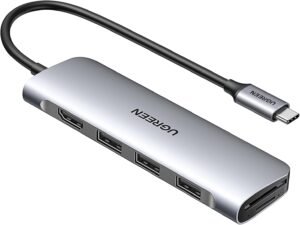
If you’re looking for a budget-friendly USB-C hub that expands your laptop’s connectivity without costing a premium, the UGREEN 6-in-1 USB-C Hub with 4K HDMI delivers exactly what most users need. It combines essential ports like USB-A, HDMI, and SD card access in a compact design — perfect for students, remote workers, and everyday laptop users.
Why Choose the UGREEN 6-in-1?
The UGREEN 6-in-1 USB-C Hub is designed for users who need simple, reliable connectivity expansion without a bulky docking station or expensive multi-port hub. It’s particularly great for:
Extending your laptop display via HDMI
Adding standard USB-A ports for peripherals
Reading SD/microSD cards without an adapter
Plug-and-play convenience
Rather than being packed with every port imaginable, this hub focuses on practical everyday use, making it a good entry-level option for most PC and Mac laptops.
Key Features and Benefits
4K HDMI Output
Supports up to 4K @ 30Hz display output
Works with external monitors, TVs, and projectors
Great for presentations, extended workspaces, and media
Plug-and-play — no drivers required
USB-A Ports for Accessories
Includes multiple USB-A ports (usually 2x USB-A)
Ideal for keyboards, mice, flash drives, and wired accessories
Keeps older peripherals usable on newer laptops
Standard connectivity most users rely on
Built-In SD / microSD Card Reader
Supports SD and microSD cards up to high capacities
Perfect for transferring photos, videos, and files
Eliminates the need for separate card readers
Useful for photographers and content transfer
Compact & Portable Design
Lightweight and pocket-friendly
Works well with laptops, tablets, and ultrabooks
Easy to toss in a bag for travel or remote work
Aluminum casing helps with durability and heat dissipation
USB-C Pass-Through Power Delivery
Supports USB-C PD pass-through (usually up to ~60–100W)
Lets you charge your laptop while using the hub
Keeps power delivery simple and uninterrupted
Great for extended desk setups
Specifications at a Glance
Ports: HDMI, USB-C PD, USB-A (2x), SD, microSD
Video Output: Up to 4K @ 30Hz
Compatibility: USB-C laptops and tablets (macOS & Windows)
Power Delivery: USB-C PD pass-through supported
Design: Compact, lightweight hub housing
Who Is It For?
Students and everyday laptop users
Remote workers who need basic expansion
Travelers who want a compact hub
Creators who transfer photos via SD cards
Users who want HDMI out for second displays
Pros & Cons
Pros
Affordable price point
4K HDMI output expands display options
SD and microSD card readers built-in
USB-A ports for everyday peripherals
Compact and portable design
Cons
HDMI output limited to 4K @ 30Hz
Not as many ports as larger docking stations
No dedicated Ethernet port
Power delivery wattage may be lower than some docks
Final Verdict
If you’re building a simple PC or Mac laptop setup and need an affordable way to expand your connectivity, the UGREEN 6-in-1 USB-C Hub with 4K HDMI is a solid choice. It gives you essential ports like HDMI, USB-A, and SD card access in a compact, lightweight package — perfect for everyday use at home, school, or the office.
This hub keeps things straightforward and practical without overwhelming you with complexity or extra cost. It may not satisfy power users who need Ethernet or multiple displays, but for most users who want basic expansion and 4K external display support, the UGREEN 6-in-1 offers simple, reliable USB-C connectivity wherever you need it.
9. Satechi Pro Hub Slim
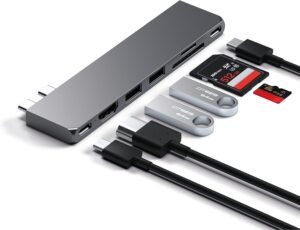
If you’re looking for a minimalist USB-C hub that adds essential ports without adding bulk, the Satechi Pro Hub Slim is a fantastic choice. Designed for modern laptops and tablets, this hub blends a slim profile with useful connectivity — making it ideal for students, professionals, and mobile users who want reliable expansion in the thinnest possible package.
Why Choose the Pro Hub Slim?
The Satechi Pro Hub Slim is designed for users who value portability and simplicity. Its ultra-thin design makes it perfect for slipping into a backpack or laptop sleeve without adding unnecessary weight. Despite its slim profile, it still packs a set of practical ports that most everyday laptop users need.
Rather than focusing on advanced docking station features, the Pro Hub Slim delivers straightforward, dependable connectivity you can rely on whether you’re at a desk, on the go, or working in a cafe.
Key Features and Benefits
USB-C Power Delivery Passthrough
Supports USB-C pass-through charging
Charge your laptop while using the hub
Maintains power delivery with minimal setup
Great for laptop users who don’t want a separate charger port
4K HDMI Video Output
Supports up to 4K @ 30Hz external video output
Works with monitors, projectors, and TVs
Expands your display workspace for productivity or presentations
Plug-and-play setup — no drivers required
Multiple USB-A Ports
Includes USB-A ports (for peripherals like mice, keyboards, flash drives)
Standard USB connectivity for everyday accessories
Great for users who still rely on legacy devices
Keeps your laptop ports free for other use
Compact & Lightweight Design
Ultra-slim profile that fits easily alongside your laptop
Lightweight construction ideal for travel
Doesn’t add bulk to laptop setups
Matches the sleek design of modern laptops
Built-In MicroSD & SD Card Readers
Quick access to SD and microSD cards
Perfect for photo/video file transfer
Eliminates need for separate card readers
Great for content creators on the go
Specifications at a Glance
Ports: HDMI, USB-C PD passthrough, USB-A, SD/microSD card reader
Video Output: Up to 4K @ 30Hz
Compatibility: USB-C laptops and tablets (macOS, Windows)
Design: Ultra-slim, lightweight hub housing
Power Delivery: USB-C PD passthrough supported
Who Is It For?
Students and professionals on the go
Travelers who need lightweight connectivity
Creators who transfer files with SD cards
Laptop users needing a sleek hub
Anyone who wants simple, essential port expansion
Pros & Cons
Pros
Slim, portable design perfect for travel
4K HDMI output expands display options
SD and microSD card readers built in
USB-C pass-through power delivery
USB-A ports for everyday peripherals
Cons
HDMI output limited to 4K @ 30Hz
Not as many ports as larger hubs or docks
Lacks Ethernet and advanced docking features
Power delivery wattage may be lower than some docks
Final Verdict
If you’re building a lightweight laptop setup and want a USB-C hub that offers portability without sacrificing essential connectivity, the Satechi Pro Hub Slim is an excellent choice. It delivers a sleek, slim profile with practical ports like HDMI, USB-A, and SD card access — ideal for students, mobile professionals, and anyone who wants dependable expansion on the go.
It may not replace a full docking station with Ethernet and multiple displays, but for everyday use and travel-ready convenience, the Pro Hub Slim does exactly what it’s designed to do: portable, dependable USB-C connectivity that moves with you.
8. Targus USB‑C Universal Dual HD Docking Station
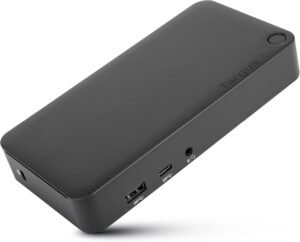
If you’re looking for a solid USB-C docking station that expands your laptop’s ports and supports dual monitor setups, the Targus USB-C Universal Dual HD Docking Station is a dependable choice. It strikes a great balance between performance, compatibility, and value — making it ideal for work-from-home setups, productivity stations, and multi-display gaming or streaming configurations.
Why Choose the Targus Dual HD?
The Targus Universal Dual HD Docking Station is designed for users who want to turn their laptop into a full desktop workstation — without investing in a high-end Thunderbolt dock. With the ability to connect two external monitors, plenty of USB ports, and network connectivity, it’s built to support productivity, multitasking, and everyday workflows.
Rather than focusing on cutting-edge bandwidth or ultra-high resolutions, the Targus dock focuses on universal compatibility and practical multi-display expansion.
Key Features and Benefits
Dual HD Display Support
Connect two external monitors via HDMI and/or DisplayPort
Supports HD resolutions ideal for productivity screens
Great for extended workspace, streaming setups, and multitasking
Simple plug-and-play setup for most laptops
Multiple USB Ports for Peripherals
Includes several USB-A ports for keyboards, mice, drives, and accessories
USB-C for additional device connection
Keeps your laptop ports free while extending connectivity
Useful for busy workstations
Integrated Ethernet Port
Wired gigabit Ethernet port for stable, high-speed networking
Great for streaming, online gaming, and large file transfers
Adds reliability compared to Wi-Fi only setups
Ideal for office and home setups with wired networks
Audio In/Out Support
Includes audio input/output ports
Works with headsets, speakers, and conference audio units
Useful for calls, meetings, and media playback
Keeps audio devices easily accessible
USB-C Power Delivery Pass-Through
Supports USB-C power delivery to charge your laptop
Keeps power flowing while you use the dock
Reduces cables on your desk
Ideal for everyday productivity
Specifications at a Glance
Display: Dual monitor support (HD)
Ports: HDMI, DisplayPort, USB-A, USB-C, Ethernet, audio
Compatibility: USB-C laptops and tablets (macOS & Windows)
Power Delivery: USB-C PD pass-through supported
Design: Full docking station with multiple ports
Who Is It For?
Professionals and remote workers
Gamers who want multi-monitor setups
Creators who need extra ports
Students with productivity needs
Anyone using a laptop as their primary workstation
Pros & Cons
Pros
Dual external display support expands workspace
Lots of ports for peripherals and accessories
Wired Ethernet adds stable network access
USB-C power delivery pass-through
Works well with Windows and macOS laptops
Cons
HDMI/DisplayPort resolutions are generally HD rather than 4K
Not as feature-rich as high-end Thunderbolt docks
Bulky compared to portable USB-C hubs
Some older laptops may require adapters
Final Verdict
If you’re building a desktop-style productivity or gaming setup using a laptop, the Targus USB-C Universal Dual HD Docking Station offers a versatile and reliable way to expand your workspace. With dual monitor support, multiple USB ports, Ethernet connectivity, and power delivery pass-through, it gives you the essential expansion features most users need — all without the high price tag of premium docks.
It may not offer ultra-high resolutions or cutting-edge bandwidth, but for everyday productivity, multi-screen workflows, and wired network dependability, the Targus dock offers practical, well-rounded USB-C docking that meets real-world needs.
7. j5create USB‑C Triple‑Display Docking Station
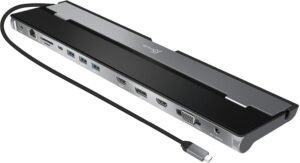
If you’re seeking a powerful USB-C docking station capable of driving multiple external displays and expanding your connectivity for productivity or creative workflows, the j5create USB-C Triple-Display Docking Station is a standout option. With support for up to three external monitors, plenty of ports, and reliable performance, it’s ideal for users who want to turn a laptop into a full desktop-class workstation.
Triple-display support may require DisplayLink drivers (especially on macOS).
Why Choose the j5create?
The j5create Triple-Display Docking Station is built for users who demand maximum screen real estate without resorting to complex setups. Whether you’re multitasking across spreadsheets, managing video streams, editing content on several canvases, or streaming while gaming and monitoring chat, this docking station gives you the extra displays and ports you need — all over a single USB-C connection.
Rather than focusing solely on basic expansion, this dock elevates your workspace and makes multimonitor power incredibly simple.
Key Features and Benefits
Triple-Display Support
Drives up to three external monitors simultaneously
Supports diverse configurations (HDMI, DisplayPort, etc.)
Great for multitasking, productivity, and content creation
Ideal for workstations that need extended visual space
Wide Array of Ports
Multiple USB-A ports for peripherals (keyboard, mouse, drives)
USB-C ports for additional devices
Gigabit Ethernet for stable wired networking
Audio input/output for headsets and speakers
USB-C Power Delivery
Supports USB-C pass-through charging
Keeps your laptop powered while connected
Reduces cable clutter on your desk
Works with many USB-C laptops
Stable Networking
Built-in Ethernet port for wired connectivity
Reliable speeds for streaming, downloads, and meetings
Better performance than Wi-Fi alone
Essential for serious workstations
Audio Support
Dedicated audio input/output jacks
Works with headsets, speakers, and microphones
Useful for conferencing, streaming, or multimedia
Keeps audio integrated with your workstation setup
Specifications at a Glance
Display Support: Triple external monitors
Ports: HDMI, DisplayPort (varies by model), USB-A, USB-C, Ethernet, audio
Compatibility: USB-C laptops and tablets (Windows & macOS*)
Power Delivery: USB-C pass-through supported
Design: Full docking station with multi-port hub
*Compatibility may vary with certain macOS models — check your device support.
Who Is It For?
Work-from-home professionals needing multiple displays
Content creators and multitaskers
Remote workers who use productivity apps across screens
Developers with dashboards + terminals
Streamers who monitor chat, stream, and content simultaneously
Pros & Cons
Pros
Support for three external displays — rare among USB-C docks
Wide variety of ports for peripherals and networking
USB-C pass-through charging
Built-in Gigabit Ethernet
Great for serious productivity and multitasking
Cons
More expensive than basic USB-C hubs
Setup may be more complex for casual users
Display performance can depend on laptop GPU limits
Bulkier than portable hubs
Final Verdict
If you’re building a professional-level laptop workstation and need the power of a multi-monitor setup without a full desktop tower, the j5create USB-C Triple-Display Docking Station is an excellent choice. Its ability to run three external monitors, combined with a rich selection of ports and power delivery, makes it ideal for productivity, content creation, streaming, and multitasking.
While it may be overkill for users who just want a couple of extra ports, it’s a smart investment for anyone who wants a serious, desk-ready USB-C docking solution that transforms a laptop into a true workstation.
6. Belkin Universal USB‑C 8‑in‑1 Dual Display Hub
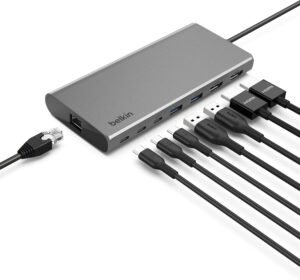
If you’re looking for a well-rounded USB-C hub that adds reliable multi-display support, a variety of ports, and everyday convenience, the Belkin Universal USB-C 8-in-1 Dual Display Hub is a versatile option. It’s built to help users expand laptop connectivity without having to buy a large docking station — and its support for dual displays sets it apart from many basic hubs.
Why Choose the Belkin 8-in-1?
The Belkin 8-in-1 Hub is designed for users who want a single, practical device to expand their USB-C laptop’s capabilities — including two external monitors, plenty of USB ports, and convenient passthrough charging. It’s ideal for users who need more functionality than entry-level hubs but don’t want the size and cost of a full docking station.
Rather than focusing on ultra-premium features, the Belkin Hub offers practical, everyday performance that works for both productivity and entertainment.
Key Features and Benefits
Dual External Display Support
Enables connection of two external displays
Supports HDMI and/or DisplayPort (configuration varies)
Great for multitasking, productivity, and creative workflows
Plug-and-play setup for most laptops
Multiple USB Ports
Includes USB-A ports for peripherals (keyboard, mouse, flash drives)
USB-C data ports for additional devices
Keeps your laptop ports open and organized
Works with common accessories without adapters
USB-C Power Delivery Passthrough
Supports pass-through charging via USB-C
Charges your laptop while you use the hub
Reduces cable clutter on your desk
Ideal for extended desktop or work-from-home setups
Ethernet and Networking (Optional)
Some models support Gigabit Ethernet (check specific SKU)
Reliable wired network connection
Great for meeting, downloads, and streaming
Better stability than Wi-Fi alone
Audio and Data Support
Audio jack for headsets or speakers
High-speed data transfer via USB ports
Works with webcams, external drives, and more
Keeps your setup flexible with plenty of connectivity options
Specifications at a Glance
Display: Dual external display support
Ports: HDMI/DisplayPort, USB-A, USB-C, Ethernet (model dependent), audio
Compatibility: USB-C laptops and tablets (Windows & macOS)
Power Delivery: USB-C PD supported
Design: Mid-size multifunction hub
Who Is It For?
Laptop users who want dual external displays
Remote workers and professionals
Students with productivity needs
Remote content creators
Anyone who wants expanded connectivity without a full dock
Pros & Cons
Pros
Dual external display support
Multiple USB ports for everyday peripherals
USB-C power delivery passthrough
Good balance of features and price
Works with multiple devices
Cons
Display resolutions may vary by setup
Not as many ports as larger docking stations
Ethernet support depends on model (check before purchasing)
Slightly larger footprint than ultra-portable hubs
Final Verdict
If you’re building a versatile laptop setup and want a USB-C hub that goes beyond basic expansion, the Belkin Universal USB-C 8-in-1 Dual Display Hub is a smart choice. With support for dual external displays, plenty of ports, and power delivery passthrough, it gives you the practical connectivity you need for work, play, and everything in between — without the size and cost of a full docking station.
Whether you’re at home, in a dorm room, or at a shared workspace, this hub delivers reliable everyday performance and multi-display flexibility that most users will appreciate.
5. HyperDrive Next 10‑Port USB‑C Hub
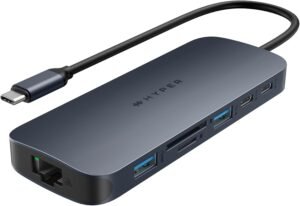
If you’re looking for a high-value USB-C hub with plenty of ports and practical connectivity, the HyperDrive Next 10-Port USB-C Hub is a standout choice. Designed for users who want to connect multiple devices — from displays to storage, peripherals, and charging — it brings a comprehensive set of ports to any USB-C laptop or tablet.
Why Choose the HyperDrive Next?
The HyperDrive Next 10-Port USB-C Hub is built for users who need versatility and convenience without stepping up to a large docking station. With ten total ports, it expands your laptop’s capabilities dramatically — whether you’re plugging in external drives, connecting displays, adding Ethernet, or expanding USB peripherals.
Rather than offering only the bare essentials, this hub combines practical everyday use with room for growth, making it a flexible choice for professionals, students, and everyday laptop users alike.
Key Features and Benefits
4K HDMI External Display Support
4K HDMI output lets you connect an external monitor
Ideal for extended workspaces, presentations, or media viewing
Supports crisp, clear visuals up to 4K
Plug-and-play setup with no drivers required
Multiple USB Ports
Includes several USB-A ports for keyboards, mice, drives, and accessories
USB-C data port for fast transfers and extra device support
Keeps legacy peripherals usable on modern laptops
Expands connectivity without adapters
USB-C Power Delivery Passthrough
Supports laptop charging through USB-C PD
Keeps power flowing while using the hub
Ideal for long work sessions
Reduces desktop clutter
Ethernet Gigabit Networking
Built-in Ethernet port for wired internet access
Offers faster, more stable connections than Wi-Fi
Perfect for streaming, downloads, or large file transfers
Great for remote work and gaming
Audio and Card Reader
3.5 mm audio jack for headphones or speakers
SD and microSD card slots included (depending on SKU)
Useful for transferring photos and media
Great for creators and everyday users
Specifications at a Glance
Ports: HDMI, USB-A (multiple), USB-C data, Ethernet, audio, card reader
Video Output: 4K HDMI
Compatibility: USB-C laptops and tablets (Windows & macOS)
Power Delivery: USB-C PD passthrough supported
Design: Mid-size hub with multiple port types
Who Is It For?
Remote workers and professionals
Students needing versatile connectivity
Content creators who transfer media often
Gamers who want wired networking
Everyday users wanting a single hub for many devices
Pros & Cons
Pros
Large variety of ports expands connectivity
4K HDMI support for external displays
Ethernet adds reliable wired networking
USB-C passthrough keeps your laptop charged
Audio jack and card reader increase flexibility
Cons
Not as compact as ultra-portable hubs
Might be overkill for basic setups
Some ports may not be used by all users
Power delivery wattage may be lower than dedicated docks
Final Verdict
If you want a feature-rich USB-C hub that dramatically expands your laptop’s connectivity without going full docking station, the HyperDrive Next 10-Port USB-C Hub fits the bill. With HDMI support, multiple USB ports, Ethernet, and passthrough charging, it gives you the flexibility to build a powerful multi-device setup — perfect for productivity, streaming, multitasking, and everyday use.
It may be larger than ultra-slim hubs, but for users who need versatility and expansion in one package, it delivers where it matters most: easy, accessible connectivity for all your peripherals and displays.
4. Belkin USB C 11‑in‑1 Multiport Dock
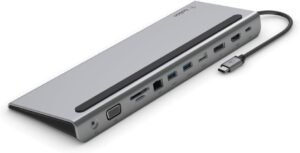
If you’re building a powerful laptop workstation and need a single device that delivers multiple displays, networking, charging, and peripheral support, the Belkin USB-C 11-in-1 Multiport Dock is a versatile all-in-one solution. With more ports than most basic hubs and plenty of real-world connectivity, it’s ideal for home offices, creative workflows, and productivity setups where flexibility matters.
Why Choose the Belkin 11-in-1?
The Belkin USB-C 11-in-1 Multiport Dock is designed for users who need comprehensive expansion from a single hub — without resorting to multiple adapters. Whether you’re using a MacBook, Windows laptop, or hybrid device, this dock lets you connect displays, peripherals, wired networks, storage devices, and more — all while charging your laptop through USB-C power delivery.
Rather than offering just a few additional ports, this dock elevates your laptop into a desktop-class workstation.
Key Features and Benefits
Multi-Display Support
Dual external display support (HDMI/DisplayPort depending on model)
Expand your workspace for productivity and multitasking
Works with extended desktops or mirrored displays
Great for spreadsheets, creative tools, and presentations
Multiple USB-A & USB-C Ports
Several USB-A ports for keyboards, mice, and storage
USB-C data port for additional device connectivity
Plenty of slots for plug-and-play peripherals
Eliminates need for separate USB hubs
Wired Ethernet Networking
Built-in Gigabit Ethernet port
Stable, faster wired internet compared to Wi-Fi
Useful for streaming, video conferences, and large downloads
Supports both work and entertainment use cases
USB-C Power Delivery Passthrough
Charges your laptop while you use the dock
Keeps everything powered with a single cable in
Reduces desktop cable clutter
Supports many USB-C laptops and tablets
SD & microSD Card Readers
Built-in SD and microSD card slots
Perfect for content creators and photographers
Fast media transfer without additional adapters
Useful for quick workflow integration
Audio In/Out Support
3.5 mm audio jack for headphones and mic
Works with headsets, speakers, and conferencing gear
Keeps audio options integrated at your desk
Great for work meetings and media playback
Specifications at a Glance
Display: Dual external monitor support
Ports: HDMI, DisplayPort, USB-A, USB-C, Ethernet, SD/microSD, audio
Compatibility: USB-C laptops and hybrid devices
Power Delivery: USB-C pass-through charging
Design: Full docking station with broad connectivity
Who Is It For?
Remote workers and home office setups
Students with productivity and media needs
Content creators who transfer files often
Professionals with multi-screen workflows
Anyone who wants a true desktop experience from a laptop
Pros & Cons
Pros
Comprehensive 11-in-1 connectivity
Dual display support expands productivity
Ethernet adds fast, stable networking
USB-C power delivery charges your laptop
SD and microSD card support built in
Cons
Larger and bulkier than portable hubs
More expensive than simple USB-C hubs
Some features (like display modes) depend on your laptop’s GPU
Setup may initially feel complex for casual users
Final Verdict
If you want a feature-rich USB-C docking station that turns your laptop into a desktop-class workstation, the Belkin USB-C 11-in-1 Multiport Dock is a fantastic choice. With generous display support, Ethernet networking, plenty of USB ports, and laptop charging via USB-C pass-through, it gives you everything you need in one hub — ideal for productivity, creative work, and everyday multitasking.
It may be larger and pricier than basic hubs, but for users who need complete expansion and convenience, this dock provides a versatile, all-in-one connectivity solution for modern laptops.
3. Satechi Triple 4K Display Docking Station
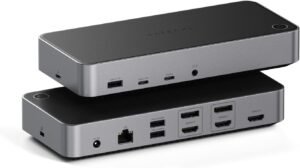
If you’re looking for a high-end docking station that can handle multiple 4K external displays, expanded connectivity, and robust productivity features, the Satechi Triple 4K Display Docking Station is a standout choice. It’s built to turn a USB-C or Thunderbolt laptop into a true desktop-class workstation — ideal for creators, professionals, and serious multitaskers.
Triple-display support may require DisplayLink drivers (especially on macOS).
Why Choose the Satechi Triple 4K Display?
The Satechi Triple 4K Display Docking Station is designed for users who want maximum screen real estate and comprehensive port expansion without juggling multiple adapters. Unlike basic hubs or simple dual-display units, this dock supports three 4K external monitors, high-speed data, wired networking, and more — all through a single USB-C or Thunderbolt connection.
Rather than offering minimal expansion, this dock pushes into desktop-class performance and convenience.
Key Features and Benefits
Triple 4K Display Support
Connect up to three external 4K monitors
Multiple HDMI and/or DisplayPort outputs (depending on model)
Immersive multi-screen workspace for productivity, streaming, and creative work
Ideal for traders, developers, designers, and multitaskers
Robust Port Expansion
Multiple USB-A ports for peripherals (keyboard, mouse, audio interfaces)
USB-C data ports for additional device connectivity
Eliminates need for multiple dongles and separate adapters
Keeps desktop workspace tidy and organized
Gigabit Ethernet for Stable Networking
Built-in Gigabit Ethernet port
Wired connectivity for reliable streaming and downloads
Essential for remote work, large file transfers, and online meetings
Offers faster speeds and stability than Wi-Fi alone
USB-C Power Delivery Passthrough
Supports high-wattage USB-C PD passthrough
Keeps your laptop charged while docked
Reduces cable clutter on your desk
Works with many USB-C and Thunderbolt laptops
Audio and Media Integration
Audio input/output ports for headphones or speakers
High-speed data transfer via USB ports
Works with webcams, external drives, and audio devices
Expands your creative and streaming capabilities
Specifications at a Glance
Display Support: Up to 3 external 4K monitors (resolution + refresh depends on host GPU & OS)
Ports: HDMI/DisplayPort, USB-A, USB-C, Ethernet, audio in/out
Compatibility: USB-C and Thunderbolt laptops (Windows & macOS)*
Power Delivery: USB-C PD passthrough
Design: Full desktop docking station with multiple interfaces
*Display compatibility may vary by laptop GPU and OS (e.g., macOS multi-display limits). Check host specs before purchase.
Who Is It For?
Professionals with complex workflows
Remote workers with multi-window productivity needs
Creators working with video, audio, or design tools
Traders, developers, and data analysts
Streamers who monitor multiple inputs simultaneously
Pros & Cons
Pros
Supports up to three 4K external monitors
Wide variety of ports for peripherals and networking
Gigabit Ethernet for wired reliability
USB-C passthrough keeps your laptop powered
Great for multi-screen productivity setups
Cons
Requires a laptop capable of driving three displays
Larger and heavier than basic hubs
Higher price point than simpler docking stations
Some features depend on host laptop limitations
Final Verdict
If you’re building a powerful workstation using a laptop and need multiple 4K displays plus rich port expansion, the Satechi Triple 4K Display Docking Station is a premium solution worth considering. It transforms your USB-C or Thunderbolt device into a desktop-class hub, supporting extensive connectivity — including triple displays, Ethernet, USB accessories, and more — all from a single connection.
While it’s larger and more expensive than basic hubs, its multi-screen support, wired networking, power delivery, and broad port selection make it an excellent choice for professionals, creatives, and anyone who needs serious productivity potential from their laptop setup.
2. Anker Prime Charging Docking Station
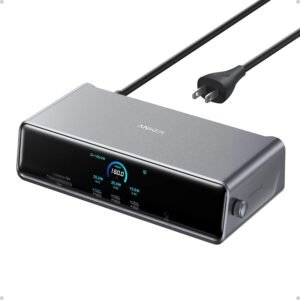
If you’re looking for a high-performance USB-C docking station that delivers robust multi-port connectivity, excellent power delivery, and smooth everyday usability, the Anker Prime Charging Docking Station is a top contender. It combines powerful charging, extensive port options, and reliable performance — making it ideal for both productivity users and creative professionals.
Why Choose the Anker Prime?
The Anker Prime Charging Docking Station is designed for users who want:
One central hub for displays, peripherals, and networking
High-wattage power delivery to keep laptops charged while you work
Stable, multi-device connectivity for desktop-style productivity
Rather than being just a simple USB-C hub, this dock turns your laptop (whether Mac, Windows, or Chrome OS) into a full workstation with the ports and power you need — without clutter.
Key Features and Benefits
Multi-Display Support
Connect external monitors via HDMI and/or DisplayPort
Expand your workspace for multitasking and productivity
Crisp, clear visuals for presentations, spreadsheets, and design tools
Plug-and-play setup for most modern laptops
High-Wattage USB-C Power Delivery
Strong power delivery keeps your laptop charged under load
Works with power-hungry machines like MacBook Pro and Windows laptops
Reduces cable clutter by combining power and data in one connection
Ideal for marathon work sessions
Extensive Port Selection
Multiple USB-A ports for keyboards, mice, and accessories
USB-C data port for fast external storage and peripherals
Ethernet port for reliable wired networking
Audio in/out for headsets or speakers
Built-In Ethernet Networking
Gigabit Ethernet port gives you a fast, stable wired connection
Great for streaming, video calls, and large file transfers
Better reliability over Wi-Fi alone
Essential for productivity and remote work
Audio & Data Support
Dedicated audio port for headsets or speakers
Multiple USB ports for fast data transfers
Works with external webcams, drives, and peripherals
Great for hybrid setups and multimedia
Specifications at a Glance
Display: External monitor support (HDMI/DisplayPort)
Power Delivery: High-wattage USB-C PD passthrough
Ports: USB-A, USB-C, Ethernet, HDMI/DP, audio jack
Compatibility: USB-C laptops and tablets (Windows, macOS, Chrome OS)
Design: Full docking station with broad connectivity
Who Is It For?
Remote professionals who rely on external displays
Students with productivity and multimedia needs
Creators working with photo/video/audio
Hybrid workers who need wired Ethernet and peripherals
Anyone who wants single-cable power + expansion support
Pros & Cons
Pros
Strong USB-C power delivery keeps laptops charged
Multi-display support increases productivity
Wide variety of ports for peripherals
Gigabit Ethernet for stable network connections
Works with most modern USB-C devices
Cons
Larger footprint than basic hubs
Not as portable as smaller USB-C adapters
Some features depend on host hardware and drivers
Price is higher than entry-level hubs
Final Verdict
If you’re building a dedicated laptop workstation and want a docking solution that combines robust port expansion, strong power delivery, and reliable network connectivity, the Anker Prime Charging Docking Station is an excellent choice. It gives you plenty of ports for peripherals, multiple external displays, wired networking, and laptop charging — all from a single USB-C connection.
It may be more than what basic users need, and its size is larger than simple adapters, but for professionals, creators, and hybrid workers who want a single, powerful hub that transforms a laptop into a desktop-type experience, the Anker Prime Docking Station delivers powerful, practical connectivity and productivity support.
1. Anker Prime Thunderbolt 5 Docking Station
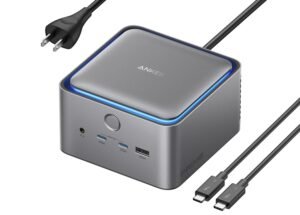
If you want a top-tier docking station that brings blazing-fast data speeds, multiple 4K display support, and robust power delivery to your laptop setup, the Anker Prime Thunderbolt 5 (TB5) Docking Station is one of the most advanced options available. It’s designed to be a power user’s hub, ideal for creators, professionals, and anyone who relies on demanding workflows with multiple peripherals and displays.
Why Choose the Anker Prime TB5?
The Anker Prime TB5 Docking Station earns its spot at #1 by delivering Thunderbolt 5 performance — which means ultra-high data bandwidth, enhanced power delivery, and seamless multi-display capability. Whether you’re pushing large media files, driving multiple 4K screens, or charging your laptop at full power, this dock is made to handle heavy workloads without breaking a sweat.
Rather than offering just incremental upgrades, the TB5 pushes into professional workstation territory with the future-ready capabilities and connectivity modern power users need.
Key Features and Benefits
Thunderbolt 5 Performance
Supports the latest Thunderbolt 5 connectivity
Next-generation data transfer speeds (much higher than USB-C alone)
Great for high-speed drives, pro workflows, and future-proofing
Handles heavy data throughput without compromises
Multiple High-Resolution Displays
Drives multiple 4K external monitors
Great for large spreadsheets, video editing timelines, and multitasking
Multiple video outputs (HDMI/DisplayPort depending on configuration)
Ideal for productivity and creative workflows
High-Wattage Power Delivery
Delivers powerful USB-C pass-through charging
Keeps high-performance laptops like MacBook Pro and Windows workstations powered
Combines data and power over a single cable
Reduces desk clutter and simplifies setup
Wide Selection of Ports
Multiple USB-A and USB-C ports for peripherals and storage
Fast data transfer and accessory support
Built-in Ethernet port for reliable wired networking
Audio input/output for headsets and conferencing
Gigabit Ethernet Networking
Stable Gigabit Ethernet connection
Excellent for video conferencing, large file transfers, and gaming
Better reliability than Wi-Fi alone
Ideal for full-time home office setups
Media and Peripheral Support
SD and microSD card readers (depending on model)
Works with webcams, external drives, audio interfaces, and more
Perfect for creators and professionals who multitask
Expands your device’s capabilities without extra dongles
Specifications at a Glance
Connection: Thunderbolt 5 (backward compatible with TB4/TB3)
Display: Multi-monitor support (up to three 4K displays or 1x 8K in some configs)*
Power Delivery: High-wattage USB-C pass-through charging
Ports: USB-A, USB-C, Ethernet, video outputs, audio, card reader
Compatibility: USB-C and Thunderbolt laptops (macOS & Windows)
Design: Premium desktop docking station *
* Display support can vary based on your laptop’s Thunderbolt bandwidth and graphics capabilities.
Who Is It For?
Power users with multiple 4K monitor workflows
Content creators and video editors
Remote workers with complex multitasking needs
Professionals needing wired networking and fast data transfer
Anyone who wants a future-proof Thunderbolt workstation hub
Pros & Cons
Pros
Cutting-edge Thunderbolt 5 bandwidth and performance
Multiple high-resolution display support
High-wattage USB-C power delivery
Multiple USB ports and Ethernet connectivity
Works well with pro workflows and large file transfers
Cons
Premium price point reflects pro performance
Larger and heavier than basic USB-C hubs
Full display capability depends on host laptop GPU and Thunderbolt support
Setup can be overwhelming for casual users
Final Verdict
If you’re ready to elevate your laptop setup into a full workstation, the Anker Prime TB5 Docking Station is a leading choice. Its Thunderbolt 5 performance, robust port selection, multi-monitor support, and power delivery make it ideal for creators, professionals, and anyone who needs a powerful hub that keeps pace with modern workflows.
This dock isn’t just an accessory — it’s a productivity engine that transforms your USB-C or Thunderbolt-equipped laptop into a desktop-class system. Whether you’re editing 4K video, managing multiple displays, or transferring vast amounts of data, the TB5 delivers exactly what it promises: powerful, future-proof performance that grows with your needs.
Final Verdict: What USB-C Hubs and Docking Stations Should You Buy?
For a future-proof, high-end workstation hub, the Anker Prime Thunderbolt 5 Docking Station (#1) is the best “buy once, use for years” option—especially if you run multiple monitors, fast drives, and a lot of accessories.
For most people building a clean work-from-home desk setup, the Anker Prime Charging Docking Station (#2) is the sweet spot: strong everyday port expansion, solid charging, and a true dock experience without going full “maxed-out pro.”
If your workflow depends on multiple external displays, the Satechi Triple 4K Display Dock (#3) or j5create Triple-Display Dock (#7) are the picks built specifically for screen-heavy multitasking—just make sure your laptop/OS supports the display configuration you want.
And if you’re mostly traveling or just need the basics (HDMI + USB-A + SD + charging), the Satechi Pro Hub Slim (#9) and UGREEN 6-in-1 (#10) are ideal “throw it in the bag” hubs that cover everyday needs without the cost or bulk of a full dock.