
Top 10 Gaming Controllers for PC
A great gaming controller can make PC gaming feel instantly better — smoother movement, cleaner inputs, and less fatigue during long sessions. But “best controller” depends on how you play: casual couch gaming needs comfort and easy pairing, competitive shooters demand low latency and extra buttons, and long-term buyers should prioritize drift resistance, durability, and strong software support.
For our Top 10 Gaming Controllers, we ranked picks that cover every tier — from budget Bluetooth gamepads to premium competitive controllers with paddles, tuning, and pro-grade performance.
Disclosure: As an Amazon Associate I earn from qualifying purchases.
Upgrading your gaming setup?
This guide is part of our Gaming Gear category, where we review keyboards, mice, controllers, headsets, and accessories for every type of gamer.
Quick Picks: Best Gaming Controllers for PC
Best Overall Performance Pick: GameSir G7 Pro (#1)
Best Premium Customizable Controller: Xbox Elite Series 2 (#3)
Best Competitive (Paddles + Customization): SCUF Envision Pro (#6)
Best Budget Wireless (Casual PC + Multi-Device): GameSir Nova Lite (#10)
How We Ranked the Best Gaming Controllers for PC
We scored each controller based on what actually matters once you’re 20 hours deep into a game:
Input performance + latency
Wired reliability vs wireless stability
Competitive responsiveness (especially in shooters/fighters)
Stick quality and drift resistance
Consistency over time
Smoothness and deadzone behavior (important for aiming)
Comfort and ergonomics
Grip shape, weight balance, trigger feel
Long-session fatigue (2–4 hour sessions)
Compatibility and “it just works” factor
Windows + Steam friendliness
Bluetooth vs 2.4 GHz vs wired flexibility
Setup friction (pairing, drivers, weird mapping issues)
Customization and extra controls
Back paddles, trigger stops, swappable sticks/modules
Profile switching and software quality (when included)
Build quality + value
Buttons, bumpers, d-pad consistency
Price-to-performance for its tier (budget vs premium expectations)
10. GameSir Nova Lite Bluetooth Wireless Gamepad
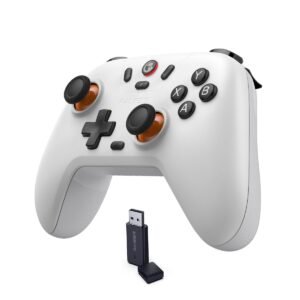
For gamers who want a simple, affordable wireless controller for PC gaming, the GameSir Nova Lite Bluetooth Wireless Gamepad is designed to deliver exactly that. It focuses on accessibility, ease of use, and cross-platform compatibility — making it a great starting point for casual PC gamers or anyone who wants a controller without a premium price tag.
Why Choose the Nova Lite?
The GameSir Nova Lite is built for gamers who want basic wireless controller functionality without paying for advanced competitive features they may not need. It’s lightweight, easy to set up, and compatible with multiple devices, making it a convenient option for everyday gaming.
Rather than targeting esports or pro-level players, the Nova Lite focuses on comfort, simplicity, and value.
Key Features and Benefits
Casual-Friendly Gaming Performance
Traditional analog stick and button layout
Responsive inputs suitable for casual and moderate gaming
Works well for platformers, RPGs, indie games, and emulation
Simple performance without advanced tuning or customization
Bluetooth Wireless Connectivity
Bluetooth wireless connection for cable-free play
Easy pairing with PCs, laptops, and compatible devices
Clean setup for couch gaming or desk use
No proprietary dongle required
Lightweight and Comfortable Design
Lightweight construction reduces hand fatigue
Ergonomic shape fits comfortably in most hand sizes
Balanced button placement for relaxed gameplay
Ideal for longer casual gaming sessions
Battery-Powered Convenience
Built-in rechargeable battery
Decent battery life for everyday use
USB charging for simple power top-ups
Suitable for travel and portable setups
Broad Compatibility
Compatible with Windows PCs
Works with Android devices and other Bluetooth-enabled platforms
Simple plug-and-play experience for most games
Great option for users who play across multiple devices
Specifications at a Glance
Connection: Bluetooth wireless
Layout: Standard dual-stick controller
Battery: Rechargeable internal battery
Compatibility: Windows PC, Android, Bluetooth-enabled devices
Weight: Lightweight design for comfort
Who Is It For?
Budget-conscious PC gamers
Casual and indie game players
Emulation and retro gaming fans
Gamers who want wireless play without extra cost
Beginners looking for their first PC controller
Pros & Cons
Pros
Very affordable price
Wireless Bluetooth connectivity
Lightweight and comfortable design
Easy setup and pairing
Broad device compatibility
Cons
Lacks premium features like back paddles or Hall-effect sticks
Not ideal for competitive or esports gaming
Fewer customization options compared to higher-end controllers
Build quality is basic
Final Verdict
If you’re just getting into PC gaming with a controller or want a low-cost wireless option for casual play, the GameSir Nova Lite Bluetooth Wireless Gamepad is a sensible choice. It delivers reliable wireless performance, comfortable ergonomics, and broad compatibility — all at a price that’s easy to justify.
It won’t satisfy competitive players or users looking for advanced customization, but for casual gamers, students, and budget-focused buyers, the Nova Lite focuses on delivering simple, reliable wireless controller support without unnecessary extras.
9. Turtle Beach Rematch Core Wired Controller
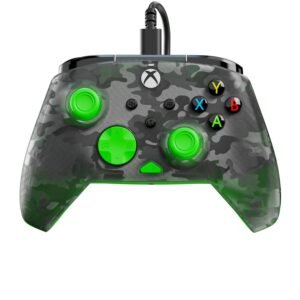
This is a simple, responsive wired controller that works seamlessly with PC games without the hassle of wireless setup. The Turtle Beach Rematch Core Wired Controller is a strong pick built for players who want plug-and-play reliability. It focuses on straightforward design and wide compatibility, making it a solid choice for casual PC gamers who want consistent performance without extra bells and whistles.
Why Choose the Rematch Core?
The Turtle Beach Rematch Core is designed for gamers who prefer wired simplicity and dependable input over wireless connectivity or advanced features. It’s ideal for players who want a controller that “just works” — no Bluetooth pairing, no battery charging, just plug it into your PC and start playing.
The Rematch Core leans toward comfort and compatibility, making it a smart choice for everyday gaming.
Key Features and Benefits
Solid Wired Performance
Plug-and-play wired connection ensures minimal latency
Stable input with no wireless interference
Reliable responsiveness for platformers, racing games, and action titles
Great for players who prioritize stable performance over wireless convenience
Comfortable Ergonomics
Comfortable grip shape for long sessions
Buttons and analog sticks laid out for ease of use
Balanced weight that feels natural in hand
Comfortable for both casual and extended play
Wide Compatibility
Works with Windows PCs right out of the box
Compatible with Steam controller support
Plug-and-play — no drivers required in most games
Ideal for retro emulation and modern PC titles alike
Durable Build Quality
Solid construction that feels sturdy
Responsive buttons and triggers
Wired connection minimizes wear and tear from wireless dongles
Reliable for everyday use
Specifications at a Glance
Connection: Wired USB
Compatibility: Windows PC, Steam support
Layout: Standard dual analog sticks + buttons
Cable: Long USB cable for comfortable desk or couch play
Buttons: Standard controller layout
Who Is It For?
Gamers who want reliable wired performance
Casual and everyday PC players
Retro and emulation gamers
Players who prefer predictability over wireless convenience
Anyone who wants plug-and-play simplicity
Pros & Cons
Pros
- Plug-and-play wired simplicity
- Very responsive input with minimal latency
- Comfortable ergonomic shape
- Broad PC compatibility
- No battery or pairing hassles
Cons
- Not wireless — cable required
- Lacks premium features like back paddles or Hall switches
- Limited customization options
- Basic feature set compared to premium controllers
Final Verdict
For players building a PC gaming setup, the Turtle Beach Rematch Core Wired Controller offers straightforward, reliable performance without the complexity of wireless pairing or rechargeable batteries. It’s comfortable, responsive, and plug-and-play ready — perfect for casual gaming and everyday use.
It might not satisfy players who want advanced customization or premium features, but for anyone who simply wants a no-nonsense wired controller that works with PC games, the Rematch Core gets the job done with dependable performance.
8. EasySMX X15 Wireless PC Controller
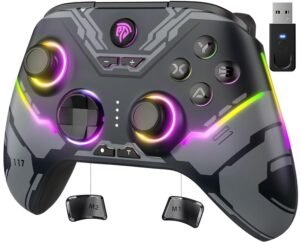
The EasySMX X15 Wireless PC Controller strikes a balance between affordability and wireless convenience, offering more features than basic entry-level gamepads. It delivers comfortable ergonomics, stable connectivity, and reliable performance—making it a strong option for PC gamers who want wireless freedom without paying premium prices.
Why Choose the EasySMX X15?
The EasySMX X15 is built for gamers who want wireless convenience with a step up in features compared to ultra-budget controllers. It’s easy to set up, comfortable to hold, and versatile enough for a wide range of PC games.
Instead of prioritizing competitive esports features, the X15 prioritizes comfort, battery life, and reliability, making it a strong everyday controller for casual and mid-level PC gamers.
Key Features and Benefits
Reliable Wireless Gaming Performance
Standard dual-stick controller layout
Responsive buttons and triggers for everyday gaming
Performs well in action games, racing titles, RPGs, and platformers
Smooth, consistent input suitable for casual to moderate play
Stable Wireless Connectivity
Wireless connection for cable-free gaming
Reliable signal with minimal input lag
Simple setup for PC gaming sessions
Ideal for desk setups or couch gaming
Comfortable Ergonomic Design
Ergonomic grip designed for extended play
Balanced weight that feels solid without being heavy
Button placement feels familiar and intuitive
Comfortable for longer gaming sessions
Long-Lasting Battery Performance
Built-in rechargeable battery
Solid battery life for extended playtime
USB charging for easy recharging
Suitable for daily gaming without frequent charging
Wide PC Compatibility
Compatible with Windows PCs
Works well with Steam controller support
Simple plug-and-play setup for most games
Great option for multi-genre PC gamers
Specifications at a Glance
Connection: Wireless
Layout: Standard dual-stick controller
Battery: Rechargeable internal battery
Compatibility: Windows PC
Design: Ergonomic, full-size controller
Who Is It For?
Budget-conscious PC gamers
Casual and everyday players
Gamers who want wireless freedom
Couch and desk gaming setups
Players looking for better comfort than entry-level controllers
Pros & Cons
Pros
Affordable wireless controller
Comfortable ergonomic design
Reliable wireless performance
Easy setup and compatibility with PC
Good battery life for everyday use
Cons
Lacks advanced features like Hall-effect sticks or back paddles
Not designed for competitive esports gaming
Fewer customization options than premium controllers
Build quality is solid but not premium
Final Verdict
If you want a wireless PC controller that goes beyond basic entry-level models without jumping into premium pricing, the EasySMX X15 Wireless PC Controller is a strong choice. It delivers comfortable ergonomics, dependable wireless connectivity, and reliable performance — all at a price that makes sense for most gamers.
It won’t satisfy competitive players who demand advanced customization or pro-level features, but for casual gamers, students, and budget-focused buyers, the EasySMX X15 provides a comfortable, reliable wireless experience for everyday PC gaming.
7. Microsoft Xbox Series X/S Wireless Controller
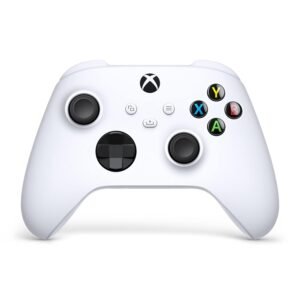
If you want a premium wireless controller that works flawlessly with PC gaming and delivers reliable performance across a wide range of titles, the Microsoft Xbox Series X/S Wireless Controller is a go-to choice for many gamers. It combines comfort, compatibility, and responsive controls — making it one of the most popular controllers for PC players.
Why Choose the Series X/S?
The Xbox Series X/S controller is designed to provide comfortable ergonomics, great wireless performance, and broad support across games and platforms. It works seamlessly with Windows PCs, major game clients like Steam, and many other devices — which makes it a reliable choice whether you’re gaming on a desktop, laptop, or streaming setup.
Rather than focusing only on premium features or competitive functionality, this controller balances ease of use, comfort, and everyday performance for a wide variety of gamers.
Key Features and Benefits
Comfort-Focused Design
Ergonomic shape fits a wide range of hand sizes
Textured grips on triggers and bumpers for secure feel
Well-spaced buttons and sticks reduce fatigue
Great for long gaming sessions
Reliable Wireless Connectivity
Uses Xbox Wireless or Bluetooth for wireless play
Stable connection with minimal latency
Easy pairing with Windows PCs
Works across multiple devices
Wide Compatibility
Native support on Windows 10 and beyond
Seamless integration with Steam
Works with supported Android and Xbox devices
No special drivers required in most cases
Responsive Controls
Precision analog sticks
Accurate D-pad and triggers
Comfortable face buttons for action gaming
Great for shooters, racers, sports, and platformers
Long-Lasting Battery Performance
Runs on replaceable AA batteries or rechargeable battery pack (sold separately)
Good battery life per session
Easy battery swaps keep you gaming longer
No need to constantly recharge
Specifications at a Glance
Connection: Xbox Wireless / Bluetooth
Compatibility: Windows PC, Xbox consoles, some Android devices
Layout: Standard dual stick + triggers + D-pad
Power: AA batteries or optional rechargeable pack
Button Mapping: Supported through Xbox Accessories app
Who Is It For?
PC gamers who want proven reliability
Players who prefer wireless freedom
Gamers who value comfort and ergonomics
Users who play a wide variety of games
Anyone who wants a controller that “just works” with PC
Pros & Cons
Pros
Excellent ergonomics and button feel
Reliable wireless performance
Seamless PC and Steam support
Comfortable for long sessions
Works with many platforms beyond PC
Cons
Uses AA batteries unless you buy a rechargeable pack
Not as customizable as enthusiast controllers
No Hall-effect sticks or advanced triggers
More expensive than basic controllers
Final Verdict
If you’re building a PC gaming setup and want a controller that just works without fuss, the Microsoft Xbox Series X/S Wireless Controller is one of the best all-around choices you can make. It pairs comfort and reliability with broad compatibility and wireless convenience, which makes it a favorite among PC gamers of all levels.
It may not have the advanced features found in premium competitive gamepads, but for casual players, daily gamers, and anyone who wants a dependable controller with wide support, the Xbox Series X/S Wireless Controller offers a comfortable, responsive, and widely compatible controller experience with minimal setup.
6. SCUF Gaming Envision Pro V2 Wireless Controller
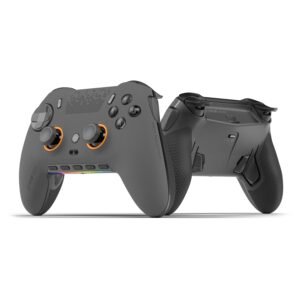
If you’re a PC gamer who wants a premium, customizable wireless controller built with competitive performance in mind, the SCUF Gaming Envision Pro Wireless Controller delivers features and adjustability that go beyond standard gamepads. Designed with esports and serious players in mind, it blends performance-focused hardware with thoughtful ergonomics and customization tools.
Why Choose the Envision Pro?
The SCUF Envision Pro is built for gamers who want competitive control with wireless freedom. It offers features like back paddles, trigger stops, interchangeable thumbsticks, and a customizable layout that appeal to shooters, action titles, and precision-focused gameplay.
Rather than simply being a “better Xbox controller,” the Envision Pro is crafted for players who demand more input control and personalization — whether that’s for ranked matches, intense sessions, or fine-tuned performance.
Key Features and Benefits
High-Level Customization
Rear paddles for additional button mapping
Interchangeable thumbsticks to suit grip and playstyle
Adjustable triggers for faster actuation
Load-and-go module system for rapid configuration
Wireless Freedom
Bluetooth wireless connection for PC play
Stable 2.4 GHz performance with compatible adapters
Minimal latency for competitive input
Wireless convenience without tangled cables
Precision Controls
Responsive analog sticks
Tight trigger feel with adjustable stops
Excellent D-pad for menus and combos
Mappable paddle controls for advanced maneuvers
Ergonomic Design
Comfortable grip optimized for long sessions
Textured surface for better handling
Balanced weight distribution
Feels like a high-end controller in hand
Software & Support
SCUF app for custom mapping and profiles
Saved configurations for game-specific layouts
Firmware updates improve performance
Works well on Windows PCs via wired or wireless modes
Specifications at a Glance
Connection: Bluetooth wireless / 2.4 GHz (adapter required)
Compatibility: Windows PC, supported devices
Additional Controls: Rear paddles & programmable inputs
Interchangeable Components: Yes
Software: Custom mapping via app
Who Is It For?
Competitive PC gamers
FPS and action gamers who use advanced techniques
Players who value customizable hardware
Users who want wireless play without sacrificing performance
Gamers with prioritized control and precision
Pros & Cons
Pros
Extensive customization options
Rear paddles enhance advanced control
Adjustable thumbsticks and triggers
Wireless performance suitable for competitive play
Comfortable ergonomic design
Cons
Premium price tier
Requires some setup to configure optimally
Extra features may be unnecessary for casual gamers
Wireless adapter (2.4 GHz) may be needed for lowest latency
Final Verdict
If you’re serious about PC gaming and want a controller that offers competitive-level customization and performance, the SCUF Gaming Envision Pro Wireless Controller is a standout choice. It strikes a strong balance between wireless convenience and high-end control features — from rear paddles to adjustable trigger stops — that experienced players will appreciate.
It may not be necessary for every gamer, especially casual players, but for those who want fine-tuned input performance and adaptable hardware, the Envision Pro provides precision, personalization, and wireless freedom for serious PC play.
5. Turtle Beach Victrix Pro BFG Reloaded Wireless Controller
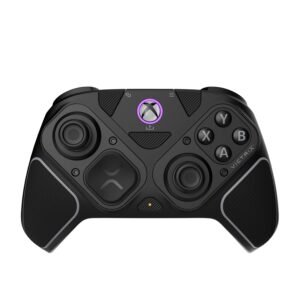
If you’re searching for a premium wireless controller with modular components and pro-level features, the Turtle Beach Victrix Pro BFG Reloaded Wireless Controller stands out as a versatile choice for PC gamers. It blends comfort, performance, and configurability to give you a competitive edge — whether you’re diving into shooters, fighting games, or fast-paced action titles.
Why Choose the Victrix Pro?
The Victrix Pro BFG Reloaded isn’t just a wireless controller — it’s a modular gaming machine designed for versatility and performance. With replaceable components, customizable layouts, and high-end hardware, it caters to gamers who value precision input and flexibility.
Rather than being a “one-size-fits-all” controller, the Victrix Pro BFG Reloaded offers adjustable gameplay configurations you can tailor for comfort, style, or competitive edge.
Key Features and Benefits
Modular Customization
Interchangeable control modules
Side handles that adapt for different grip styles
Swappable thumbstick tops for personal preference
Component swaps without tools
Wireless Freedom
Reliable 2.4 GHz wireless connection
Minimal input latency designed for gaming
Bluetooth capability for wider compatibility
Clean wireless setup for PC play
Pro-Level Control Layout
Responsive analog sticks and triggers
Precision D-pad for fighting and platform games
Back paddles for mapped action commands
Excellent balance of controls for diverse genres
Comfort-Focused Ergonomics
Balanced weight for long sessions
Soft-touch grips with textured surfaces
Designed to reduce fatigue during extended play
Contoured form factor fits many hand sizes
Broad PC Compatibility
Works with Windows PCs via wireless or wired USB-C
Compatible with Steam and many PC game clients
Plug-and-play features streamline setup
Optional software support for layouts and mapping
Specifications at a Glance
Connection: Wireless (2.4 GHz) + Bluetooth
Compatibility: Windows PC, Steam, supported devices
Layout: Full-size with modular components
Additional Controls: Back paddles, swappable modules
Charging: USB-C rechargeable battery
Software: Optional mapping support
Who Is It For?
Gamers who want modular customization
Competitive players seeking advanced control options
Wireless gamers who want pro-grade features
PC players across genres (fighters, shooters, action)
Users who appreciate ergonomic comfort and adaptability
Pros & Cons
Pros
Modular components for personalized feel
Responsive controls and thoughtful layout
Wireless freedom without sacrificing precision
Comfortable for long gaming sessions
Back paddles expand input options
Cons
Price is higher than basic wireless controllers
Not every player will use modular features
Setup may be more complex than plug-and-play
Some optional features require software support
Final Verdict
If you’re building a premium PC gaming setup and want a controller that balances modular customization, pro-level responsiveness, and wireless convenience, the Turtle Beach Victrix Pro BFG Reloaded Wireless Controller is an excellent choice. With interchangeable components, responsive controls, and comfort-centric ergonomics, it’s built for gamers who demand flexibility and performance.
It may not be necessary for every casual player, but for anyone who wants precision, adaptability, and wireless performance all in one package, the Victrix Pro BFG Reloaded delivers a versatile, high-end wireless controller experience built for both competitive and everyday play.
4. Sony PlayStation DualSense Wireless Controller
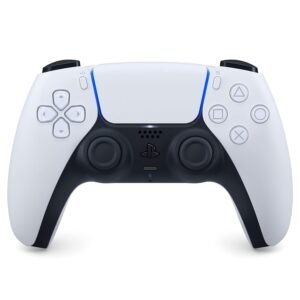
If you’re looking for a feature-rich wireless controller that offers comfort, precision, and modern technology, the Sony PlayStation DualSense Wireless Controller is a standout choice for PC gamers. Originally designed for the PlayStation 5, DualSense has become popular on PC thanks to its advanced haptics and responsive controls, giving games a more immersive feel.
In this review, we’ll break down what makes the DualSense Wireless Controller a compelling option on PC, where it shines, and who will benefit most from its design and performance.
“Adaptive triggers/haptics only work in supported PC games, often wired, and sometimes require Steam Input to be configured/disabled depending on the title.”
PCGamingWiki tracks supported titles and notes common setup caveats.
Why Choose the DualSense?
The Sony DualSense combines ergonomic comfort with innovative features like adaptive triggers and haptic feedback that bring games to life. While not every PC title supports all features natively, its broad compatibility and modern design make it one of the most desirable controllers available — especially if you value comfort and immersion.
Rather than catering strictly to competitive features, DualSense focuses on premium feel and advanced tactile feedback that many players love.
Key Features and Benefits
Advanced Haptic Feedback
Adaptive haptic motors provide nuanced vibration
Offers a deeper sense of immersion in supported titles
Can simulate tension, impact, and texture in gameplay
Elevates sensory experience beyond standard rumble
Adaptive Trigger Technology
Built-in adaptive triggers with varying resistance
Can simulate tension in actions like drawing a bow
Works best in games with DualSense PC support
Adds depth and tactile nuance to gameplay
Comfortable Ergonomic Design
Intuitive button layout with familiar PlayStation style
Contoured grips for long-session comfort
Well-placed analog sticks and triggers
Familiar feel for players who prefer console-style controllers
Wireless Convenience
Bluetooth wireless connectivity
USB-C wired option for low-latency play
Easy pairing with Windows PCs
Wireless freedom without cables
Built-In Speaker & Motion Controls
Integrated speaker adds audio cues in supported games
Motion sensors enable tilt and motion input
Adds optional control methods for supported titles
Specifications at a Glance
Connection: Bluetooth wireless / USB-C wired
Compatibility: Windows PC (features vary by game)
Feedback: Adaptive triggers + advanced haptics
Controls: Standard dual analog + buttons + motion input
Charge: USB-C rechargeable internal battery
Who Is It For?
PC gamers who love premium comfort
Players who want advanced haptic immersion
Gamers who enjoy narrative and adventure titles
Users who want wireless convenience
DualSense fans transitioning to PC gaming
Pros & Cons
Pros
- Comfortable ergonomic design
- Advanced haptic feedback and adaptive triggers
- Wireless Bluetooth connectivity
- USB-C wired option for low-latency play
- Modern features add immersion in supported games
Cons
- Not all PC games support adaptive triggers and haptics
- Battery life varies depending on feature use
- More expensive than basic controllers
- Some advanced features require software support
Final Verdict
If you’re building a PC gaming setup and want a premium controller with advanced feedback and wireless convenience, the Sony PlayStation DualSense Wireless Controller is one of the best choices available. Its adaptive triggers and haptic feedback set it apart from many standard controllers — especially in games that support its full feature set.
It might not be perfect for every competitive player or every PC title (since not all games support the advanced haptic features), but for most gamers who value comfort, immersion, and modern design, the DualSense delivers exactly what it promises: a feature-rich, comfortable controller that feels at home in your hands.
3. Xbox Elite Series 2 Wireless Controller
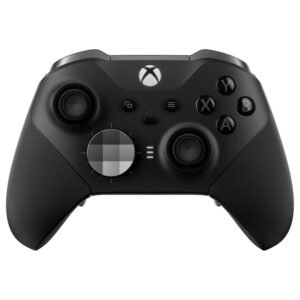
If you’re looking for a high-end wireless controller that offers deep customization, premium build quality, and excellent performance on PC, the Xbox Elite Series 2 Wireless Controller is one of the most respected options available. Designed for serious gamers, it delivers refined control, adjustable components, and a luxurious feel that stands out from standard controllers.
Why Choose the Elite Series 2?
The Xbox Elite Series 2 is built for gamers who want maximum control and customization. With adjustable thumbsticks, rear paddles, and trigger stops, it allows you to tailor the controller exactly to your playstyle — whether you’re grinding competitive matches or enjoying long single-player sessions.
Rather than focusing on gimmicks, the Elite Series 2 emphasizes precision, durability, and personalization, making it a favorite among competitive and enthusiast PC gamers.
Key Features and Benefits
Advanced Customization Options
Interchangeable thumbsticks with adjustable tension
Four removable rear paddles for extra inputs
Hair trigger locks for faster actuation
Custom profiles that can be switched on the fly
Reliable Wireless Performance
Uses Xbox Wireless or Bluetooth for PC connectivity
Stable wireless connection with low latency
Seamless pairing with Windows PCs
Wired USB-C option available for uninterrupted play
Precision Controls
Highly accurate analog sticks
Responsive triggers with adjustable resistance
Improved D-pad for precise inputs
Excellent consistency across gaming genres
Premium Build & Comfort
High-quality materials with rubberized grips
Balanced weight that feels substantial and controlled
Comfortable design for long gaming sessions
Charging dock included for convenience
Software & Compatibility
Full customization through the Xbox Accessories app
Button remapping, trigger adjustment, and profile storage
Native support on Windows and Steam
Works across a wide range of PC games
Specifications at a Glance
Connection: Xbox Wireless / Bluetooth / USB-C
Compatibility: Windows PC, Steam-supported titles
Controls: Adjustable thumbsticks, rear paddles, trigger locks
Power: Built-in rechargeable battery
Extras: Charging dock, carrying case
Who Is It For?
Competitive PC gamers
Players who want deep hardware customization
FPS, action, and sports game fans
Gamers who value premium materials and feel
Users upgrading from standard controllers
Pros & Cons
Pros
Extensive customization options
Premium build quality and materials
Adjustable thumbstick tension and trigger stops
Rear paddles expand control possibilities
Strong PC and Steam compatibility
Charging dock included
Cons
Expensive compared to standard controllers
Heavier than basic gamepads
Advanced features may be unnecessary for casual gamers
Battery is not user-replaceable
Final Verdict
If you’re building a serious PC gaming setup and want a controller that offers top-tier customization, precision, and build quality, the Xbox Elite Series 2 Wireless Controller is an outstanding choice. It provides a level of control and personalization that few controllers can match, making it especially appealing for competitive and enthusiast gamers.
It may be overkill for casual players or those on a tight budget, but for gamers who want maximum control and a premium feel, the Elite Series 2 offers a powerful, highly customizable controller experience built for serious PC gaming.
2. 8BitDo Ultimate 2 Wireless Controller
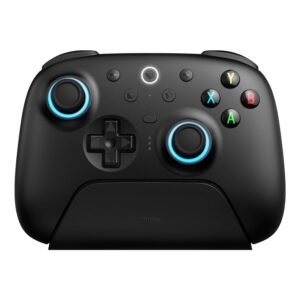
If you’re searching for a versatile, modern wireless controller that combines premium features, excellent customization, and broad compatibility with PC games, the 8BitDo Ultimate 2 Wireless Controller stands out as one of the most compelling choices available. It offers a blend of performance, flexibility, and smart software support — all at a price that competes well with other high-end controllers.
Why Choose the Ultimate 2?
The 8BitDo Ultimate 2 Wireless Controller is built for gamers who want advanced customization, wireless convenience, and wide platform support — including seamless PC compatibility. Whether you’re playing shooters, platformers, or strategy games, the Ultimate 2 adapts to your style and preferences.
Instead of focusing solely on hardware, it pairs a solid controller build with a robust software ecosystem that gives you control over button layouts, sensitivity, profiles, and more.
Key Features and Benefits
Customizable Controls
Button remapping through 8BitDo Ultimate Software
Adjustable stick and trigger sensitivity
Save multiple custom profiles
Create game-specific configurations
Reliable Wireless Connectivity
Wireless support via Bluetooth
Stable connection with minimal latency
Works well with Windows PC
Wired USB-C option for low-latency play
Comfortable, Ergonomic Design
Comfortable grip for extended sessions
Balanced weight distribution
Intuitive button layout
Designed for both relaxed and competitive play
Long Battery Life
Built-in rechargeable battery
Strong battery life between charges
USB-C charging for convenience
LED battery indicator
Broad Compatibility
Supports Windows PC
Works with Steam and many PC game clients
Compatible with Switch and Android (good bonus)
Multiple platform modes for flexibility
Specifications at a Glance
Connection: Bluetooth wireless / USB-C wired
Compatibility: Windows PC, Steam, Switch, Android
Customization: 8BitDo Ultimate Software
Battery: Rechargeable internal battery
Layout: Standard dual analog + triggers + buttons
Who Is It For?
PC gamers who want customization
Players who enjoy various genres of games
Users who play on multiple devices
Gamers who want wireless convenience
Fans who appreciate flexible software support
Pros & Cons
Pros
High level of customization via software
Comfortable ergonomic design
Broad platform compatibility
Wireless Bluetooth connectivity
Long battery life
Wired option available
Cons
Advanced features may require software setup
Not as tactile as some premium competitive controllers
Wireless latency is slightly more than dedicated RF solutions
Some games may require manual profile switching
Final Verdict
If you’re building a PC gaming setup and want a well-rounded controller that offers excellent customization, comfortable design, and wide compatibility, the 8BitDo Ultimate 2 Wireless Controller is a fantastic choice. Its combination of software flexibility and reliable hardware makes it great for a wide range of playstyles — whether you’re tackling action titles, exploring indie games, or enjoying long sessions with friends.
It may take a bit of setup to get exactly how you like it, but for gamers who value control personalization and wireless convenience, the Ultimate 2 offers a flexible, feature-rich controller experience built for modern PC gaming.
1. GameSir G7 Pro Controller
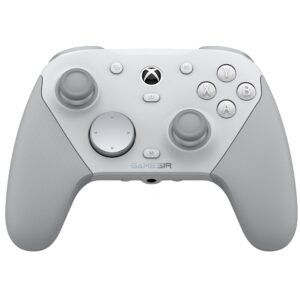
If you’re looking for a top-tier wireless controller that combines performance, precision, and premium features — the GameSir G7 Pro Controller is one of the best choices available for PC gaming today. It blends professional-grade hardware with intuitive controls and strong cross-platform support, making it a favorite among both everyday gamers and competitive players alike.
Why Choose the G7 Pro?
The GameSir G7 Pro is built for gamers who want premium wireless performance without compromise. It delivers high-precision controls, robust connectivity options, and thoughtful ergonomics — all in a package that feels substantial and responsive in every game, from shooters and racers to action RPGs and sports titles.
Rather than simply competing with standard controllers, the G7 Pro pushes into the territory of pro-level responsiveness, strong customization, and long-lasting comfort.
Key Features and Benefits
Hall-Effect Sensor Technology
Hall-effect analog sticks and triggers for enhanced precision
Smooth, drift-resistant performance over time
Analog control sensitivity perfect for shooters and racing games
Greater accuracy compared to traditional potentiometer inputs
Flexible Wireless Connectivity
Wireless 2.4 GHz connection for low-latency gaming
Bluetooth mode for broader compatibility
Wired USB-C option for lowest possible latency and charging
Stable connections across all modes
Comfort-Focused Ergonomic Design
Well-balanced weight distribution
Comfortable grip for long gaming sessions
Button layout optimized for responsiveness
Textured thumbsticks for improved control
Long Battery Life
Extended wireless playtime
USB-C rechargeable battery
LED battery status indicator
Reliable energy management
Software Customization
Button remapping supported
Adjustable stick sensitivity
Custom profiles through GameSir software
Flexible configuration for different game genres
Specifications at a Glance
Connection: Wireless 2.4 GHz / Bluetooth / USB-C wired
Sensors: Hall-effect sticks and triggers
Compatibility: Windows PC + multiple platforms
Battery: Rechargeable internal battery
Software: GameSir configuration support
Layout: Standard dual thumbsticks + triggers + buttons
Who Is It For?
PC gamers who want premium precision and responsiveness
Competitive players who want Hall-effect technology
Wireless gamers who want reliable low-latency play
Players who like customization without complexity
Users who want strong cross-platform support
Pros & Cons
Pros
Hall-effect sticks and triggers for high precision
Multiple connection modes (2.4 GHz, Bluetooth, wired)
Long battery life and USB-C charging
Comfortable, ergonomic design
Customization options via GameSir software
Reliable wireless performance
Cons
Software customization may take time to configure
Premium features come with a higher price tag
Hall-effect controls may be overkill for casual players
Requires software for full control mapping
Final Verdict
If you’re building a high-performance PC gaming setup and want a controller that delivers precision, comfort, and versatility, the GameSir G7 Pro Controller is our top recommendation. It combines premium hardware, robust wireless performance, and thoughtful customization features to give you a competitive edge in nearly any game.
It may be more than casual gamers need, but for anyone who cares about accuracy, customization, and seamless cross-platform compatibility, the G7 Pro stands out as a top-tier controller experience for modern PC gaming.
Final Verdict: Which Gaming Controller Should You Buy?
If you want the cheapest solid wireless controller for casual PC gaming, the GameSir Nova Lite (#10) is a smart entry point — easy Bluetooth play, lightweight comfort, and broad compatibility without paying for premium extras.
If you want a controller that works flawlessly with PC with minimal fuss, the Xbox Series X/S controller (#7) is the safest “daily driver” pick: great ergonomics, strong support, and reliable performance across nearly every PC game.
If you care about competitive features like paddles, tuning, and faster inputs, jump to the Xbox Elite Series 2 (#3) for premium customization, or SCUF Envision Pro (#6) if you want a more competition-forward setup.
And if you want the best balance of performance + modern features at the top of your list, your GameSir G7 Pro (#1) is the “go big” option — built for players who value precision, versatility, and a higher-end controller experience.