
Top 10 Laptops for Work From Home
10. Acer Chromebook 315
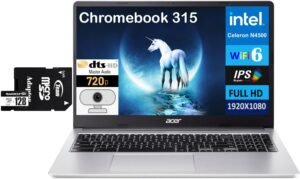
If you need a simple, affordable laptop for everyday work-from-home use, the Acer Chromebook 315 is one of the best budget-friendly options available. It pairs a large 15.6-inch display with long battery life, reliable ChromeOS performance, and a comfortable keyboard — all at a price point that’s hard to beat for basic productivity.
In this review, we’ll break down what makes the Chromebook 315 a compelling choice at its price, where it excels, and the types of remote workers who’ll benefit most from it.
Why Choose the Acer Chromebook 315?
The Acer Chromebook 315 isn’t about high-end performance — it’s about straightforward, reliable productivity for everyday tasks like browsing, video calls, email, and document editing. Powered by ChromeOS, this Chromebook boots fast, updates automatically, and manages apps efficiently with minimal maintenance.
With its large 15.6″ anti-glare display, all-day battery life, and lightweight design, it’s especially useful for:
-
Work-from-home setups on a budget
-
Students and casual users who multitask light duties
-
Anyone who wants a simple, distraction-free laptop experience without the complexity of Windows or macOS
Key Features and Benefits
Large 15.6″ Display
Big anti-glare screen for documents, spreadsheets, and browsers
Easier multitasking with more screen real estate than smaller laptops
Great for watching tutorials and working with split-screen apps
Smooth Everyday Performance
ChromeOS keeps things fast and simple
Handles web apps, email, calendars, and conferencing tools with ease
Lightweight experience without unnecessary bloat
All-Day Battery Life
Battery life typically lasts a full work or study session
Great for remote days or working from a couch or coffee table
Comfortable Full-Size Keyboard
Includes number pad for spreadsheets and data entry
Good tactile typing feel for longer work sessions
Secure, Hassle-Free Software
ChromeOS offers fast boot times and automatic updates
Built-in security features keep data safe with minimal setup
Specifications at a Glance
Display: 15.6″ Full HD
Processor: Intel Celeron N4500
Memory: 4 GB RAM
Storage: 64GB SSD + 128GB SD Card
Ports: USB-C, USB-A, microSD reader
Operating System: ChromeOS
Battery Life: Up to ~10 hours
Use Case: Everyday productivity, web work, education
Who Is It For?
Remote workers on a tight budget
Students or travelers who want simple productivity
Users who primarily use web apps and cloud tools
First-time laptop buyers or casual users
Anyone wanting low maintenance and secure software
Pros & Cons
Pros
Excellent value at an affordable price
Large, easy-to-read screen for work and media
Long battery life for full day use
ChromeOS is simple and secure
Comfortable keyboard with numeric pad
Cons
Not powerful enough for demanding software
Limited storage and memory compared to Windows laptops
ChromeOS depends on web apps (offline limitations)
Display brightness not ideal for very bright settings
Final Verdict
The Acer Chromebook 315 is a smart pick for budget-focused remote workers who need a reliable device for email, documents, video calls, and browsing without breaking the bank. Its large screen, long battery life, and simple ChromeOS experience make it especially appealing for everyday tasks, student workflows, or anyone who doesn’t need heavy-duty computing power.
It won’t replace a high-end Windows or macOS laptop, but for essential work-from-home productivity and lightweight workloads, this Chromebook gets the job done with minimal hassle and maximum value.
9. Lenovo IdeaPad 5 2‑in‑1 16"
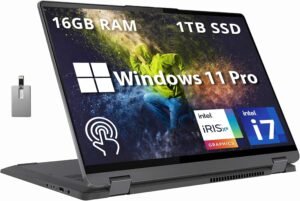
If you want an affordable yet capable laptop that can handle everyday work-from-home tasks with flexibility and power, the Lenovo IdeaPad 5 2-in-1 16″ is a compelling choice at the entry point of this list. It combines a large, 16-inch touchscreen with convertible 2-in-1 versatility, solid battery life, and a comfortable keyboard — all packaged in a value-oriented design.
In this review, we’ll break down what makes the IdeaPad 5 2-in-1 such a solid work-from-home contender, where it shines, and who will get the most out of it.
Why Choose the Lenovo IdeaPad 5 2-in-1 16″?
The Lenovo IdeaPad 5 2-in-1 isn’t just a basic laptop — its convertible form factor and generous display make it especially useful for remote workers who want both a traditional clamshell and tablet-style experience. Whether you’re typing up documents, hopping on video calls, or sketching ideas with touch and pen support, this model delivers flexibility that helps streamline your workflow.
Rather than focusing solely on power like premium machines, the IdeaPad 5 2-in-1 strikes a balance of everyday performance, comfort, and versatility at a price that won’t break the bank.
Key Features and Benefits
Large 16″ Touch Display
Spacious screen ideal for split-screen multitasking
Touch input adds an interactive, tablet-like feel
Great for documents, spreadsheets, and content consumption
2-in-1 Convertible Design
Flip into tablet mode for note-taking or presentations
Tent mode works well for watching videos and collaboration
Makes WFH setups more flexible
Comfortable Keyboard and Trackpad
Well-spaced keys with decent travel for typing sessions
Responsive trackpad supports Windows gestures
Good for long writing or Zoom call days
Everyday Performance
Reliable performance for office apps, email, and browsing
Smooth handling of remote work workloads
Adequate memory and storage for typical use
Solid Battery Life
All-day battery for most schedules
Keeps you productive throughout your workday
Useful for work without frequent charging
Specifications at a Glance
Display: 16″ touchscreen
Processor: Intel Core i7-1255U
Memory: 16 GB RAM
Storage: 1 TB SSD
Ports: USB-C, USB-A, HDMI, audio jack
Operating System: Windows 11
Weight: ~4 lbs
Use Case: Work-from-home productivity, everyday tasks
Who Is It For?
Remote workers on a budget
People who value touch and pen input
Students or home office setups
Anyone who wants a convertible laptop for versatile use
Pros & Cons
Pros
Large, touch-enabled display
Flexible 2-in-1 form factor
Comfortable keyboard for typing
Good battery life for everyday use
Great value for entry-level productivity
Cons
Not designed for heavy creative workloads
Performance varies with configuration
Heavier than some ultraportables
Display quality is good but not premium
Final Verdict
The Lenovo IdeaPad 5 2-in-1 16″ earns its spot at #9 on this work-from-home laptop list by offering versatile performance, a large interactive display, and a flexible design — all at a very accessible price point. It may not match premium flagship power, but for office productivity, video calls, web apps, and everyday tasks, it delivers reliable performance with a form factor that adapts to your workflow.
If you’re setting up a home office on a budget and want a laptop that does more than just the basics, the IdeaPad 5 2-in-1 is a solid start to your tech lineup.
8. Lenovo IdeaPad Slim 3 15.6"
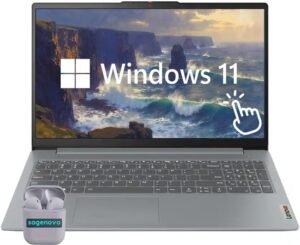
If you’re looking for a straightforward, budget-friendly laptop that can comfortably handle everyday work-from-home tasks, the Lenovo IdeaPad Slim 3 15.6″ is a strong contender. It offers a large display, dependable performance for office work, and a clean, no-nonsense design that fits perfectly into a home office setup.
In this review, we’ll break down what makes the IdeaPad Slim 3 a solid productivity option, where it performs best, and who it’s ideal for.
Why Choose the Lenovo IdeaPad Slim 3 15.6″?
The Lenovo IdeaPad Slim 3 focuses on reliability and value rather than flashy extras. It’s built for users who need a dependable Windows laptop for emails, spreadsheets, video calls, and web-based tools without paying for premium features they won’t use.
With its 15.6-inch screen, comfortable keyboard, and efficient everyday performance, the Slim 3 is especially well-suited for remote workers who want a traditional laptop experience that simply gets the job done.
Key Features and Benefits
Large 15.6″ Display
Plenty of screen space for multitasking
Comfortable viewing for documents and spreadsheets
Ideal for split-screen workflows and extended use
Reliable Everyday Performance
Smooth handling of office software and web apps
Responsive for video meetings and multitasking
Designed for consistent, everyday workloads
Comfort-Focused Keyboard
Full-size keyboard with good key spacing
Comfortable for long typing sessions
Great for emails, reports, and data entry
Efficient Battery Life
Lasts through most of a standard workday
Reduces the need for frequent charging
Reliable for home and hybrid work setups
Slim, Lightweight Design
Easy to move between rooms or workspaces
Clean, professional look
Doesn’t feel bulky despite the large screen
Specifications at a Glance
Display: 15.6″ Full HD
Processor: AMD Ryzen 7 5825U
Memory: 16 GB RAM
Storage: 1 TB
Ports: USB-A, USB-C, HDMI, headphone jack
Operating System: Windows 11
Use Case: Work-from-home productivity, everyday computing
Who Is It For?
Remote workers on a budget
Students or home office users
Anyone who prefers a traditional laptop form factor
Users who need reliable performance for everyday tasks
People who want value over premium extras
Pros & Cons
Pros
Affordable price point
Large screen ideal for productivity
Comfortable keyboard for long work sessions
Reliable everyday performance
Clean, professional design
Cons
Not intended for demanding creative or gaming workloads
Display quality is solid but not premium
Performance varies depending on configuration
Limited upgrade options on some models
Final Verdict
The Lenovo IdeaPad Slim 3 15.6″ earns its spot at #8 by delivering dependable work-from-home performance at an accessible price. It’s not designed to compete with premium ultrabooks, but for everyday office tasks, video calls, and productivity software, it performs exactly as needed.
If you want a simple, affordable Windows laptop with a large display and comfortable typing experience, the IdeaPad Slim 3 is a practical and reliable choice for your home office setup.
7. Dell Pro 16 PC16250
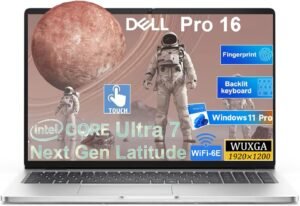
If you want a solid work-from-home laptop with a spacious display, strong multitasking performance, and business-ready features, the Dell Pro 16 PC16250 stands out as a capable option — especially for professionals who want reliability and productivity in one machine. It blends a large screen, robust specs, and practical design to help get work done without unnecessary complexity.
In this review, we’ll break down what makes the Pro 16 such a compelling choice for remote work, where it excels, and who will get the most value from it.
Why Choose the Dell Pro 16 PC16250?
The Dell Pro 16 PC16250 is built with professional productivity and everyday performance at its core. It’s designed to handle demanding office workloads, multiple apps, and frequent multitasking — making it ideal for work-from-home setups where responsiveness and reliability matter.
Unlike basic budget laptops, this model leans into a larger 16″ display, solid memory and storage configurations, and business-focused features like Windows 11 Pro and vPro support on select SKUs, giving it an edge for people who need more than just the basics.
Key Features and Benefits
Expansive 16″ Display
Large screen with a 16:10 aspect ratio enhances productivity
More vertical space for documents and multi-window workflows
Comfortable for spreadsheets, video calls, and creative tasks
Powerful Multi-Core Performance
Configurable with Intel Core Ultra or Core 7/5 processors
Excellent for multitasking, office software, and business apps
Handles video conferencing and browser tabs with ease
Generous Memory & Storage Options
Typically 16 GB DDR5 RAM for smooth multitasking
SSD storage options (256 GB–512 GB or more) for fast access
Keeps files and apps responsive in everyday use
Productivity-Focused Keyboard
Comfortable keyboard layout for long typing sessions
Numeric keypad makes data entry easier
Helps reduce fatigue during extended work hours
Business-Ready Features
Windows 11 Pro gives professional security and management tools
vPro support available on higher-end configs
Business-class networking and connectivity
Specifications at a Glance
Display: 16″ FHD+ (1920×1200) IPS with anti-glare
Processor: Intel Ultra 7 225U
Memory: 16 GB DDR5 (upgradeable)
Storage: 512 GB SSD (NVMe)
Graphics: Integrated Intel Graphics
Operating System: Windows 11 Pro
Connectivity: Wi-Fi 6E, Bluetooth
Use Case: Work-from-home productivity, business computing
Who Is It For?
Professionals who need large screen productivity
Remote workers running multiple apps and meetings
Small business owners and hybrid employees
Anyone who values reliable Windows performance
People who prefer business-class security and management tools
Pros & Cons
Pros
Spacious 16″ display enhances multitasking
Strong performance for business workloads
Solid RAM and SSD configurations
Comfortable keyboard with numeric keypad
Windows 11 Pro adds professional features
Cons
Base model display color reproduction is average
Not a premium design — functionality over flair
Higher price than basic budget laptops
Performance gains vary by configuration
Final Verdict
The Dell Pro 16 PC16250 is a reliable work-from-home laptop that leans into productivity and business features without unnecessary extras. Its large, comfortable display and strong performance make it a great choice for professionals who juggle complex tasks, spreadsheets, and video calls throughout the day.
While it’s not a flashy machine, its focus on function — combined with professional-grade software and hardware options — makes it a solid pick for anyone setting up a serious home office or remote work environment.
6. Lenovo ThinkBook 16 G7
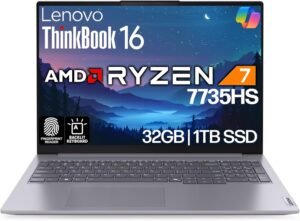
If you want a work-from-home laptop that blends business-class performance with everyday usability, the Lenovo ThinkBook 16 G7 is a standout option. It combines a large, vibrant display, capable specs, and thoughtful design touches that make daily productivity smoother — whether you’re juggling documents, spreadsheets, or video calls.
In this review, we’ll break down what makes the ThinkBook 16 G7 a compelling choice for professionals and remote workers, where it excels, and who will benefit most from adding it to their home office setup.
Why Choose the Lenovo ThinkBook 16 G7?
The Lenovo ThinkBook 16 G7 isn’t just another mid-range laptop — it’s designed to bring business-ready features and performance into a sleek, accessible package. With a spacious 16″ screen and robust processor options, it handles demanding productivity tasks, multitasking workflows, and daily conferencing and collaboration with ease.
Rather than prioritizing flashy extras, this model leans into reliable performance, solid build quality, and practical design — attributes that are especially valuable for home-based professionals who want a dependable machine that feels confident across workday tasks.
Key Features and Benefits
16″ High-Quality Display
Large, sharp screen ideal for multitasking and creative work
Plenty of space for spreadsheets, documents, and browser tabs
Helps reduce eye strain with a spacious visual workspace
Strong Productivity Performance
Capable processor handles multitasking and business apps
Smooth performance for video calls, office software, and cloud tools
Reliable for long work sessions without lag or slowdown
Professional-Oriented Design
Thoughtful keyboard and trackpad for comfortable typing
Minimal, business-friendly design that fits home office setups
Solid build quality with practical port selection
All-Day Battery Life
Power to last through typical workdays
Great for hybrid work or extended productivity sessions
Reduces interruptions for charging
Good Connectivity Options
USB-C, USB-A, HDMI, and other essential ports
Easy connection to external displays and accessories
Flexible for home office peripherals
Specifications at a Glance
Display: 16″ Full HD+ (1920×1200) IPS
Processor: AMD Ryzen 7 7735HS
Memory: 32GB RAM DDR5
Storage: 1 TB NVMe
Graphics: Integrated graphics
Operating System: Windows 11 Pro
Use Case: Work-from-home productivity, business computing
Who Is It For?
Remote workers who need reliable all-day performance
Professionals running multiple apps and simultaneous workflows
Users who want a spacious screen for multitasking
Home office setups requiring solid connectivity
Anyone who values a comfortable keyboard and practical design
Pros & Cons
Pros
Large, productivity-friendly display
Strong performance for business tasks
Comfortable keyboard and solid build quality
Good battery life for long use
Well-rounded connectivity options
Cons
Not as light or portable as some ultraportables
Display isn’t the brightest compared with premium models
Not optimized for intensive creative tasks
Premium power configurations can raise the price
Final Verdict
The Lenovo ThinkBook 16 G7 is a dependable and well-rounded work-from-home laptop that bridges the gap between everyday productivity and business-class performance. With its spacious screen, capable specs, and thoughtful design, it’s well suited for professionals who juggle documents, meetings, and multitasking throughout the workday.
If you want a laptop that keeps up with your workflow without unnecessary complexity, the ThinkBook 16 G7 delivers consistent performance and practical features that make remote work smoother and more efficient.
5. Lenovo Yoga 7 7i 2‑in‑1
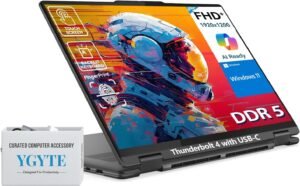
If you want a versatile laptop that doubles as a tablet and fits perfectly into a work-from-home setup, the Lenovo Yoga 7 7i 2-in-1 is a standout choice. It combines solid performance, a flexible 360° hinge, and a bright, touch-enabled display — ideal for productivity, creative tasks, and everyday computing.
In this review, we’ll break down what makes the Yoga 7 7i such a compelling 2-in-1 option, where it shines, and who will benefit most from its blend of power and adaptability.
Why Choose the Lenovo Yoga 7 7i 2-in-1?
The Yoga 7 7i isn’t just another laptop — it’s a convertible powerhouse that gives you the best of both worlds: traditional clamshell performance and tablet-style convenience. Whether you’re typing up reports, taking notes in tablet mode, or presenting in tent mode during a video meeting, this Yoga adapts to your workflow seamlessly.
With solid internals, responsive touch, and sleek design, it’s a great option for remote workers who want more flexibility than a standard notebook without sacrificing performance.
Key Features and Benefits
360° 2-in-1 Design
Switch easily between laptop, tablet, tent, or stand modes
Great for taking handwritten notes or reviewing documents in tablet mode
Makes presentations and collaboration more intuitive
Bright Touch-Enabled Display
Clear, vivid screen with touch support for intuitive interaction
Excellent for multitasking and media
Responsive for pen or finger input
Powerful Everyday Performance
Handles office software, web apps, and multitasking with ease
Smooth performance during video calls and productivity tasks
Good balance of power and efficiency
Comfortable Keyboard & Build
Comfortable keys with satisfying travel
Solid build quality with a professional aesthetic
Comfortable for extended typing sessions
Strong Battery Life
Long battery life keeps you productive throughout the day
Great for hybrid schedules or sessions away from a charger
Helps minimize interruptions during work sessions
Specifications at a Glance
Display: 16″ Full HD+ touch screen
Processor: Intel Core Ultra 7
Memory: 16 GB RAM DDR5
Storage: 1TB SSD
Graphics: Integrated Intel Iris Xe
Operating System: Windows 11
Use Case: Work-from-home productivity with flexibility
Who Is It For?
Remote workers who want versatility
People who enjoy tablet and laptop modes
Students or creatives who benefit from touch input
Anyone who values long battery life
Users needing reliable performance without premium pricing
Pros & Cons
Pros
Flexible 2-in-1 design adapts to many workflows
Bright, responsive touch display
Good performance for everyday tasks
Comfortable keyboard and solid build
Long battery life for work sessions
Cons
Slightly heavier than traditional clamshell laptops
Not designed for high-end creative workloads
Touch and pen features may be unnecessary for some users
Premium performance configurations can increase price
Final Verdict
The Lenovo Yoga 7 7i 2-in-1 is a versatile and capable work-from-home laptop that gives you flexibility without sacrificing performance. Its convertible design, responsive touch display, and solid everyday power make it ideal for professionals, creatives, and hybrid workers who want one device that can handle multiple roles.
If you’re looking for a multi-mode laptop that adapts to productivity tasks, meetings, and media, the Yoga 7 7i delivers a balanced experience that’s both practical and enjoyable.
4. Asus ZenBook 14 OLED
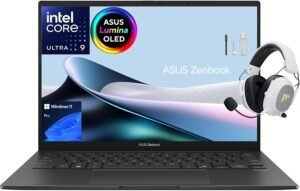
If you want a premium work-from-home laptop that delivers serious performance and one of the best displays in its class, the Asus ZenBook 14 OLED is a top choice. It pairs a gorgeous OLED screen with capable internals, long battery life, and a sleek, lightweight design — perfect for professionals who want both style and substance.
In this review, we’ll break down what makes the ZenBook 14 OLED such a compelling option, where it shines, and who will benefit most from its combination of performance and visual excellence.
Why Choose the Asus ZenBook 14 OLED?
The Asus ZenBook 14 OLED isn’t just another 14-inch laptop — its OLED display sets it apart, offering richer colors, deep blacks, and crisp visuals that make working with documents, spreadsheets, and creative content a joy. Whether you’re on video calls, editing photos, or managing multiple workspaces, this screen enhances every task.
Coupled with solid performance, excellent battery life, and premium build quality, the ZenBook 14 OLED delivers a productivity experience that feels both capable and refined.
Key Features and Benefits
Vibrant 14″ OLED Display
Exceptional color accuracy and contrast
Deep blacks and wide viewing angles
Makes long hours of work easier on the eyes
Strong Productivity Performance
Powerful processors keep up with multitasking
Smooth performance for office software and web apps
Handles demanding workflows with ease
Sleek, Lightweight Design
Thin profile ideal for home office or travel
Premium build quality feels solid and durable
Attractive aesthetic that stands out on any desk
Comfortable Typing Experience
Well-spaced keyboard with pleasant feedback
Responsive trackpad enhances productivity
Great for long writing or spreadsheet sessions
Excellent Battery Life
Long-lasting power for full workdays
Great for hybrid work or sessions away from a charger
Keeps you productive without frequent recharging
Specifications at a Glance
Display: 14″ OLED Full HD
Processor: Intel Core Ultra 9
Memory: 32 GB RAM
Storage: 1 TB Gen 4 SSD
Graphics: Integrated Intel Iris Xe
Operating System: Windows 11 Pro
Use Case: Work-from-home productivity, creative workflows
Who Is It For?
Professionals who want a stunning display
Remote workers who multitask heavily
People who edit photos, videos, or creative content
Users who value a premium design and feel
Anyone who wants a versatile laptop for work and play
Pros & Cons
Pros
Gorgeous OLED display elevates content quality
Strong everyday performance
Lightweight, portable design
Excellent battery life
Premium build and feel
Cons
OLED may impact battery life under heavy bright content
Premium price compared with basic productivity laptops
Not geared toward heavy gaming
Limited to integrated graphics
Final Verdict
The Asus ZenBook 14 OLED is an outstanding work-from-home laptop that combines a breathtaking display with robust performance and refined design. Whether you’re juggling spreadsheets, video calls, design work, or streaming media, its OLED screen and responsive hardware make every task look and feel better.
If you want a laptop that’s both beautiful and capable, the ZenBook 14 OLED delivers an exceptional balance of productivity, style, and performance that’s hard to beat in its class.
3. Dell 14 Plus Laptop
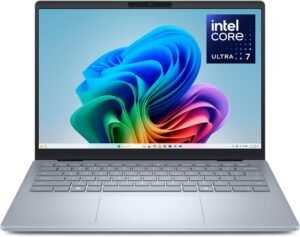
If you want a well-rounded laptop that delivers strong performance, a spacious display, and long-lasting battery life, the Dell 14 Plus Laptop is a standout choice for remote work. It combines solid internal hardware with a productivity-focused design, making it ideal for professionals, students, and anyone who needs reliable everyday computing.
In this review, we’ll break down what makes the Dell 14 Plus such a compelling work-from-home option, where it excels, and who will get the most value from it.
Why Choose the Dell 14 Plus Laptop?
The Dell 14 Plus isn’t just another compact notebook — it’s built to blend performance and practicality. With a larger 14″ display than typical ultraportables and powerful processor options, this model feels responsive and capable throughout a workday. Whether you’re tackling spreadsheets, running multiple browser tabs, or juggling Zoom calls, it keeps up without hesitation.
Featuring comfortable typing, solid connectivity, and dependable battery life, the Dell 14 Plus is designed to be a versatile centerpiece in your home office.
Key Features and Benefits
Generous 14″ Display
Bigger screen than standard 13″ laptops
Great for multitasking and split-screen workflows
Sharp visuals for documents, presentations, and web apps
Strong Everyday Performance
Powerful processors for smooth productivity
Keeps up with office software, collaboration tools, and media
Handles multitasking and conferencing with ease
Comfortable Keyboard and Build
Well-spaced keys with good feedback
Solid build that feels durable
Comfortable for long work sessions
Long Battery Life
Reliable power for a full workday
Reduces interruptions for charging
Ideal for hybrid work routines
Good Connectivity
USB-C, USB-A, HDMI, and headphone port
Easy to connect to external displays and accessories
Practical for a range of work setups
Specifications at a Glance
Display: 14″ FHD (1920×1080)
Processor: Intel Core Ultra 7
Memory: 32 LPDDRX5 GB RAM
Storage: 1 TB SSD
Graphics: Integrated Intel Iris Xe
Operating System: Windows 11
Use Case: Work-from-home productivity, everyday computing
Who Is It For?
Remote workers who want a balance of power and portability
Professionals juggling multiple apps and workflows
Students needing strong performance for study and work
Anyone who prefers a 14″ display for productivity
Users who want reliable everyday performance without extra weight
Pros & Cons
Pros
Powerful performance for everyday productivity
Spacious 14″ screen enhances multitasking
Comfortable keyboard for long typing sessions
Solid battery life for full workdays
Good port selection for accessories
Cons
Not as light as ultraportable 13″ laptops
Integrated graphics limit gaming or heavy creative work
Premium configurations raise the price
Final Verdict
The Dell 14 Plus Laptop is an excellent choice for work-from-home users who want a dependable and capable machine without overpaying for premium features they won’t use. With its powerful performance, comfortable display, and long battery life, it’s suited for anyone juggling documents, video calls, collaborative tools, and everyday productivity tasks.
If you need a reliable all-around laptop that keeps up with your workflow and adapts to the demands of remote work, the Dell 14 Plus delivers strong performance, functionality, and value in a versatile 14″ package.
2. Microsoft Surface Laptop Copilot+ PC 13"
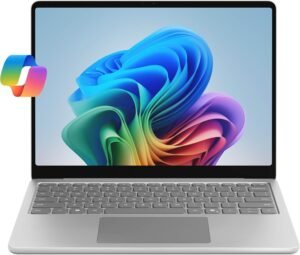
If you want a compact, lightweight laptop designed for modern productivity with built-in AI capabilities, the Microsoft Surface Laptop Copilot+ PC 13″ is one of the most forward-looking work-from-home options available. It combines a sleek premium design, long battery life, and Microsoft’s new Copilot+ AI features into an ultraportable package that’s easy to use anywhere.
In this review, we’ll break down what makes this Surface Laptop such a strong choice for remote work, where it shines, and who will benefit most from its blend of portability and next-generation features.
Why Choose the Microsoft Surface Laptop Copilot+ PC 13″?
The Surface Laptop Copilot+ PC 13″ isn’t just another compact Windows laptop — it’s built around AI-enhanced productivity and efficiency. Powered by an ARM-based processor, it delivers fast everyday performance while maintaining excellent battery life, making it ideal for long workdays without being tied to a charger.
With its bright touchscreen, refined keyboard, and deeply integrated Windows AI tools, this laptop feels purpose-built for professionals who want a modern, responsive, and future-ready work-from-home machine.
Key Features and Benefits
Copilot+ AI Integration
Built-in AI features help streamline workflows
Smart tools assist with productivity and multitasking
Designed to enhance everyday work tasks
13″ PixelSense Touch Display
Sharp, vibrant screen with a productivity-friendly aspect ratio
Touch support makes navigation and interaction more intuitive
Excellent for documents, emails, and web-based tools
Efficient Everyday Performance
Smooth performance for office apps and multitasking
Optimized for collaboration tools and video calls
Focuses on efficiency and responsiveness
Premium Keyboard & Trackpad
Comfortable typing experience for long work sessions
Precise, responsive trackpad
Clean, minimalist design fits any home office
Exceptional Battery Life
Easily lasts through a full workday
Ideal for hybrid work and remote flexibility
Reduces the need to constantly stay plugged in
Specifications at a Glance
Display: 13″ PixelSense touchscreen
Processor: Snapdragon X Plus (8 Core)
Memory: 16 GB RAM
Storage: 512 GB SSD
Graphics: Integrated graphics
Operating System: Windows 11 with Copilot+
Use Case: Work-from-home productivity, portable computing
Who Is It For?
Remote workers who prioritize portability and battery life
Professionals interested in AI-enhanced productivity
Users who prefer a compact, premium laptop
People who rely on cloud apps and modern software
Anyone who wants a future-focused Windows device
Pros & Cons
Pros
Lightweight and extremely portable
Excellent battery life for full workdays
Copilot+ AI features add modern productivity value
High-quality touchscreen display
Premium build and typing experience
Cons
ARM-based architecture may limit compatibility with some apps
Not designed for heavy creative or gaming workloads
Premium price compared to traditional laptops
Limited upgrade flexibility
Final Verdict
The Microsoft Surface Laptop Copilot+ PC 13″ earns its #2 ranking by delivering a modern, AI-ready work-from-home experience in a sleek and highly portable package. Its long battery life, responsive performance, and built-in Copilot+ features make it especially appealing for professionals who want a laptop that feels efficient, intelligent, and future-focused.
If you’re looking for a lightweight productivity laptop that blends premium design with next-generation Windows features, this Surface Laptop is one of the most compelling options available today.
1. Apple 13" MacBook Air M4
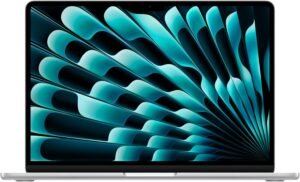
If you want one of the most capable and portable laptops available for remote work, the Apple 13″ MacBook Air M4 stands at the top of our list — and for good reason. It combines Apple’s latest M4 chip, an exceptional screen, ultra-long battery life, and a lightweight design into a machine that’s just as at home on video calls and spreadsheets as it is on creative tasks.
In this review, we’ll break down what makes the MacBook Air M4 our #1 work-from-home laptop, where it excels, and who will benefit most from its balanced blend of power and everyday usability.
Why Choose the Apple 13″ MacBook Air M4?
The MacBook Air has long been synonymous with portable productivity, and the 2025 version takes that legacy even further with the Apple M4 chip, delivering head-turning performance without sacrificing battery life or silence — thanks to its fanless design. Whether you’re managing spreadsheets, editing photos, or hosting back-to-back video meetings, this laptop feels consistently responsive and efficient.
Its high-resolution Liquid Retina display, exceptional battery endurance, and macOS software ecosystem also make it one of the best all-around choices for remote work — especially if you value a premium experience that just works.
Key Features and Benefits
Apple M4 Chip Performance
Highly efficient 10-core CPU handles everyday productivity with ease
Powerful 8–10-core GPU handles creative and visual workloads
Excellent performance per watt for long battery life
13.6″ Liquid Retina Display
Sharp, vibrant screen with excellent color and brightness
Great for documents, media, and creative tasks
True Tone and wide color make content look natural
Ultra-Portable & Premium Design
Slim and lightweight aluminum unibody feels premium
Easy to carry between rooms or when traveling
Minimalist look fits any home office
All-Day Battery Life
Up to ~15–18 hours of use on a single charge
Excellent efficiency thanks to Apple silicon
Great for long workdays without plugging in
Improved Webcam & Features
12 MP Center Stage webcam for great video call quality
macOS features like Focus, Stage Manager, and Continuity enhance workflow
Specifications at a Glance
Display: 13.6″ Liquid Retina
Processor: Apple M4 chip with up to 10-core CPU
Memory: 16 GB unified
Storage: 512 GB SSD
Graphics: Integrated Apple GPU
Operating System: macOS
Battery Life: Up to ~15–18 hours
Use Case: Work-from-home productivity, creative workflows
Who Is It For?
Professionals who want maximum portability and power
Remote workers who run multiple apps and workflows
Creatives working with photo and light video editing
Anyone who values great battery life and silent performance
Users invested in the Apple ecosystem (iPhone, iPad, etc.)
Pros & Cons
Pros
Excellent performance from the M4 chip
Bright, crisp Liquid Retina display
Class-leading battery life
Lightweight and premium design
Fantastic webcam and macOS features
Cons
Premium price compared with some Windows alternatives
Limited ports (USB-C/Thunderbolt only)
Not designed for heavy gaming or workstation-class workloads
Storage and memory aren’t user-upgradeable
Final Verdict
The Apple 13″ MacBook Air M4 is our #1 pick for work-from-home laptops because it hits the sweet spot between power, portability, and everyday usability. Its efficient M4 chip delivers strong performance with minimal heat and exceptional battery life, while the beautiful Liquid Retina display and premium design make every task feel effortless.
Whether you’re writing reports, attending video meetings, managing large spreadsheets, or even dabbling in creative work, this MacBook Air delivers reliable performance that keeps up with your workflow — all while remaining sleek and enjoyable to use.