
Top 10 Gaming Keyboards for PC Gamers
10. Corsair K55 RGB PRO
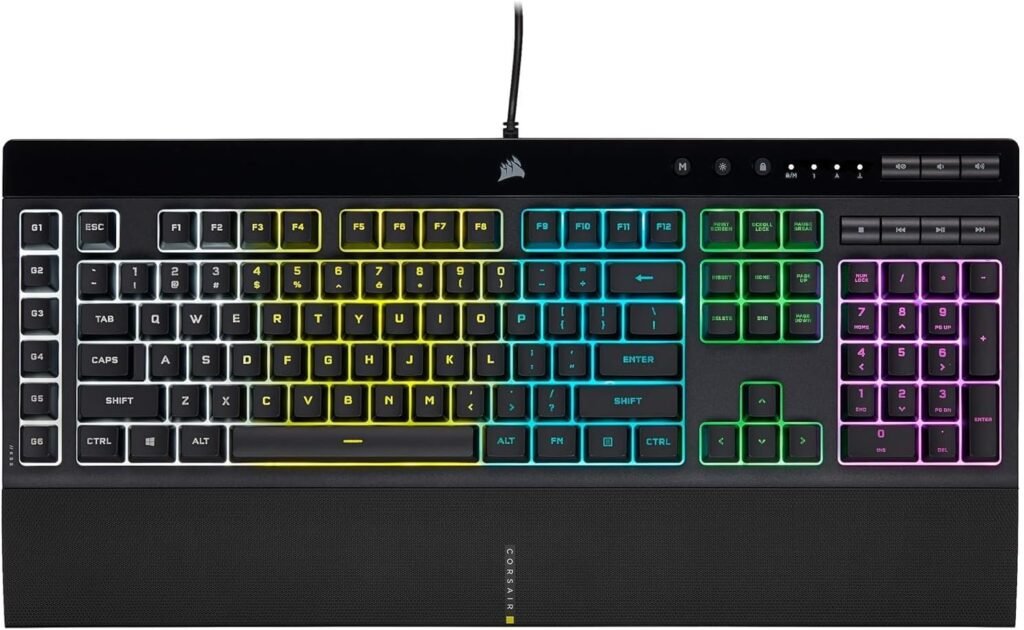
Are you looking for a feature-rich gaming keyboard that doesn’t break the bank? The Corsair K55 RGB PRO Gaming Keyboard delivers dependable performance, vibrant RGB lighting, and gamer-friendly features — all at a wallet-friendly price. In this review, we’ll break down what makes the K55 RGB PRO one of the best budget gaming keyboards you can buy today.
Whether you’re a casual gamer, a starter PC enthusiast, or someone who wants more than a basic membrane keyboard, this review will help you decide if the K55 RGB PRO is right for you.
Why Choose the Corsair K55 RGB PRO?
The Corsair K55 RGB PRO is designed to give gamers a robust, customizable keyboard experience without demanding a premium price tag. It’s a great first “true gaming keyboard” for new PC players who still want essential features like RGB lighting, programmable keys, and reliable build quality.
Some key reasons to consider the K55 RGB PRO include:
-
Affordable price point
-
Customizable RGB lighting
-
Dedicated macro keys
-
Comfortable typing performance
-
Trusted Corsair software support
Key Features and Benefits
Responsive Performance for Everyday Gaming
High-response membrane switches
Quiet keystrokes compared to mechanical keyboards
Reliable input for FPS, MOBA, RPG, and casual games
Consistent performance for long gaming sessions
Customizable RGB Lighting
Five dynamic RGB lighting zones
Multiple preset lighting effects
Full lighting control via Corsair iCUE software
Syncs with other Corsair RGB peripherals
Dedicated Macro Keys
Six programmable G-keys on the left side
Supports complex macros and shortcuts
Ideal for MMO skills, productivity workflows, and custom binds
Easy setup through Corsair iCUE
Comfortable Design for Long Sessions
Low-profile keys reduce finger fatigue
Quiet typing suitable for shared spaces
Detachable wrist rest included
Ergonomic layout for gaming and everyday use
Compatibility & Software Support
USB wired connection
Compatible with Windows 10 and newer
Limited console compatibility (Xbox Series X|S)
Full customization through Corsair iCUE on PC
Specifications at a Glance
Switch Type: Membrane
Connection: USB wired
Backlighting: RGB with dynamic effects
Macro Keys: 6 dedicated G-keys
Wrist Rest: Detachable, included
Software Support: Corsair iCUE
Who Is It For?
Budget-conscious gamers
First-time PC builders
Casual and everyday gamers
Users who prefer quiet keys
Players who want RGB and macros without a high price
Pros & Cons
Pros
Affordable entry-level price
Bright, customizable RGB lighting
Dedicated macro keys
Quiet and comfortable typing
Wrist rest included
Easy setup and software support
Cons
Not a mechanical keyboard
Wired only (no wireless option)
Limited advanced features compared to premium boards
Full customization requires iCUE software
Final Verdict
If you’re building your first gaming setup or upgrading from a basic keyboard, the Corsair K55 RGB PRO Gaming Keyboard is an excellent value-driven choice. It offers comfort, customization, and dependable performance without the premium price tag.
It may not satisfy mechanical-keyboard purists, but for casual gamers, students, and budget-focused buyers, the K55 RGB PRO delivers exactly what it promises — solid gaming performance at an accessible price.
9. Corsair K70 CORE RGB
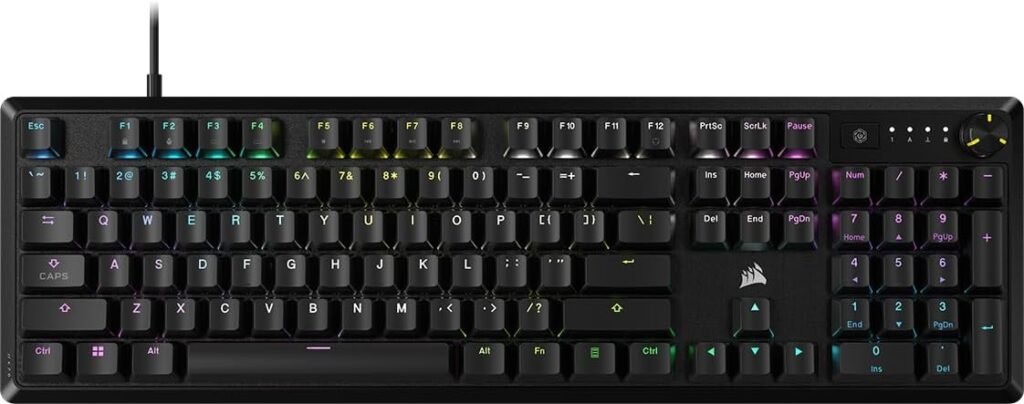
If you’re looking for a modern gaming keyboard that balances premium build quality, smooth performance, and clean design, the Corsair K70 CORE RGB Gaming Keyboard is built to deliver. Positioned between entry-level and enthusiast keyboards, the K70 CORE focuses on comfort, reliability, and refined gaming performance rather than overwhelming users with unnecessary extras.
In this review, we’ll break down what makes the K70 CORE RGB a strong option for gamers who want an upgrade from budget keyboards — without jumping into ultra-expensive enthusiast territory.
Why Choose the Corsair K70 CORE RGB?
The Corsair K70 CORE RGB is designed for gamers who want a mechanical keyboard experience with a smooth feel, durable construction, and tasteful RGB lighting. It removes some of the complexity found in flagship models while keeping the features that matter most for everyday gaming and productivity.
Key Features and Benefits
Smooth, Consistent Mechanical Performance
Equipped with Corsair MLX Red mechanical switches
Linear, smooth keystrokes ideal for gaming and fast typing
Factory-lubed switches for reduced friction and noise
Reliable input for FPS, MOBA, RPG, and competitive play
Clean, Customizable RGB Lighting
Per-key RGB lighting with vibrant color output
Custom lighting effects through Corsair iCUE software
Syncs seamlessly with other Corsair RGB components
Clean top-plate design enhances light diffusion
Comfort-Focused Design
Soft-touch magnetic wrist rest included
Stable, low-flex chassis for consistent typing feel
Standard full-size layout with intuitive spacing
Designed for long gaming or work sessions
Refined Build Quality
Durable construction with a minimalist aesthetic
Reduced visual clutter compared to older K70 models
Quiet, controlled sound profile compared to traditional mechanical boards
Ideal for shared spaces or late-night gaming
Software & Compatibility
USB wired connection
Full support through Corsair iCUE software
Custom key remapping, lighting profiles, and macros
Compatible with Windows 10 and newer
Specifications at a Glance
Switch Type: Corsair MLX Red mechanical (linear)
Connection: USB wired
Backlighting: Per-key RGB lighting
Layout: Full-size
Wrist Rest: Magnetic, soft-touch
Software Support: Corsair iCUE
Who Is It For?
Gamers upgrading from membrane or entry-level keyboards
Users who want smooth mechanical switches without loud clicks
Players who value comfort and clean design
Corsair ecosystem users
Gamers who want RGB without an aggressive “gamer” look
Pros & Cons
Pros
Smooth, factory-lubed mechanical switches
Comfortable magnetic wrist rest included
Clean, modern design
Per-key RGB lighting with excellent diffusion
Strong build quality
Easy customization through iCUE
Cons
No wireless option
Fewer enthusiast features than flagship models
No dedicated macro keys
Higher price than membrane or entry-level boards
Final Verdict
If you’re building your first mechanical gaming setup or upgrading from a basic keyboard, the Corsair K70 CORE RGB Gaming Keyboard is an excellent step-up choice. It delivers smooth mechanical performance, premium comfort, and clean RGB customization without pushing into overbuilt or overly complex territory.
It may not satisfy hardcore keyboard enthusiasts looking for advanced modding features, but for gamers, students, and professionals who want a reliable, refined mechanical keyboard, the K70 CORE RGB offers exactly what most people need — premium performance at a sensible price point.
8. SteelSeries Apex 3 TKL
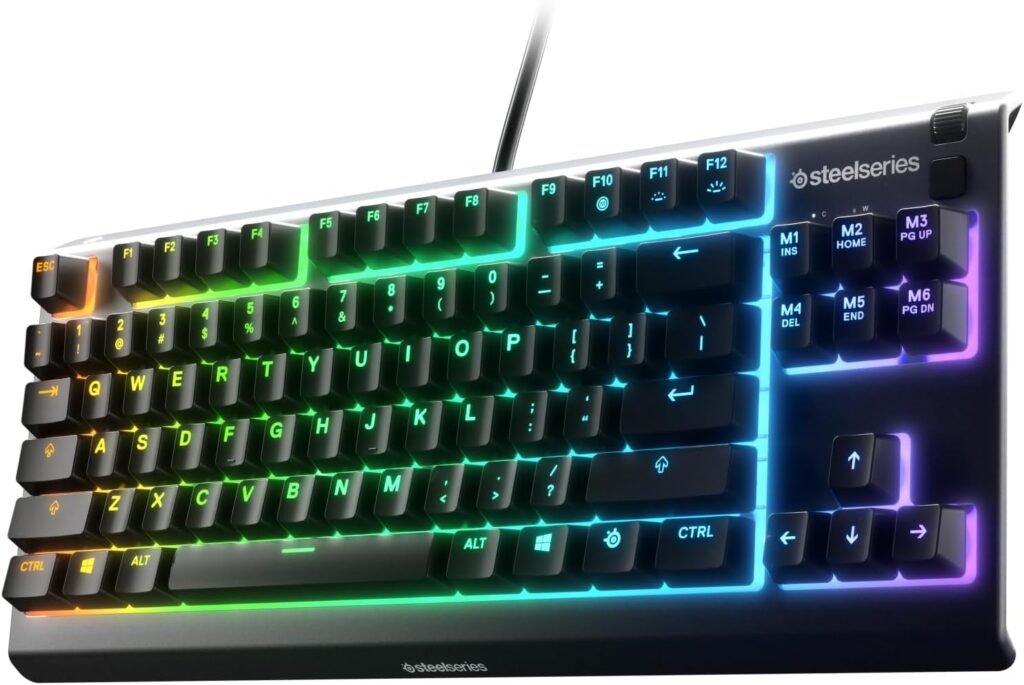
If you’re searching for a durable TKL gaming keyboard that balances performance, comfort, and price, the SteelSeries Apex 3 TKL Gaming Keyboard is a compelling choice. It delivers quiet but responsive typing, strong illumination, and thoughtful design — perfect for gamers and everyday users who want solid performance without spending premium dollars.
In this review, we’ll cover what makes the Apex 3 TKL a strong contender in the competitive tenkeyless keyboard category.
Why Choose the SteelSeries Apex 3 TKL?
The SteelSeries Apex 3 TKL brings a clean and compact TKL layout to gamers who want desk space for mouse movement and a comfortable gaming experience. It emphasizes durability, weather resistance, and reliable performance, making it a sensible all-around keyboard without flashy extras.
Key Features and Benefits
Tenkeyless Compact Layout
Removes the number pad to save desk space
Perfect for gamers who need extra room for mouse movement
Keeps all essential gaming keys while streamlining layout
Ideal for smaller desks or multi-setup rigs
Quiet, Responsive Gaming Performance
Uses whisper-quiet membrane switches
Smooth key presses ideal for FPS, MOBA, and everyday use
Comfortable tactile feedback with minimal noise
Good balance for gaming and typing
Dynamic RGB Illumination
Customizable per-key RGB lighting
Multiple effects: wave, ripple, color shift, etc.
Easy control via SteelSeries Engine software
Syncs with other SteelSeries RGB products
Durable, Water-Resistant Build
IP32-rated spill resistance
Tough build quality for long-term use
Clean design that fits competitive and casual environments
Great choice for gamers who want a durable everyday keyboard
Software & Compatibility
Wired USB connection for reliable input
Works with SteelSeries Engine for customization
Remap keys, adjust lighting, and save profiles
Compatible with Windows and popular gaming setups
Specifications at a Glance
Switch Type: Whisper-quiet membrane
Layout: Tenkeyless (TKL)
Connection: USB wired
Backlighting: Full per-key RGB
Spill-Resistance: IP32 rated
Software Support: SteelSeries Engine
Who Is It For?
Gamers who prefer a tenkeyless layout
Players who want quiet key action
Users with smaller desks or minimalist setups
RGB lovers looking for customization
Everyday users who want a durable all-purpose keyboard
Pros & Cons
Pros
Compact tenkeyless design
Quiet and smooth membrane keys
Fully customizable RGB lighting
Durable, spill-resistant design
Good value for mid-range buyers
Cons
Membrane switches aren’t mechanical
Not ideal for hardcore mechanical keyboard enthusiasts
No dedicated macro keys
Software customization can be simpler than some competitors
Final Verdict
If you’re building your first competitive gaming setup or upgrading from a full-size membrane keyboard, the SteelSeries Apex 3 TKL Gaming Keyboard is a fantastic mid-range choice. It delivers a comfortable, compact layout, strong RGB customization, and thoughtful durability — all without pushing your budget.
It may not satisfy mechanical-keyboard purists or those looking for lots of advanced features, but for everyday gamers, students, and casual players, the Apex 3 TKL provides solid performance where it counts — making it one of the best tenkeyless keyboards at this price point.
7. Glorious GMMK 3 PRO HE 65
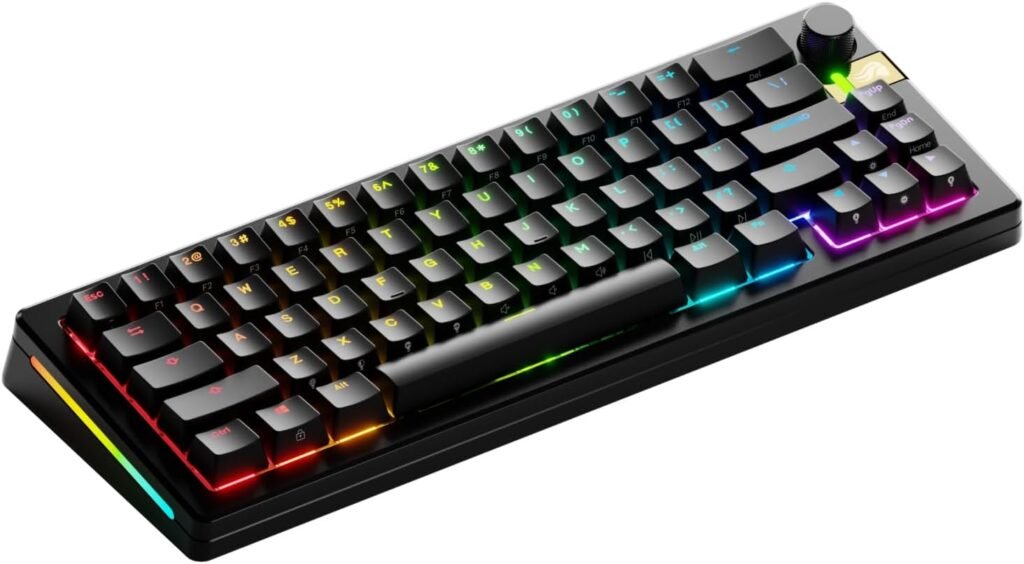
If you’re looking for a premium compact gaming keyboard that combines excellent performance, advanced features, and customization flexibility — the Glorious GMMK 3 PRO HE 65% Gaming Wireless Keyboard stands out as one of the best in its class. It blends cutting-edge switch technology, wireless convenience, and a minimalist 65% layout that appeals to both gamers and keyboard enthusiasts.
In this review, we’ll break down why the GMMK 3 PRO HE is such a compelling choice for gamers and productivity users alike.
Why Choose the GMMK 3 PRO?
The Glorious GMMK 3 PRO HE takes everything that made the original GMMK 3 great and elevates it with Hall Effect switches, wireless capability, and an enthusiast-friendly design. Its 65% layout captures the sweet spot between compact size and everyday usability, making it great for gaming desks with limited space.
Key Features and Benefits
Hall Effect Switches for Precision
Uses Hall Effect switches for smooth, ultra-precise actuation
True analog input support (fine-tuned control in compatible games)
Excellent durability and longevity
Reduced debounce delay for crisp, responsive keypresses
Wireless & Wired Flexibility
Connects via 2.4 GHz wireless for minimal latency
Optional Bluetooth support for multi-device use
USB-C wired mode when wired input is preferred
Great for both PC and mobile gaming setups
65% Compact Layout
Saves desk space without sacrificing essential keys
Arrow keys and function layer kept accessible
Ideal for small desks and portable setups
Offers balance of compactness and practicality
Customizable RGB Lighting
Per-key RGB illumination with vibrant effects
Works with Glorious Core software for deep customization
Syncs lighting zones across other Glorious gear
Great for matching your desktop aesthetic
Build Quality & Modularity
Premium aluminum top plate
Hot-swappable sockets for easy switch swaps
Gasket mount design for improved sound/feel
Strong build that appeals to enthusiasts and customizers
Specifications at a Glance
Switch Type: Hall Effect (analog support)
Layout: 65% compact
Connection: Wireless (2.4 GHz / Bluetooth) + USB-C
Backlighting: Per-key RGB
Hot-Swappable: Yes
Software: Glorious Core
Battery: Long-lasting for wireless mode
Who Is It For?
Gamers who want compact performance
Enthusiasts who love Hall Effect precision
Users who want wireless and wired flexibility
Custom keyboard fans who appreciate modular designs
Travel-friendly or small-desk setups
Pros & Cons
Pros
Hall Effect switches offer precise and smooth feel
Wireless + Bluetooth + USB-C versatility
Compact 65% layout saves space
Hot-swappable for personalization
Vibrant customizable RGB
Strong build quality
Cons
Premium price compared to basic boards
Software dependency for full customization
Smaller layout means learning curve for some users
Analog game support depends on compatibility
Final Verdict
If you’re building a high-performance compact gaming setup or moving up from a standard keyboard, the Glorious GMMK 3 PRO HE 65% Gaming Wireless Keyboard is an outstanding choice. It blends precision, flexibility, and enthusiast-level features in a compact package that appeals to both gamers and keyboard hobbyists.
It may not be the perfect fit for everyone — especially those who prefer full-size keyboards or don’t care about modular customization — but for anyone who values premium feel, wireless convenience, and future-proof design, the GMMK 3 PRO HE delivers exactly what you’d want from a top-tier 65% gaming keyboard.
6. Corsair Vanguard PRO 96 Hall Effect
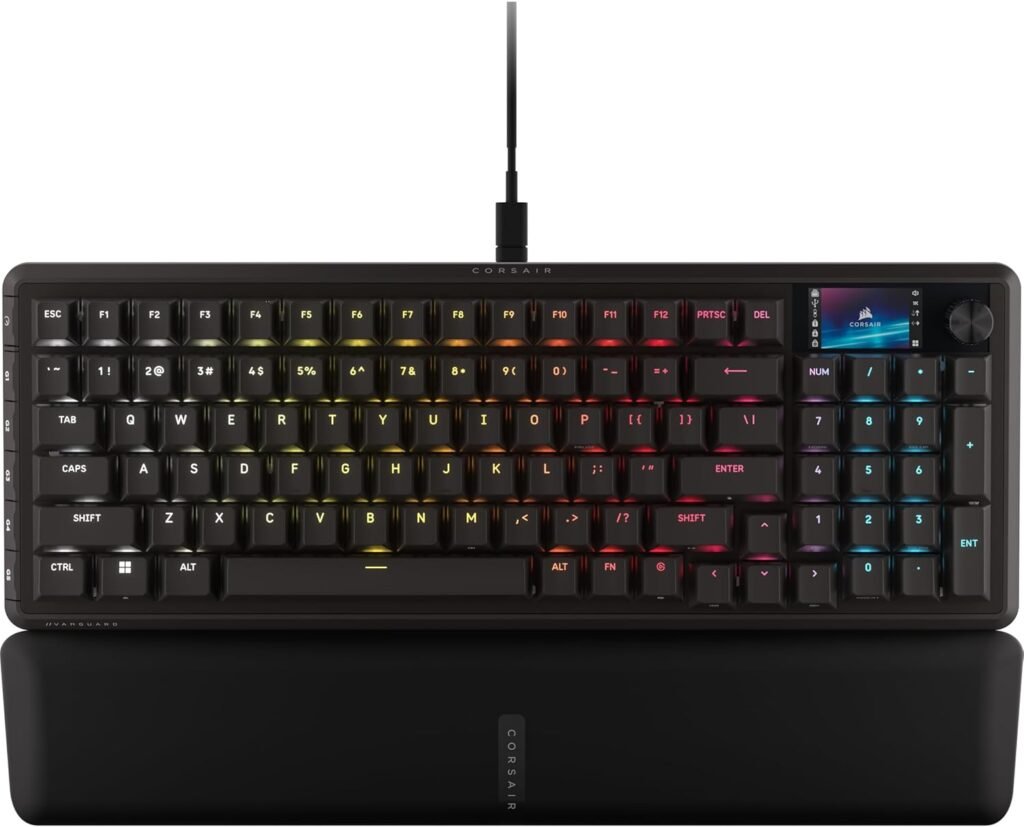
If you’re looking for a high-end gaming keyboard that blends the best of compact design and full-size functionality, the Corsair Vanguard PRO 96 Hall Effect Gaming Keyboard delivers. With cutting-edge Hall Effect switches, premium build quality, and a near-full layout in a smaller footprint, this keyboard is built for gamers who want performance, precision, and versatility without sacrificing key features.
In this review, we’ll break down why the Vanguard PRO 96 is one of the most compelling premium keyboards for serious gamers and enthusiasts.
Why Choose the Vanguard PRO?
The Vanguard PRO 96 is designed for players who want serious performance in a compact, productivity-friendly form factor. Its 96% layout keeps most keys you expect from a full-size keyboard (including arrow keys and a numpad cluster) while reducing wasted space, making it ideal for gamers with limited desk real estate or those who want a cleaner setup.
Key Features and Benefits
Hall Effect Switches for Precision and Durability
Uses Hall Effect magnetic switches
Ultra-precise actuation with near-instant responsiveness
Exceptional durability and reliability over time
Smooth, consistent feel ideal for competitive gameplay
96% Compact Layout
Combines the space-saving of compact keyboards with the utility of full-size layouts
Includes arrow keys, navigation cluster, and numpad in a tighter profile
Perfect for gaming and productivity workflows
Saves desk space without sacrificing essential keys
Custom RGB Lighting
Per-key RGB illumination with bold, customizable effects
Controlled via Corsair iCUE software
Syncs with other Corsair RGB products
Creates an immersive visual setup
Premium Build Quality
Solid aluminum top plate for rigidity and durability
Quality keycaps with clean legends
Stable and substantial typing feel
Quiet but responsive key action
Corsair iCUE Integration
Control lighting, macros, and profiles with iCUE
Save profiles locally for quick switching
Customize lighting based on games or apps
Sync lighting across compatible devices
Specifications at a Glance
Switch Type: Hall Effect magnetic switches
Layout: 96% compact
Backlighting: Per-key RGB lighting
Connection: Wired USB-C
Software: Corsair iCUE
Extras: Macros, profile storage, advanced lighting sync
Who Is It For?
Competitive gamers who want fast, reliable actuation
Users who want a premium feel without a huge footprint
Desk setups with limited space
RGB enthusiasts who like vibrant lighting
Productivity users who want full key coverage without clutter
Pros & Cons
Pros
Highly precise Hall Effect switches
Compact 96% layout with numpad functionality
Premium aluminum build quality
Robust software support through iCUE
Per-key RGB lighting with deep customization
Great balance between gaming and productivity
Cons
Price is higher than basic gaming keyboards
Wired only — no wireless mode
Advanced features require iCUE software
May be overkill for casual gamers
Final Verdict
If you’re building your ultimate gaming setup or upgrading from a more basic keyboard, the Corsair Vanguard PRO 96 Hall Effect Gaming Keyboard offers a compelling combination of performance, precision, and design. It doesn’t just function — it elevates your typing and gaming experience with premium switches, durable construction, and beautiful RGB customization.
It may not be the simplest option for entry-level gamers, but for enthusiasts, competitive players, and anyone who values a compact yet fully capable layout, the Vanguard PRO 96 delivers exactly what you want: powerful performance at a justified premium price.
5. Logitech G515 RAPID TKL
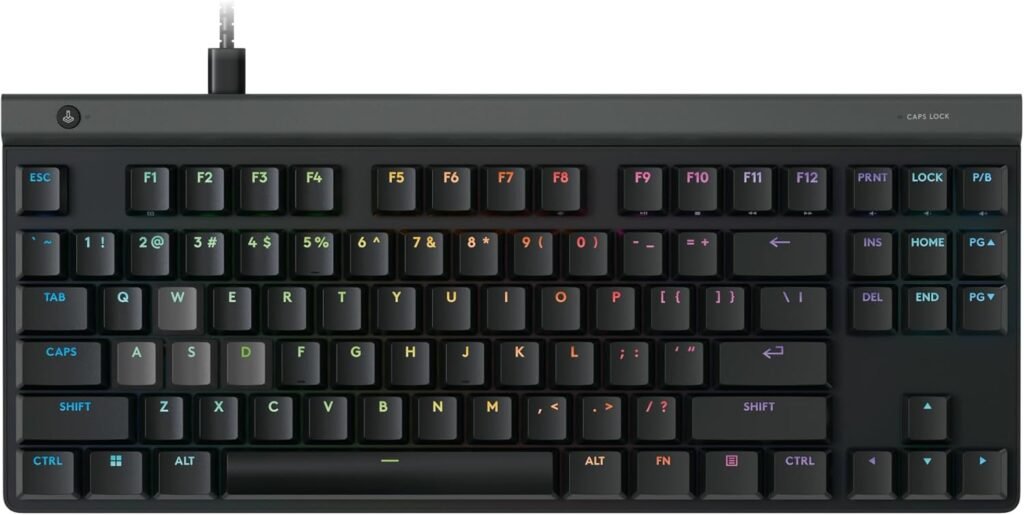
If you’re seeking a high-performance gaming keyboard that blends precision, responsiveness, and portability, the Logitech G515 RAPID TKL Wired Analog Gaming Keyboard is a standout choice. With analog input technology, a sleek tenkeyless layout, and solid build quality, this keyboard is designed for gamers who want a competitive edge — without extra bulk.
In this review, we’ll walk through the features, benefits, and what makes the Logitech G515 RAPID TKL a compelling pick for serious gaming setups.
Why Choose the G515 RAPID?
The Logitech G515 RAPID TKL offers analog control — a feature typically found in high-end gaming gear — which enables more nuanced input for movement and control (especially in racing sims and shooters). Added to the compact TKL design, this makes the keyboard feel comfortable on desk space while still delivering pro-level performance.
Key Features and Benefits
Analog Input Technology
Analog keys detect varying levels of key press depth
Enables finer control in supported games (e.g., movement, throttle/brake input)
Gives a more fluid, game-specific advantage
Sets it apart from standard digital keyboards
Tenkeyless (TKL) Compact Layout
Saves valuable desk space
Ideal for gamers who need extra room for widesweeping mouse movement
Keeps essential keys without number pad bulk
Perfect for competitive FPS and MOBA players
Responsive Performance
Uses Logitech’s RAPID switches for quick actuation
Crisp, consistent keystrokes for gaming and typing
Wired connection ensures zero input latency
Excellent responsiveness for fast-paced games
Dynamic RGB Lighting
Full per-key RGB lighting via Logitech G HUB
Multiple lighting effects and game-sync options
Syncs with other Logitech G peripherals
Enhances gaming ambiance and personalization
Build Quality & Comfort
Durable construction with clean aesthetic
Flat, low-profile keycaps for comfortable typing
Stable chassis with minimal flex
Designed for long sessions and daily use
Specifications at a Glance
Switch Type: Logitech RAPID analog switches
Layout: Tenkeyless (TKL)
Connection: Wired USB
Backlighting: Per-key RGB via G HUB
Software Support: Logitech G HUB
Analog Input: Yes (game-enhanced input control)
Who Is It For?
Competitive gamers who crave precise input control
FPS, racing, and simulation players who benefit from analog
Users with limited desk space
RGB lighting enthusiasts
Keyboard users who want a premium TKL feel without bulky layout
Pros & Cons
Pros
Analog input offers finer control than traditional keyboards
TKL layout saves desk space
Fast, responsive key performance
Strong RGB lighting with G HUB customization
Durable build and comfortable typing feel
Cons
Analog advantage only in supported games
No wireless mode
Higher price than basic TKL keyboards
Requires software for full feature access
Final Verdict
If you’re building your competitive gaming rig or upgrading from a standard keyboard, the Logitech G515 RAPID TKL Wired Analog Gaming Keyboard is an excellent mid-to-high-end choice. It offers elite performance features, comprehensive customization, and a compact design that fits perfectly into both gaming and productivity setups.
It may not be for absolute beginners who don’t plan to use analog control, but for serious gamers and players who want that extra edge — especially in shooters and racing games — the G515 RAPID TKL delivers powerful performance with accessible, competitive precision.
4. HyperX Alloy Origins 65
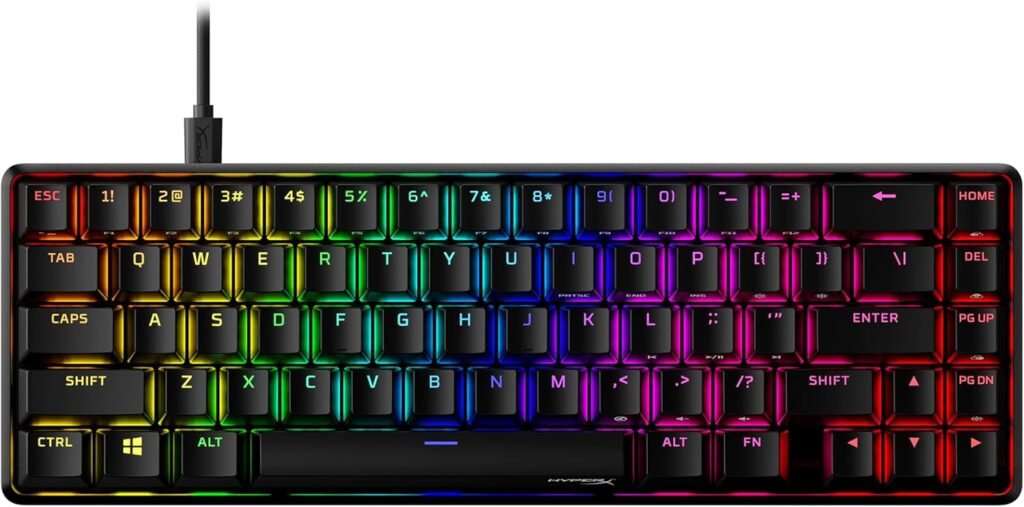
If you’re searching for a compact mechanical gaming keyboard that delivers premium performance in a small footprint, the HyperX Alloy Origins 65% Mechanical Gaming Keyboard is a standout choice. With a 65% layout, high-quality mechanical switches, and HyperX’s reputation for durability and performance, this keyboard is perfect for gamers and tech lovers who want serious capability without unnecessary bulk.
In this review, we’ll break down what makes the Alloy Origins 65% an excellent option for gamers, streamers, and writers alike.
Why Choose the HyperX Alloy?
The HyperX Alloy Origins 65% strips away the extras and focuses on pure performance and portability. Its compact layout is ideal for desk setups with limited space, while its mechanical switches and solid build quality bring premium feel and responsiveness to every keystroke.
Key Features and Benefits
High-Quality Mechanical Switches
Uses HyperX mechanical switches (tactile or linear options)
Fast actuation and satisfying feedback
Durable — rated for millions of key presses
Excellent for both gaming and typing performance
65% Compact Layout
Saves significant desk space
Includes essential keys while removing the number pad
Ideal for gamers who need extra mouse room
Great fit for minimalist setups or travel
Dynamic RGB Lighting
Per-key RGB lighting with multiple effects
Customization via HyperX NGENUITY software
Sync lighting with other HyperX RGB peripherals
Bright, expressive lighting for all play styles
Sleek, Durable Build
Aircraft-grade aluminum body
Solid construction with minimal flex
Floating keycap design enhances aesthetics and cleaning
Stable base reduces wobble during intense play
Software & Compatibility
Compatible with Windows systems
Extensive customization through HyperX NGENUITY
Remap keys, adjust lighting, save profiles
USB-C wired connection for reliable performance
Specifications at a Glance
Switch Type: HyperX mechanical switches (tactile/linear)
Layout: 65% compact
Connection: USB-C wired
Backlighting: Per-key RGB
Software: HyperX NGENUITY
Build: Aluminum frame
Who Is It For?
Gamers who want a true mechanical feel
Users with limited desk space or minimalist setups
RGB lighting fans who like customization
PC builders and streamers who prefer premium keyboards
Everyday typists who also game
Pros & Cons
Pros
Premium mechanical switches
Compact, space-saving 65% design
Wide RGB customization options
Solid aluminum build quality
Great for gaming and typing
Cons
No dedicated macro row
No wireless option
Might take adjustment for new users
Software required for full customization
Final Verdict
If you’re building a high-performance gaming setup or upgrading from a standard keyboard, the HyperX Alloy Origins 65% Mechanical Gaming Keyboard is an outstanding all-around choice. It delivers a responsive mechanical experience, solid RGB features, and a compact layout that’s perfect for both gaming and productivity.
It may not include every premium feature found in larger boards — like a numpad or dedicated macro keys — but for players who want pure performance in a sleek, space-efficient form, the Alloy Origins 65% delivers exactly what matters most: precision, style, and reliability.
3. SteelSeries Apex Pro Gen 3 TKL
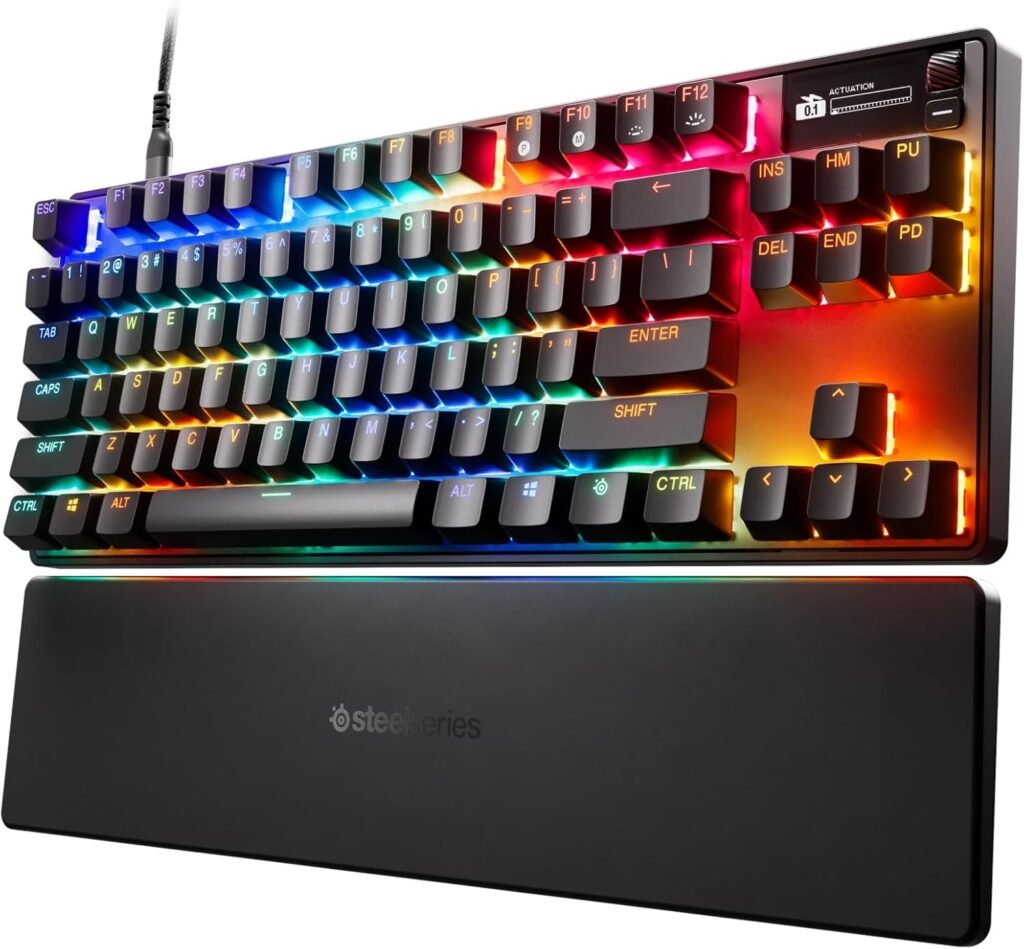
If you’re hunting for a high-end gaming keyboard that delivers professional-level performance in a compact, tenkeyless form factor, the SteelSeries Apex Pro Gen 3 TKL Gaming Keyboard is one of the best options available today. With adjustable actuation, premium materials, and competitive features built for esports and everyday play alike, this keyboard brings true premium performance without extra clutter.
In this review, we’ll break down what sets the Apex Pro Gen 3 TKL apart and why it’s a favorite among serious gamers.
Why Choose the Apex Pro?
The Apex Pro Gen 3 TKL pairs tournament-ready performance with a compact layout that’s ideal for gamers who prefer space for mouse movement without giving up advanced features. It builds on SteelSeries’ history of competitive hardware and introduces next-level responsiveness and customization.
Key Features and Benefits
Adjustable Actuation for Precision
Uses SteelSeries’ latest adjustable Switches
Customize actuation per key via software
Ultra-precise input for competitive gaming
Lets you dial in responsiveness for your playstyle
Tenkeyless (TKL) Layout
Compact size saves desk space
Ideal for gamers who rely on large mouse movements
Includes essential keys without numpad bulk
Great for FPS, MOBA, and fast-paced gaming setups
Premium Build Quality
Aluminum top plate with solid rigidity
Low flex and premium feel under heavy use
Clean design aesthetic with gamer appeal
Designed for years of daily gaming performance
RGB Illumination & SteelSeries Engine
Per-key RGB lighting with deep customization
Sync lighting with other SteelSeries gear
Powerful SteelSeries Engine software for macros and profiles
Dynamic effects based on games and apps
Responsive Performance Across Games
Excellent key feel for rapid actions
Instantaneous feedback for competitive play
Great for shooters, action titles, and MOBAs
Balanced performance for gaming + typing
Specifications at a Glance
Switch Type: Adjustable SteelSeries mechanical switches
Layout: Tenkeyless (TKL)
Connection: Wired USB-C
Backlighting: Per-key RGB via SteelSeries Engine
Software: SteelSeries Engine
Extras: Adjustable actuation, macros, lighting sync
Who Is It For?
Competitive gamers seeking an edge in responsiveness
Players who prefer a compact TKL layout
RGB and macro customization enthusiasts
Users who want a premium-grade gaming keyboard
Gamers who play fast-paced FPS and action titles
Pros & Cons
Pros
Adjustable actuation for personalized responsiveness
Premium aluminum build quality
Compact TKL design saves space
Deep RGB and macro customization
Excellent performance for competitive play
Cons
Higher price than basic keyboards
Wired only — no wireless support
Software required for full configuration
Might be overkill for casual gamers
Final Verdict
If you’re building a serious gaming setup or upgrading from an entry-level keyboard, the SteelSeries Apex Pro Gen 3 TKL Gaming Keyboard earns its place among elite compact keyboards. With adjustable actuation, solid build quality, and robust software support, it delivers refined performance that both competitive players and enthusiasts will appreciate.
It may be more than you need if you’re a casual gamer or budget shopper, but for anyone who wants precision, performance, and custom control in a compact package, the Apex Pro Gen 3 TKL delivers exactly what you’re looking for — elite performance without wasted space.
2. Razer Huntsman V3 Pro
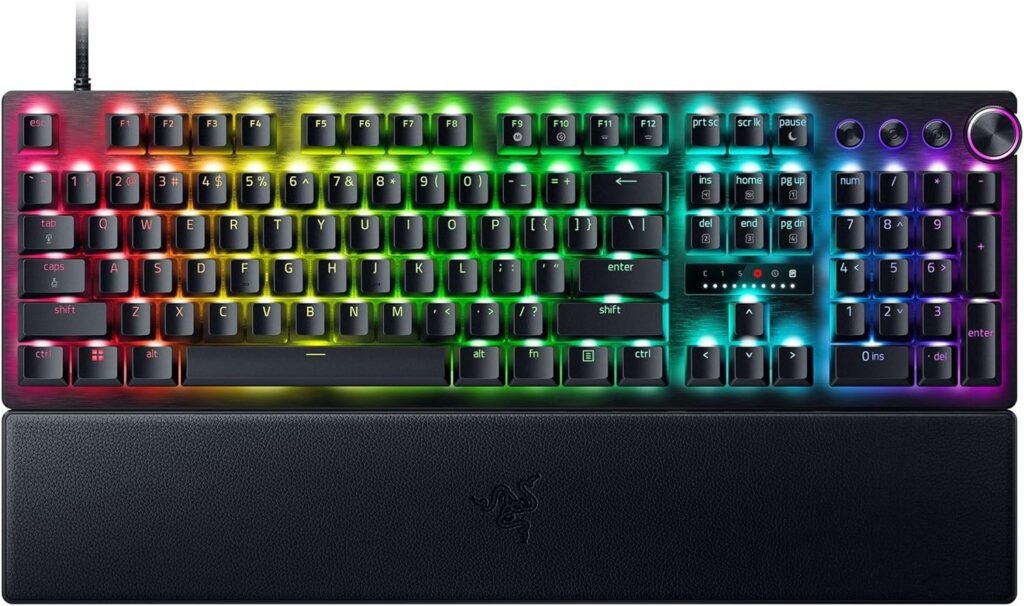
If you’re looking for a premium gaming keyboard that combines cutting-edge speed, precision, and versatility, the Razer Huntsman V3 Pro Keyboard is one of the best flagship boards available today. Packed with advanced optical switches, wireless flexibility, and Razer’s robust software customization, this keyboard is built for serious gamers who want top-tier performance without compromise.
In this review, we’ll break down what makes the Razer Huntsman V3 Pro a standout choice for competitive play, creative work, and everyday use.
Why Choose the Huntsman V3 Pro?
The Razer Huntsman V3 Pro is designed for gamers who demand ultra-fast actuation, versatile connectivity, and customizable performance. Whether you’re playing fast-paced shooters or heavy-workload games, this keyboard brings the responsiveness and features that high-level players crave — plus enough flair to satisfy enthusiasts.
Key Features and Benefits
Razer Optical Switches
Uses Razer’s latest optical switches
Light-based actuation for near-instant responsiveness
Ultra-fast input ideal for competitive gaming
Minimal debounce delay for crisp, accurate keypresses
Wireless + Wired Connectivity
Connect via Razer HyperSpeed Wireless for low-latency play
Bluetooth support for multi-device use
USB-C wired mode when you need consistent performance
Flexibility across setups and devices
Full-Size Layout With Premium Build
Standard full-size keyboard for all players
Solid build with premium frame and keycaps
Comfortable layout for gaming and productivity
Durable design for long-term use
Chroma RGB Lighting
Full per-key RGB lighting with Razer Chroma support
16.8 million customizable colors
Sync lighting with games and Razer ecosystem
Bring dynamic light effects to life on your desk
Razer Synapse Customization
Customize keys, macros, and lighting via Synapse
Store multiple profiles
On-the-fly adjustments make it easier to switch setups
Great for game-specific configurations
Specifications at a Glance
Switch Type: Razer Optical switches
Layout: Full-size
Connection: Wireless (HyperSpeed), Bluetooth, Wired USB-C
Backlighting: Full per-key Chroma RGB
Software Support: Razer Synapse
Extras: Macro support, multi-device pairing
Who Is It For?
Competitive gamers craving faster response
Players who want wireless flexibility
RGB enthusiasts in the Razer ecosystem
Productivity users who appreciate premium build quality
Keyboard lovers who enjoy customizable lighting and macros
Pros & Cons
Pros
Ultra-fast optical switches
Multiple connectivity options
Chroma RGB with rich customization
Premium build quality
Great for both gaming and work
Cons
Premium price point
Requires Razer Synapse for full features
Wireless may need occasional charging
Some gamers prefer tactile switches over optical
Final Verdict
If you’re building a serious gaming setup or upgrading to a feature-packed keyboard, the Razer Huntsman V3 Pro Keyboard is a top-tier choice that delivers speed, versatility, and performance. Its optical switches provide snappy responsiveness, the RGB and software customization add personalization, and the flexible connectivity makes it a solid all-around keyboard.
It may be overkill for casual gamers or those on a tight budget, but for anyone who wants a responsive, premium-grade keyboard — especially competitive players and enthusiasts — the Huntsman V3 Pro delivers exactly what you’re looking for: elite performance, reliable function, and future-proof features.
1. ASUS ROG Strix Scope II 96
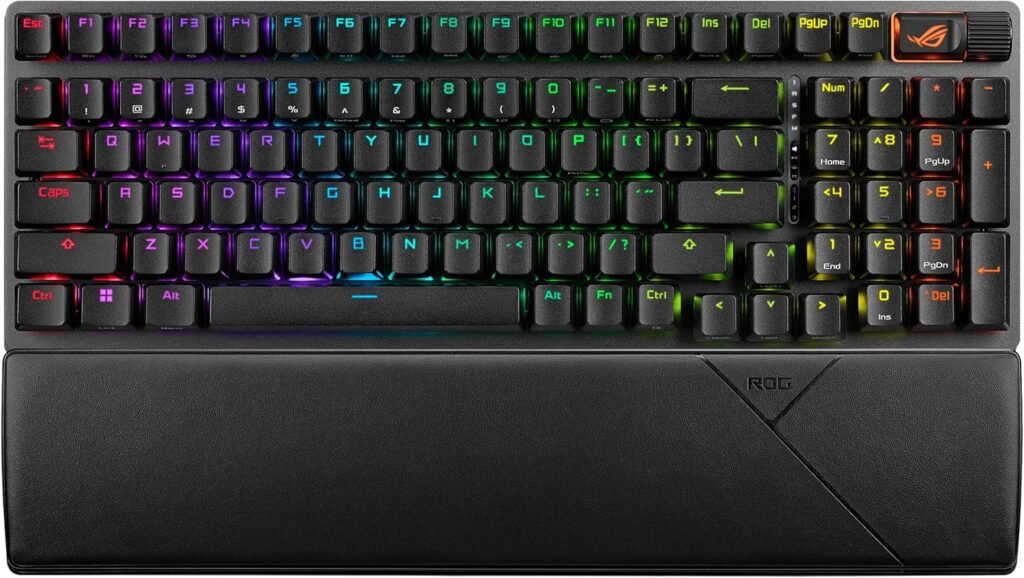
If you’re searching for a premium gaming keyboard that blends high-end performance, smart design, and wireless freedom, the ASUS ROG Strix Scope II 96 Wireless Gaming Keyboard stands out as a top contender. With a 96% layout, robust wireless options, and excellent build quality, this keyboard delivers performance and productivity in one compact package.
In this review, we’ll walk through what makes the Strix Scope II 96 a compelling pick for avid gamers, content creators, and anyone who wants a high-end typing and gaming experience.
Why Choose the Strix Scope II?
The ASUS ROG Strix Scope II 96 Wireless is built for gamers and power users who want performance without compromises. Its 96% layout preserves essential keys while saving desk space, the wireless connectivity options offer flexibility, and ASUS’s gaming-oriented features make it a powerful all-around keyboard.
Whether you’re gaming, working, or coding, this keyboard is designed to elevate the experience.
Key Features and Benefits
Flexible Connectivity
Hybrid wireless: 2.4 GHz + Bluetooth + wired USB-C
Switch between devices seamlessly
Low-latency wireless ideal for gaming
Wired mode for zero latency and power
96% Space-Saving Layout
Compact layout with arrow keys and numpad cluster
Less desk footprint than full-size keyboards
Perfect balance of compactness and functionality
Great for minimal or productivity-focused setups
ROG Mech-X Optical Switches
Fast, precise optical actuation
Excellent responsiveness for FPS, action, and MMO games
Durable switch life rated for heavy use
Crisp feel without unnecessary noise
Vibrant RGB Lighting
Per-key RGB illumination via Aura Sync
Sync lighting with other Aura Sync devices
Multiple lighting effects and custom profiles
Brings dynamic style to your setup
Premium Build Quality
Aluminum top plate for rigidity
Sleek design with subtle ROG accents
Comfortable keycaps and stable base
Built for long gaming sessions and everyday typing
Specifications at a Glance
Layout: 96% compact
Switch Type: ROG Mech-X Optical
Connection: 2.4 GHz wireless / Bluetooth / Wired USB-C
Backlighting: Per-key RGB with Aura Sync
Software: Armoury Crate
Extras: Multi-device support, low-latency mode
Who Is It For?
Gamers who want both wireless freedom and performance
Users who want a premium, compact layout
RGB and customization enthusiasts
Productivity users needing space-saving design
Fans of ASUS ROG ecosystem gear
Pros & Cons
Pros
Excellent wireless performance
Flexible connectivity options
Responsive optical switches
Compact 96% layout saves space
Strong RGB and software integration
Premium aluminum build quality
Cons
Higher price compared to basic keyboards
Armoury Crate required for full customization
Slight learning curve for multi-mode switching
Wireless battery life depends on lighting usage
Final Verdict
If you’re building a high-end gaming setup or upgrading from a standard keyboard, the ASUS ROG Strix Scope II 96 Wireless Gaming Keyboard is a fantastic choice that blends performance, flexibility, and style. Its premium switches offer crisp responsiveness, the 96% layout keeps things compact without sacrificing keys, and the wireless options make it incredibly versatile.
It may be more than what casual gamers need, but for anyone who values speed, customization, and a high-quality typing feel, the Strix Scope II 96 delivers exactly what you’re looking for — powerful performance with thoughtful design in a compact package.